
Blog
/
AI
/
March 7, 2025

Darktrace's Early Detection of the Latest Ivanti Exploits

In January 2025, Ivanti disclosed two critical vulnerabilities affecting their products. Darktrace detected exploitation of these vulnerabilities as early as December 2024.
Inside the SOC
Darktrace cyber analysts are world-class experts in threat intelligence, threat hunting and incident response, and provide 24/7 SOC support to thousands of Darktrace customers around the globe. Inside the SOC is exclusively authored by these experts, providing analysis of cyber incidents and threat trends, based on real-world experience in the field.
Written by
Hugh Turnbull
Cyber Analyst
Default blog imageDefault blog imageDefault blog imageDefault blog imageDefault blog imageDefault blog image
07
Mar 2025

As reported in Darktrace’s 2024 Annual Threat Report, the exploitation of Common Vulnerabilities and Exposures (CVEs) in edge infrastructure has consistently been a significant concern across the threat landscape, with internet-facing assets remaining highly attractive to various threat actors.

Back in January 2024, the Darktrace Threat Research team investigated a surge of malicious activity from zero-day vulnerabilities such as those at the time on Ivanti Connect Secure (CS) and Ivanti Policy Secure (PS) appliances. These vulnerabilities were disclosed by Ivanti in January 2024 as CVE-2023-46805 (Authentication bypass vulnerability) and CVE-2024-21887 (Command injection vulnerability), where these two together allowed for unauthenticated, remote code execution (RCE) on vulnerable Ivanti systems.

What are the latest vulnerabilities in Ivanti products?

In early January 2025, two new vulnerabilities were disclosed in Ivanti CS and PS, as well as their Zero Trust Access (ZTA) gateway products.

  • CVE-2025-0282: A stack-based buffer overflow vulnerability. Successful exploitation could lead to unauthenticated remote code execution, allowing attackers to execute arbitrary code on the affected system [1]
  • CVE-2025-0283: When combined with CVE-2025-0282, this vulnerability could allow a local authenticated attacker to escalate privileges, gaining higher-level access on the affected system [1]

Ivanti also released a statement noting they are currently not aware of any exploitation of CVE-2025-0283 at the time of disclosure [1].

Darktrace coverage of Ivanti

The Darktrace Threat Research team investigated the new Ivanti vulnerabilities across their customer base and discovered suspicious activity on two customer networks. Indicators of Compromise (IoCs) potentially indicative of successful exploitation of CVE-2025-0282 were identified as early as December 2024, 11 days before they had been publicly disclosed by Ivanti.

Case 1: December 2024

Authentication with a Privileged Credential

Darktrace initially detected suspicious activity connected with the exploitation of CVE-2025-0282 on December 29, 2024, when a customer device was observed logging into the network via SMB using the credential “svc_negbackups”, before authenticating with the credential “svc_negba” via RDP.

This likely represented a threat actor attempting to identify vulnerabilities within the system or application and escalate their privileges from a basic user account to a more privileged one. Darktrace / NETWORK recognized that the credential “svc_negbackups” was new for this device and therefore deemed it suspicious.

Darktrace / NETWORK’s detection of the unusual use of a new credential.
Figure 1: Darktrace / NETWORK’s detection of the unusual use of a new credential.

Likely Malicious File Download

Shortly after authentication with the privileged credential, Darktrace observed the device performing an SMB write to the C$ share, where a likely malicious executable file, ‘DeElevate64.exe’ was detected. While this is a legitimate Windows file, it can be abused by malicious actors for Dynamic-Link Library (DLL) sideloading, where malicious files are transferred onto other devices before executing malware. There have been external reports indicating that threat actors have utilized this technique when exploiting the Ivanti vulnerabilities [2].

Darktrace’s detection the SMB write of the likely malicious file ‘DeElevate64.exe’ on December 29, 2024.
Figure 2: Darktrace’s detection the SMB write of the likely malicious file ‘DeElevate64.exe’ on December 29, 2024.

Shortly after, a high volume of SMB login failures using the credential “svc_counteract-ext” was observed, suggesting potential brute forcing activity. The suspicious nature of this activity triggered an Enhanced Monitoring model alert that was escalated to Darktrace’s Security Operations Center (SOC) for further investigation and prompt notification, as the customer was subscribed to the Security Operations Support service.  Enhanced Monitoring are high-fidelity models detect activities that are more likely to be indicative of compromise

Suspicious Scanning and Internal Reconnaissance

Darktrace then went on to observe the device carrying out network scanning activity as well as anomalous ITaskScheduler activity. Threat actors can exploit the task scheduler to facilitate the initial or recurring execution of malicious code by a trusted system process, often with elevated permissions. The same device was also seen carrying out uncommon WMI activity.

Darktrace’s detection of a suspicious network scan from the compromised device.
Figure 3: Darktrace’s detection of a suspicious network scan from the compromised device.

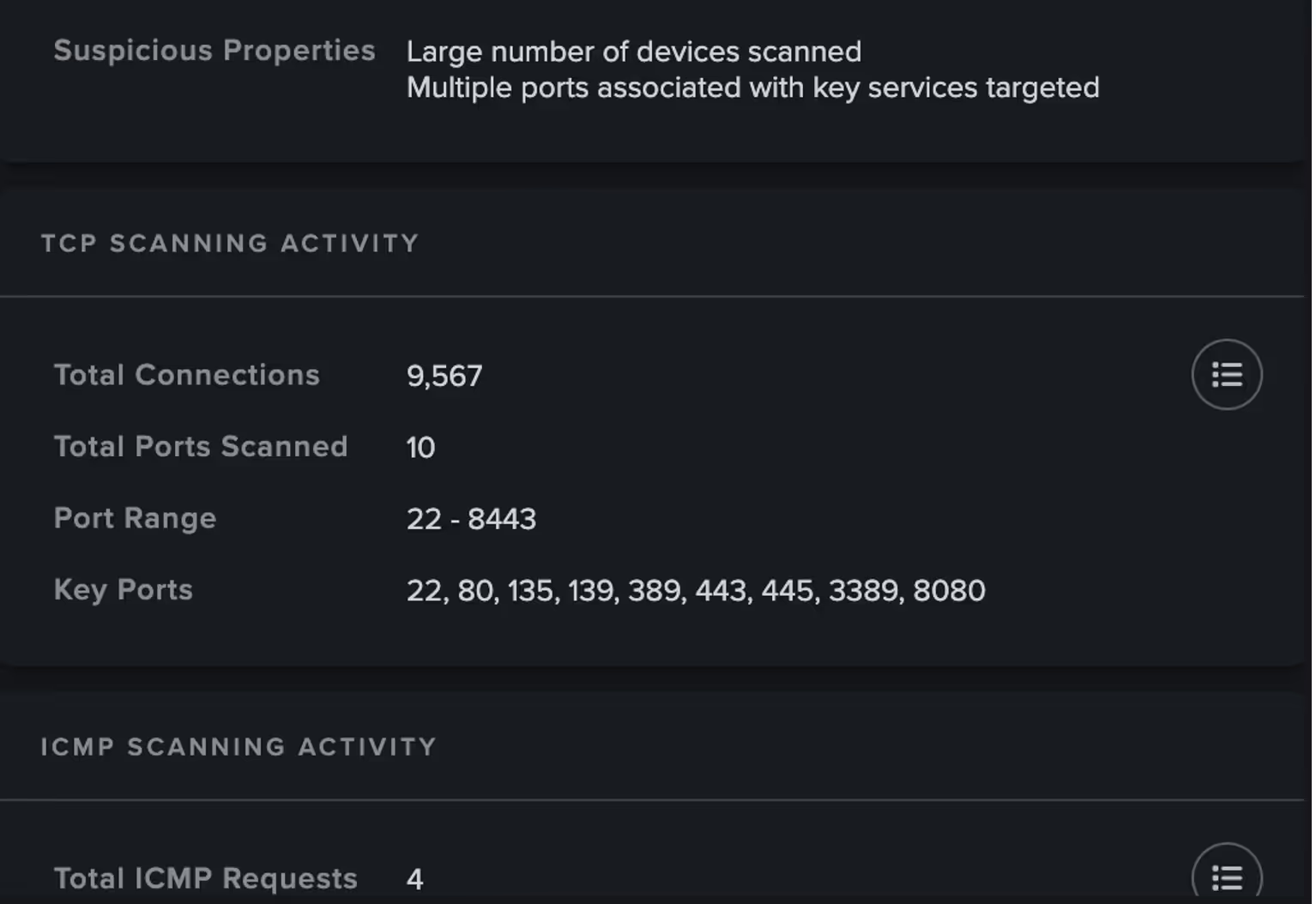
Further information on the suspicious scanning activity retrieved by Cyber AI Analyst, including total number of connections and ports scanned.
Figure 4: Further information on the suspicious scanning activity retrieved by Cyber AI Analyst, including total number of connections and ports scanned.
Darktrace’s detection of a significant spike in WMI activity represented by DCE_RPC protocol request increases at the time, with little to no activity observed one week either side.
Figure 5: Darktrace’s detection of a significant spike in WMI activity represented by DCE_RPC protocol request increases at the time, with little to no activity observed one week either side.

Case 2: January 2025

Suspicious File Downloads

On January 13, 2025, Darktrace began to observe activity related to the exploitation of CVE-2025-0282  on the network of another customer, with one in particular device attempting to download likely malicious files.

Firstly, Darktrace observed the device making a GET request for the file “DeElevator64.dll” hosted on the IP 104.238.130[.]185. The device proceeded to download another file, this time “‘DeElevate64.exe”. from the same IP. This was followed by the download of “DeElevator64.dll”, similar to the case observed in December 2024. External reporting indicates that this DLL has been used by actors exploiting CVE-2025-0282 to sideload backdoor into infected systems [2]

Darktrace’s detection of the download of the suspicious file “DeElevator64.dll” on January 13, 2025.
Figure 6: Darktrace’s detection of the download of the suspicious file “DeElevator64.dll” on January 13, 2025.

Suspicious Internal Activity

Just like the previous case, on January 15, the same device was observed making numerous internal connections consistent with network scanning activity, as well as DCE-RPC requests.

Just a few minutes later, Darktrace again detected the use of a new administrative credential, observing the following details:

  • domain=REDACTED hostname=DESKTOP-1JIMIV3 auth_successful=T result=success ntlm_version=2 .

The hostname observed by Darktrace, “DESKTOP-1JIMIV3,” has also been identified by other external vendors and was associated with a remote computer name seen accessing compromised accounts [2].

Darktrace also observed the device performing an SMB write of an additional file, “to.bat,” which may have represented another malicious file loaded from the DLL files that the device had downloaded earlier. It is possible this represented the threat actor attempting to deploy a remote scheduled task.

Darktrace’s detection of SMB Write of the suspicious file “to.bat”.
Figure 7: Darktrace’s detection of SMB Write of the suspicious file “to.bat”.

Further investigation revealed that the device was likely a Veeam server, with its MAC address indicating it was a VMware device. It also appeared that the Veeam server was capturing activities referenced from the hostname DESKTOP-1JIMIV3. This may be analogous to the remote computer name reported by external researchers as accessing accounts [2]. However, this activity might also suggest that while the same threat actor and tools could be involved, they may be targeting a different vulnerability in this instance.

Autonomous Response

In this case, the customer had Darktrace’s Autonomous Response capability enabled on their network. As a result, Darktrace was able to contain the compromise and shut down any ongoing suspicious connectivity by blocking internal connections and enforcing a “pattern of life” on the affected device. This action allows a device to make its usual connections while blocking any that deviate from expected behavior. These mitigative actions by Darktrace ensured that the compromise was promptly halted, preventing any further damage to the customer’s environment.

Darktrace's Autonomous Response capability actively mitigating the suspicious internal connectivity.
Figure 8: Darktrace's Autonomous Response capability actively mitigating the suspicious internal connectivity.

Conclusion

If the previous blog in January 2024 was a stark reminder of the threat posed by malicious actors exploiting Internet-facing assets, the recent activities surrounding CVE-2025-0282 and CVE-2025-0283 emphasize this even further.

Based on the telemetry available to Darktrace, a wide range of malicious activities were identified, including the malicious use of administrative credentials, the download of suspicious files, and network scanning in the cases investigated .

These activities included the download of suspicious files such as “DeElevate64.exe” and “DeElevator64.dll” potentially used by attackers to sideload backdoors into infected systems. The suspicious hostname DESKTOP-1JIMIV3 was also observed and appears to be associated with a remote computer name seen accessing compromised accounts. These activities are far from exhaustive, and many more will undoubtedly be uncovered as threat actors evolve.

Fortunately, Darktrace was able to swiftly detect and respond to suspicious network activity linked to the latest Ivanti vulnerabilities, sometimes even before these vulnerabilities were publicly disclosed.

Credit to: Nahisha Nobregas, Senior Cyber Analyst, Emma Foulger, Principle Cyber Analyst, Ryan Trail, Analyst Content Lead and the Darktrace Threat Research Team

Appendices

Darktrace Model Detections

Case 1

·      Anomalous Connection / Unusual Admin SMB Session

·      Anomalous File / EXE from Rare External Location

·      Anomalous File / Internal / Unusual SMB Script Write

·      Anomalous File / Multiple EXE from Rare External Locations

·      Anomalous File / Script from Rare External Location

·      Compliance / SMB Drive Write

·      Device / Multiple Lateral Movement Model Alerts

·      Device / Network Range Scan

·      Device / Network Scan

·      Device / New or Uncommon WMI Activity

·      Device / RDP Scan

·      Device / Suspicious Network Scan Activity

·      Device / Suspicious SMB Scanning Activity

·      User / New Admin Credentials on Client

·      User / New Admin Credentials on Server 

Case 2

·      Anomalous Connection / Unusual Admin SMB Session

·      Anomalous Connection / Unusual Admin RDP Session

·      Compliance / SMB Drive Write

·      Device / Multiple Lateral Movement Model Alerts

·      Device / SMB Lateral Movement

·      Device / Possible SMB/NTLM Brute Force

·      Device / Suspicious SMB Scanning Activity

·      Device / Network Scan

·      Device / RDP Scan

·      Device / Large Number of Model Alerts

·      Device / Anomalous ITaskScheduler Activity

·      Device / Suspicious Network Scan Activity

·      Device / New or Uncommon WMI Activity

List of IoCs Possible IoCs:

·      DeElevator64.dll

·      deelevator64.dll

·      DeElevate64.exe

·      deelevator64.dll

·      deelevate64.exe

·      to.bat

Mid-high confidence IoCs:

-       104.238.130[.]185

-       http://104.238.130[.]185/DeElevate64.exe

-       http://104.238.130[.]185/DeElevator64.dll

-       DESKTOP-1JIMIV3

References:

1.     https://www.ivanti.com/blog/security-update-ivanti-connect-secure-policy-secure-and-neurons-for-zta-gateways

2.     https://unit42.paloaltonetworks.com/threat-brief-ivanti-cve-2025-0282-cve-2025-0283/

3.     https://www.proofpoint.com/uk/blog/identity-threat-defense/privilege-escalation-attack#:~:text=In%20this%20approach%2C%20attackers%20exploit,handing%20over%20their%20login%20credentials

Inside the SOC
Darktrace cyber analysts are world-class experts in threat intelligence, threat hunting and incident response, and provide 24/7 SOC support to thousands of Darktrace customers around the globe. Inside the SOC is exclusively authored by these experts, providing analysis of cyber incidents and threat trends, based on real-world experience in the field.
Written by
Hugh Turnbull
Cyber Analyst

More in this series

No items found.

Blog

/

AI

/

April 17, 2026

Why Behavioral AI Is the Answer to Mythos

mythos behavioral aiDefault blog imageDefault blog image

How AI is breaking the patch-and-prevent security model

The business world was upended last week by the news that Anthropic has developed a powerful new AI model, Claude Mythos, which poses unprecedented risk because of its ability to expose flaws in IT systems.  

Whether it’s Mythos or OpenAI’s GPT-5.4-Cyber, which was just announced on Tuesday, supercharged AI models in the hands of hackers will allow them to carry out attacks at machine speed, much faster than most businesses can stop them.  

This news underscores a stark reality for all leaders: Patching holes alone is not a sufficient control against modern cyberattacks. You must assume that your software is already vulnerable right now. And while LLMs are very good at spotting vulnerabilities, they’re pretty bad at reliably patching them.

Project Glasswing members say it could take months or years for patches to be applied. While that work is done, enterprises must be protected against Zero-Day attacks, or security holes that are still undiscovered.  

Most cybersecurity strategies today are built like a daily multivitamin: broad, preventative, and designed to keep the system generally healthy over time. Patch regularly. Update software. Reduce known vulnerabilities. It’s necessary, disciplined, and foundational. But it’s also built for a world where the risks are well known and defined, cycles are predictable, and exposure unfolds at a manageable pace.

What happens when that model no longer holds?

The AI cyber advantage: Behavioral AI

The vulnerabilities exposed by AI systems like Mythos aren’t the well-understood risks your “multivitamin” was designed to address. They are transient, fast-emerging entry points that exist just long enough to be exploited.

In that environment, prevention alone isn’t enough. You don’t need more vitamins—you need a painkiller. The future of cybersecurity won’t be defined by how well you maintain baseline health. It will be defined by how quickly you respond when something breaks and every second counts.

That’s why behavioral AI gives businesses a durable cyber advantage. Rather than trying to figure out what the attacker looks like, it learns what “normal” looks like across the digital ecosystem of each individual business.  

That’s exactly how behavioral AI works. It understands the self, or what's normal for the organization, and then it can spot deviations in from normal that are actually early-stage attacks.

The Darktrace approach to cybersecurity

At Darktrace, we’ve been defending our 10,000 customers using behavioral AI cybersecurity developed in our AI Research Centre in Cambridge, U.K.

Darktrace was built on the understanding that attacks do not arrive neatly labeled, and that the most damaging threats often emerge before signatures, indicators, or public disclosures can catch up.  

Our AI algorithms learn in real time from your personalized business data to learn what’s normal for every person and every asset, and the flows of data within your organization. By continuously understanding “normal” across your entire digital ecosystem, Darktrace identifies and contains threats emerging from unknown vulnerabilities and compromised supply chain dependencies, autonomously curtailing attacks at machine speed.  

Security for novel threats

Darktrace is built for a world where AI is not just accelerating attacks, but fundamentally reshaping how they originate. What makes our AI so unique is that it's proven time and again to identify cyber threats before public vulnerability disclosures, such as critical Ivanti vulnerabilities in 2025 and SAP NetWeaver exploitations tied to nation-state threat actors.  

As AI reshapes how vulnerabilities are found and exploited, cybersecurity must be anchored in something more durable than a list of known flaws. It requires a real-time understanding of the business itself: what belongs, what does not, and what must be stopped immediately.

What leaders should do right now

The leadership priority must shift accordingly.

First, stop treating unknown vulnerabilities as an edge case. AI‑driven discovery makes them the norm. Security programs built primarily around known flaws, signatures, and threat intelligence will always lag behind an attacker that is operating in real time.

Second, insist on an understanding of what is actually normal across the business. When threats are novel, labels are useless. The earliest and most reliable signal of danger is abnormal behavior—systems, users, or data flows that suddenly depart from what is expected. If you cannot see that deviation as it happens, you are effectively blind during the most critical window.

Finally, assume that the next serious incident will occur before remediation guidance is available. Ask what happens in those first minutes and hours. The organizations that maintain resilience are not the ones waiting for disclosure cycles to catch up—they are the ones that can autonomously identify and contain emerging threats as they unfold.

This is the reality of cybersecurity in an AI‑shaped world. Patching and prevention remain important foundations, but the advantage now belongs to those who can respond instantly when the unpredictable occurs.

Behavioral AI is security designed not just for known threats, but for the ones that AI will discover next.

[related-resource]

Continue reading
About the author
Ed Jennings
President and CEO

Blog

/

OT

/

April 17, 2026

Inside ZionSiphon: Darktrace’s Analysis of OT Malware Targeting Israeli Water Systems

zionsiphonDefault blog imageDefault blog image

What is ZionSiphon?

Darktrace recently analyzed a malware sample, which identifies itself as ZionSiphon. This sample combines several familiar host-based capabilities, including privilege escalation, persistence, and removable-media propagation, with targeting logic themed around water treatment and desalination environments.

This blog details Darktrace’s investigation of ZionSiphon, focusing on how the malware identifies targets, establishes persistence, attempts to tamper with local configuration files, and scans for Operational Technology (OT)-relevant services on the local subnet. The analysis also assesses what the code suggests about the threat actor’s intended objectives and highlights where the implementation appears incomplete.

Function “ZionSiphon()” used by the malware author.
Figure 1: Function “ZionSiphon()” used by the malware author.

Targets and motivations

Israel-Focused Targeting and Messaging

The clearest indicators of intent in this sample are its hardcoded Israel-focused targeting checks and the strong political messaging found in some strings in the malware’s binary.

In the class initializer, the malware defines a set of IPv4 ranges, including “2.52.0.0-2.55.255.255”, “79.176.0.0-79.191.255.255”, and “212.150.0.0-212.150.255.255”, indicating that the author intended to restrict execution to a narrow range of addresses. All of the specified IP blocks are geographically located within Israel.

The malware obfuscates the IP ranges by encoding them in Base64.
Figure 2: The malware obfuscates the IP ranges by encoding them in Base64.

The ideological motivations behind this malware are also seemingly evident in two Base64-encoded strings embedded in the binary. The first (shown in Figure 1) is:

Netanyahu = SW4gc3VwcG9ydCBvZiBvdXIgYnJvdGhlcnMgaW4gSXJhbiwgUGFsZXN0aW5lLCBhbmQgWWVtZW4gYWdhaW5zdCBaaW9uaXN0IGFnZ3Jlc3Npb24uIEkgYW0gIjB4SUNTIi4=“, which decodes to “In support of our brothers in Iran, Palestine, and Yemen against Zionist aggression. I am "0xICS".

The second string, “Dimona = UG9pc29uaW5nIHRoZSBwb3B1bGF0aW9uIG9mIFRlbCBBdml2IGFuZCBIYWlmYQo=“, decodes to “Poisoning the population of Tel Aviv and Haifa”.  These strings do not appear to be used by the malware for any operational purpose, but they do offer an indication of the attacker’s motivations. Dimona, referenced in the second string, is an Israeli city in the Negev desert, primarily known as the site of the Shimon Peres Negev Nuclear Research Center.

The Dimona string as it appears in the decompiled malware, with the Base64-decoded text.
Figure 3: The Dimona string as it appears in the decompiled malware, with the Base64-decoded text.

The hardcoded IP ranges and propaganda‑style text suggest politically motivated intent, with Israel appearing to be a likely target.

Water and desalination-themed targeting?

The malware also includes Israel-linked strings in its target list, including “Mekorot, “Sorek”, “Hadera”, “Ashdod”, “Palmachim”, and “Shafdan”. All of the strings correspond to components of Israel’s national water infrastructure: Mekorot is Israel’s national water company responsible for managing the country’s water system, including major desalination and wastewater projects. Sorek, Hadera, Ashdod, and Palmachim are four of Israel’s five major seawater desalination plants, each producing tens of millions of cubic meters of drinking water annually. Shafdan is the country’s central wastewater treatment and reclamation facility. Their inclusion in ZionSiphon’s targeting list suggests an interest in infrastructure linked to Israel’s water sector.

Strings in the target list, all related to Israel and water treatment.
Figure 4: Strings in the target list, all related to Israel and water treatment.

Beyond geographic targeting, the sample contains a second layer of environment-specific checks aimed at water treatment and desalination systems. In the function ”IsDamDesalinationPlant()”, the malware first inspects running process names for strings such as “DesalPLC”, “ROController”, “SchneiderRO”, “DamRO”, “ReverseOsmosis”, “WaterGenix”, “RO_Pump”, “ChlorineCtrl”, “WaterPLC”, “SeaWaterRO”, “BrineControl”, “OsmosisPLC”, “DesalMonitor”, “RO_Filter”, “ChlorineDose”, “RO_Membrane”, “DesalFlow”, “WaterTreat”, and “SalinityCtrl”. These strings are directly related to desalination, reverse osmosis, chlorine handling, and plant control components typically seen in the water treatment industry.

The filesystem checks reinforce this focus. The code looks for directories such as “C:\Program Files\Desalination”, “C:\Program Files\Schneider Electric\Desal”, “C:\Program Files\IDE Technologies”, “C:\Program Files\Water Treatment”, “C:\Program Files\RO Systems”, “C:\Program Files\DesalTech”, “C:\Program Files\Aqua Solutions”, and “C:\Program Files\Hydro Systems”, as well as files including “C:\DesalConfig.ini”, “C:\ROConfig.ini”, “C:\DesalSettings.conf”, “C:\Program Files\Desalination\system.cfg”, “C:\WaterTreatment.ini”, “C:\ChlorineControl.dat”, “C:\RO_PumpSettings.ini”, and “C:\SalinityControl.ini.”

Malware Analysis

Privilege Escalation

The “RunAsAdmin” function from the malware sample.
Figure 5: The “RunAsAdmin” function from the malware sample.


The malware’s first major action is to check whether it is running with administrative rights. The “RunAsAdmin()” function calls “IsElevated()”, which retrieves the current Windows identity and checks whether it belongs to the local Administrators group. If the process is already elevated, execution proceeds normally.

The “IsElevated” function as seen in the sample.
Figure 6: The “IsElevated” function as seen in the sample.


If not, the code waits on the named mutex and launches “powershell.exe” with the argument “Start-Process -FilePath <current executable> -Verb RunAs”, after which it waits for that process to finish and then exits.

Persistence and stealth installation

Registry key creation.
Figure 7: Registry key creation.

Persistence is handled by “s1()”. This routine opens “HKCU\Software\Microsoft\Windows\CurrentVersion\Run”, retrieves the current process path, and compares it to “stealthPath”. If the current file is not already running from that location, it copies itself to the stealth path and sets the copied file’s attributes to “hidden”.

The code then creates a “Run” value named “SystemHealthCheck” pointing to the stealth path. Because “stealthPath” is built from “LocalApplicationData” and the hardcoded filename “svchost.exe”, the result is a user-level persistence mechanism that disguises the payload under a familiar Windows process name. The combination of a hidden file and a plausible-sounding autorun value suggests an intent to blend into ordinary Windows artifacts rather than relying on more complex persistence methods.

Target determination

The malware’s targeting determination is divided between “IsTargetCountry()” and “IsDamDesalinationPlant()”. The “IsTargetCountry()” function retrieves the local IPv4 address, converts it to a numeric value, and compares it against each of the hardcoded ranges stored in “ipRanges”. Only if the address falls within one of these ranges does the code move on to next string-comparison step, which ultimately determines whether the country check succeeded.

The main target validation function.
Figure 8: The main target validation function.
 The “IsTargetCountry” function.
Figure 9 : The “IsTargetCountry” function.


IsDamDesalinationPlant()” then assesses whether the host resembles a relevant OT environment. It first scans running process names for the hardcoded strings previously mentioned, followed by checks for the presence of any of the hardcoded directories or files. The intended logic is clear: the payload activates only when both a geographic condition and an environment specific condition related to desalination or water treatment are met.

Figure. 10: An excerpt of the list of strings used in the “IsDamDesalinationPlant” function

Why this version appears dysfunctional

Although the file contains sabotage, scanning, and propagation functions, the current sample appears unable to satisfy its own target-country checking function even when the reported IP falls within the specified ranges. In the static constructor, every “ipRanges” entry is associated with the same decoded string, “Nqvbdk”, derived from “TnF2YmRr”. Later, “IsTargetCountry()” (shown in Figure 8) compares that stored value against “EncryptDecrypt("Israel", 5)”.

The “EncryptDecrypt” function
Figure 11: The “EncryptDecrypt” function

As implemented, “EncryptDecrypt("Israel", 5)” does not produce “Nqvbdk”, it produces a different string. This function seems to be a basic XOR encode/decode routine, XORing the string “Israel” with value of 5. Because the resulting output does not match “Nqvbdk” the comparison always fails, even when the host IP falls within one of the specified ranges. As a result, this build appears to consistently determine that the device is not a valid target. This behavior suggests that the version is either intentionally disabled, incorrectly configured, or left in an unfinished state. In fact, there is no XOR key that would transform “Israel” into “Nqvbdk” using this function.

Self-destruct function

The “SelfDestruct” function
Figure 12: The “SelfDestruct” function

If IsTargetCountry() returns false, the malware invokes “SelfDestruct()”. This routine removes the SystemHealthCheck value from “HKCU\Software\Microsoft\Windows\CurrentVersion\Run”, writes a log file to “%TEMP%\target_verify.log” containing the message “Target not matched. Operation restricted to IL ranges. Self-destruct initiated.” and creates the batch file “%TEMP%\delete.bat”. This file repeatedly attempts to delete the malware’s executable, before deleting itself.

Local configuration file tampering

If the malware determines that the system it is on is a valid target, its first action is local file tampering. “IncreaseChlorineLevel()” checks a hardcoded list of configuration files associated with desalination, reverse osmosis, chlorine control, and water treatment OT/Industrial Control Systems (ICS).  As soon as it finds any one of these file present, it appends a fixed block of text to it and returns immediately.

The block of text appended to relevant configuration files.
Figure 13: The block of text appended to relevant configuration files.

The appended block of text contains the following entries: “Chlorine_Dose=10”, “Chlorine_Pump=ON”, “Chlorine_Flow=MAX”, “Chlorine_Valve=OPEN”, and “RO_Pressure=80”. Only if none of the hardcoded files are found does the malware proceed to its network-based OT discovery logic.

OT discovery and protocol logic

This section of the code attempts to identify devices on the local subnet, assign each one a protocol label, and then attempt protocol-specific communication. While the overall structure is consistent across protocols, the implementation quality varies significantly.

Figure 14: The ICS scanning function.

The discovery routine, “UZJctUZJctUZJct()”, obtains the local IPv4 address, reduces it to a /24 prefix, and iterates across hosts 1 through 255. For each host, it probes ports 502 (Modbus), 20000 (DNP3), and 102 (S7comm), which the code labels as “Modbus”, “DNP3”, and “S7” respectively if a valid response is received on the relevant port.

The probing is performed in parallel. For every “ip:port” combination, the code creates a task and attempts a TCP connection. The “100 ms” value in the probe routine is a per-connection timeout on “WaitOne(100, ...)”, rather than a delay between hosts or protocols. In practice, this results in a burst of short-lived OT-focused connection attempts across the local subnet.

Protocol validation and device classification

When a connection succeeds, the malware does not stop at the open port. It records the endpoint as an “ICSDevice” with an IP address, port, and protocol label. It then performs a second-stage validation by writing a NULL byte to the remote stream and reading the response that comes back.

For Modbus, the malware checks whether the first byte of the reply is between 1 and 255, for DNP3, it checks whether the first two bytes are “05 64”, and for S7comm, it checks whether the first byte is “03”. These checks are not advanced parsers, but they do show that the author understood the protocols well enough to add lightweight confirmation before sending follow-on data.

 The Modbus read request along with unfinished code for additional protocols.
Figure 15: The Modbus read request along with unfinished code for additional protocols.  

The most developed OT-specific logic is the Modbus-oriented path. In the function “IncreaseChlorineLevel(string targetIP, int targetPort, string parameter)”, the malware connects to the target and sends “01 03 00 00 00 0A”. It then reads the response and parses register values in pairs. The code then uses some basic logic to select a register index: for “Chlorine_Dose”, it looks for values greater than 0 and less than 1000; for “Turbine_Speed”, it looks for values greater than 100.

The Modbus command observed in the sample (01 03 00 00 00 0A) is a Read Holding Registers request. The first byte (0x01) represents the unit identifier, which in traditional Modbus RTU specifies the addressed slave device; in Modbus TCP, however, this value is often ignored or used only for gateway routing because device addressing is handled at the IP/TCP layer.

The second byte (0x03) is the Modbus function code indicating a Read Holding Registers request. The following two bytes (0x00 0x00) specify the starting register address, indicating that the read begins at address zero. The final two bytes (0x00 0A) define the number of registers to read, in this case ten consecutive registers. Taken together, the command requests the contents of the first ten holding registers from the target device and represents a valid, commonly used Modbus operation.

If a plausible register is found, the malware builds a six-byte Modbus write using function code “6” (Write)” and sets the value to 100 for “Chlorine_Dose”, or 0 for any other parameter. If no plausible register is found, it falls back to using hardcoded write frames. In the main malware path, however, the code only calls this function with “Chlorine_Dose".

If none of the ten registers meets the expected criteria, the malware does not abandon the operation. Instead, it defaults to a set of hardcoded Modbus write frames that specify predetermined register addresses and values. This behavior suggests that the attacker had only partial knowledge of the target environment. The initial register-scanning logic appears to be an attempt at dynamic discovery, while the fallback logic ensures that a write operation is still attempted even if that discovery fails.

Incomplete DNP3 and S7comm Logic

The DNP3 and S7comm branches appear much less complete. In “GetCommand()”, the DNP3 path returns the fixed byte sequence “05 64 0A 0C 01 02”, while the S7comm path returns “03 00 00 13 0E 00”. Neither sequence resembles a fully formed command for the respective protocol.

In the case of the S7comm section, the five byte‑ sequence found in the malware sample (05 00 1C 22 1E) most closely matches the beginning of an S7comm parameter block, specifically the header of a “WriteVar (0x05)” request, which is the S7comm equivalent of a Modbus register write operation. In the S7comm protocol, the first byte of a parameter block identifies the function code,  but the remaining bytes in this case do not form a valid item definition. A vaild S7 WriteVar parameter requires at least one item and a full 11-byte variable-specification structure. By comparison this 5‑ byte array is far too short to be a complete or usable command.

The zero item count (0x00) and the trailing three bytes appear to be either uninitialized data or the beginning of an incomplete address field. Together, these details suggest that the attacker likely intended to implement S7 WriteVar functionality, like the Modbus function, but left this portion of the code unfinished.

The DNP3 branch of the malware also appears to be only partially implemented. The byte sequence returned by the DNP3 path (05 64 0A 0C 01 02) begins with the correct two‑byte DNP3 link‑layer sync header (0x05 0x64) and includes additional bytes that resemble the early portion of a link‑layer header. However, the sequence is far too short to constitute a valid DNP3 frame. It lacks the required destination and source address fields, the 16‑bit CRC blocks, and any application‑layer payload in which DNP3 function code would reside. As a result, this fragment does not represent a meaningful DNP3 command.

The incomplete S7 and DNP3 fragments suggest that these protocol branches were still in a developmental or experimental state when the malware was compiled. Both contain protocol‑accurate prefixes, indicating an intent to implement multi‑protocol OT capabilities, however for reasons unknow, these sections were not fully implemented or could not be completed prior to deployment.

USB Propagation

The malware also includes a removable-media propagation mechanism. The “sdfsdfsfsdfsdfqw()” function scans for drives, selects those identified as removable, and copies the hidden payload to each one as “svchost.exe” if it is not already present. The copied executable is marked with the “Hidden” and “System” attributes to reduce visibility.

The malware then calls “CreateUSBShortcut()”, which uses “WScript.Shell” to create .lnk files for each file in the removable drive root. Each shortcut’s TargetPath is set to the hidden malware copy, the icon is set to “shell32.dll, 4” (this is the windows genericfile icon), and the original file is hidden. Were a victim to click this “file,” they would unknowingly run the malware.

Figure 14:The creation of the shortcut on the USB device.

Key Insights

ZionSiphon represents a notable, though incomplete, attempt to build malware capable of malicious interaction with OT systems targeting water treatment and desalination environments.

While many of ZionSiphon’s individual capabilities align with patterns commonly found in commodity malware, the combination of politically motivated messaging, Israel‑specific IP targeting, and an explicit focus on desalination‑related processes distinguishes it from purely opportunistic threats. The inclusion of Modbus sabotage logic, filesystem tampering targeting chlorine and pressure control, and subnet‑wide ICS scanning demonstrates a clear intent to interact directly with industrial processes controllers and to cause significant damage and potential harm, rather than merely disrupt IT endpoints.

At the same time, numerous implementation flaws, most notably the dysfunctional country‑validation logic and the placeholder DNP3 and S7comm components, suggest that analyzed version is either a development build, a prematurely deployed sample, or intentionally defanged for testing purposes. Despite these limitations, the overall structure of the code likely indicates a threat actor experimenting with multi‑protocol OT manipulation, persistence within operational networks, and removable‑media propagation techniques reminiscent of earlier ICS‑targeting campaigns.

Even in its unfinished state, ZionSiphon underscores a growing trend in which threat actors are increasingly experimenting with OT‑oriented malware and applying it to the targeting of critical infrastructure. Continued monitoring, rapid anomaly detection, and cross‑visibility between IT and OT environments remain essential for identifying early‑stage threats like this before they evolve into operationally viable attacks.

Credit to Calum Hall (Cyber Analyst)
Edited by Ryan Traill (Content Manager)

References

1.        https://www.virustotal.com/gui/file/07c3bbe60d47240df7152f72beb98ea373d9600946860bad12f7bc617a5d6f5f/details

Continue reading
About the author
Calum Hall
Technical Content Researcher
Your data. Our AI.
Elevate your network security with Darktrace AI






