
Blog
/
/
November 9, 2023

Using Darktrace for Threat Hunting

Read about effective threat hunting techniques with Darktrace, focusing on identifying vulnerabilities and improving your security measures.
Inside the SOC
Darktrace cyber analysts are world-class experts in threat intelligence, threat hunting and incident response, and provide 24/7 SOC support to thousands of Darktrace customers around the globe. Inside the SOC is exclusively authored by these experts, providing analysis of cyber incidents and threat trends, based on real-world experience in the field.
Written by
Brianna Luong (Leddy)
Sr. Technical Alliances Manager
Default blog image
09
Nov 2023

What is Threat Hunting?

Threat Hunting is a technique to identify adversaries within an organization that go undetected by traditional security tools.

While a traditional, reactive approach to cyber security often involves automated alerts received and investigated by a security team, threat hunting takes a proactive approach to seek out potential threats and vulnerabilities before they escalate into full-blown security incidents. The benefits of hunting include identifying hidden threats, reducing the dwell time of attackers, and enhancing overall detection and response capabilities.

Threat Hunting Methodology

There are many different methodologies and frameworks for threat hunting, including the Pyramid of Pain, the Sqrrl Hunting Loop, and the MITRE ATT&CK Framework.  While there is not one gold standard on how to conduct threat hunts, the typical process can be broken down into several key steps:

Planning and Hypothesis Creation: Define the scope and objective of the threat hunt. Identify potential targets and predict activity that might be taking place.

Data Collection: Refining data collection methods and gathering data from various sources, including logs, network traffic, and endpoint data.

Data Processing: Data that has been collected needs to be processed to generate information.

Data Analysis: Processed data can then be analyzed for anomalies, indicators of compromise (IoCs), or patterns of suspicious behavior.

Threat Identification: Based on the analysis, threat hunters may identify potential threats or security incidents.

Response: Taking action to mitigate or eradicate identified threats if any.

Documentation and Dissemination: It is important to record any findings or actions taken during the threat hunting process to serve as lessons learned for future reference. Additionally, any new threats or tactics, techniques, and procedures (TTPs) discovered may be shared with the cyber threat intelligence team or the wider community.

Building a Threat Hunting Program

For organizations looking to implement threat hunting as part of their cyber security program, they will need both a data collection source and human analysts as threat hunters.

Data collection and analysis may often be performed through existing security tools including SIEM systems, Network Traffic Analysis tools, endpoint agents, and system logs. On the human side, experienced threat hunters may be hired into an organization, or existing SOC analysts may be upskilled to perform threat hunts.

Leveraging AI security tools such as Darktrace can help to lower the bar in building a threat hunting program, both in analysis of the data and in assisting humans in their investigations.

Threat Hunting in Darktrace

To illustrate the benefits of leveraging Darktrace in threat hunting, we can walk through an example hunt following the key steps outlined above.

Planning and Hypothesis Creation

The initial hypothesis used in defining the scope of a threat hunt can come from several sources: threat intelligence feeds, the threat hunter’s own experience, or an anomaly detection that has been highlighted by Darktrace.

In this case, let’s imagine that this hunt is focused on a recent campaign by an Advanced Persistent Threat (APT). Threat intel has provided known file hashes, Command and Control (C2) IP addresses and domains, and MITRE techniques used by the attacker. The goal is to determine whether any indicators of this threat are present in the organization’s environment.

Data Collection and Data Processing

Darktrace can be deployed to cover an organization’s entire digital estate, including passive network traffic monitoring, cloud environments, and SaaS applications. Self-Learning AI is applied to the raw data to learn normal patterns of life for a specific environment and to highlight deviations from normal that might represent a threat. This data gives threat hunters a starting point in analyzing logs, meta-data, and anomaly detections.

Data Analysis

In the data analysis phase, threat hunters can use the Darktrace platform to search for the IoCs and TTPs identified during planning.

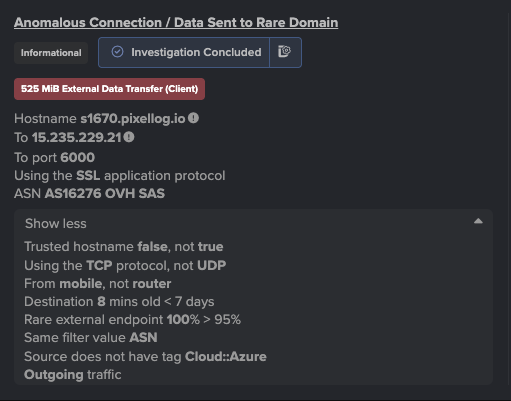
When searching for IoCs such as IP addresses or domain names, hunters can query the environment through the Omnisearch bar in the Darktrace Threat Visualizer. This search can provide a summary of all devices or users contacting a suspicious endpoint. From here the hunters can quickly pivot to identify surrounding activity from the source device.

Figure 1: Search for twitter[.]com (now known as X) as a potential indicator of compromise

Alternately, Darktrace Advanced Search can be used to search for these IoCs, but it also supports queries for file hashes or more advanced searches based on ports, protocols, data volumes, etc.
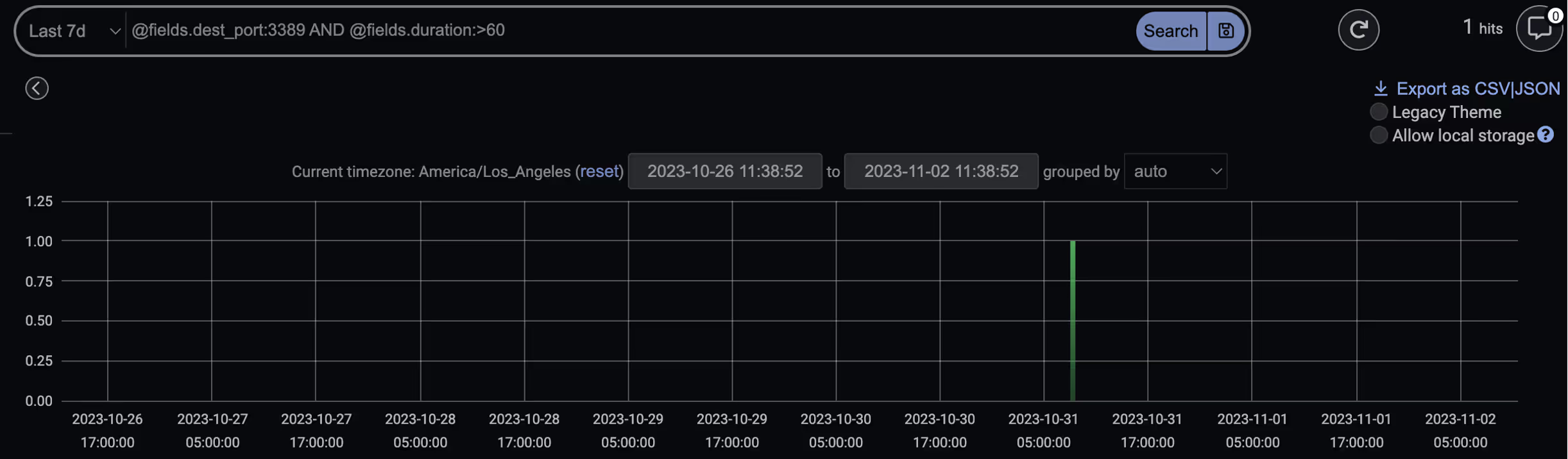
Figure 2: Advanced Search query for connections on port 3389 lasting longer than 60 seconds

While searching for known suspicious domains and IP addresses is straightforward, the real strength of Darktrace lies in the ability to highlight deviations from a device’s ‘normal’ pattern of life. Darktrace has many built-in behavioral models designed to detect common adversary TTPs, all mapped to the MITRE ATT&CK Framework.

In the context of our threat hunt, we know that our target APT uses the Remote Desktop Protocol (RDP) to move laterally within a compromised network, specifically leveraging MITRE technique T1021.001. As each Darktrace model is mapped to MITRE, the threat hunter can search and find specific detection models that may be of interest, in this case the model ‘Anomalous Connection / Unusual Internal Remote Desktop’. From here they can view any devices that may have triggered this model, indicating possible attacker activity.
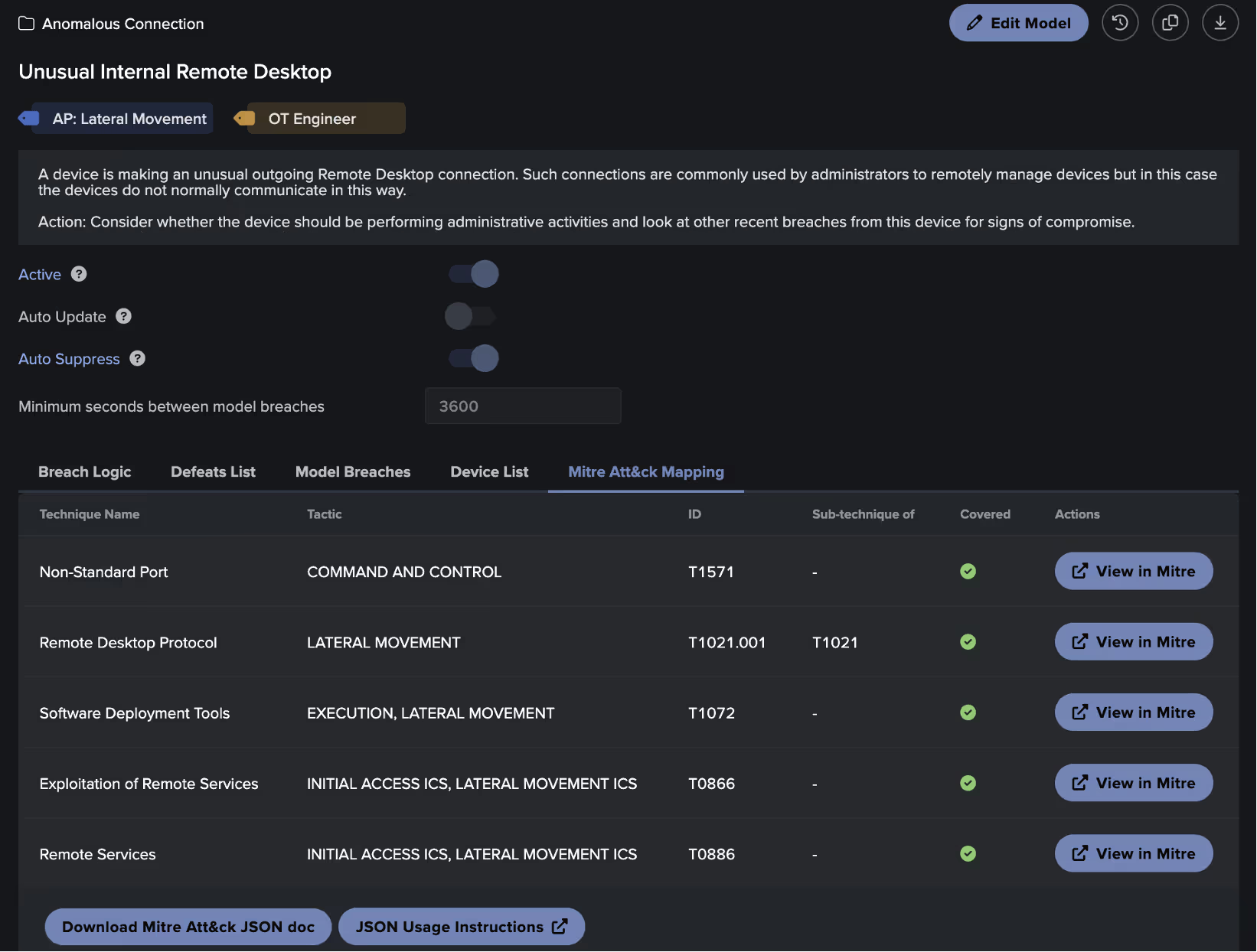
Figure 3: MITRE Mapping details in the Darktrace Model Editor

Threat hunters can also search more widely for any detections within a specific MITRE tactic through filters found on the Darktrace Threat Tray.
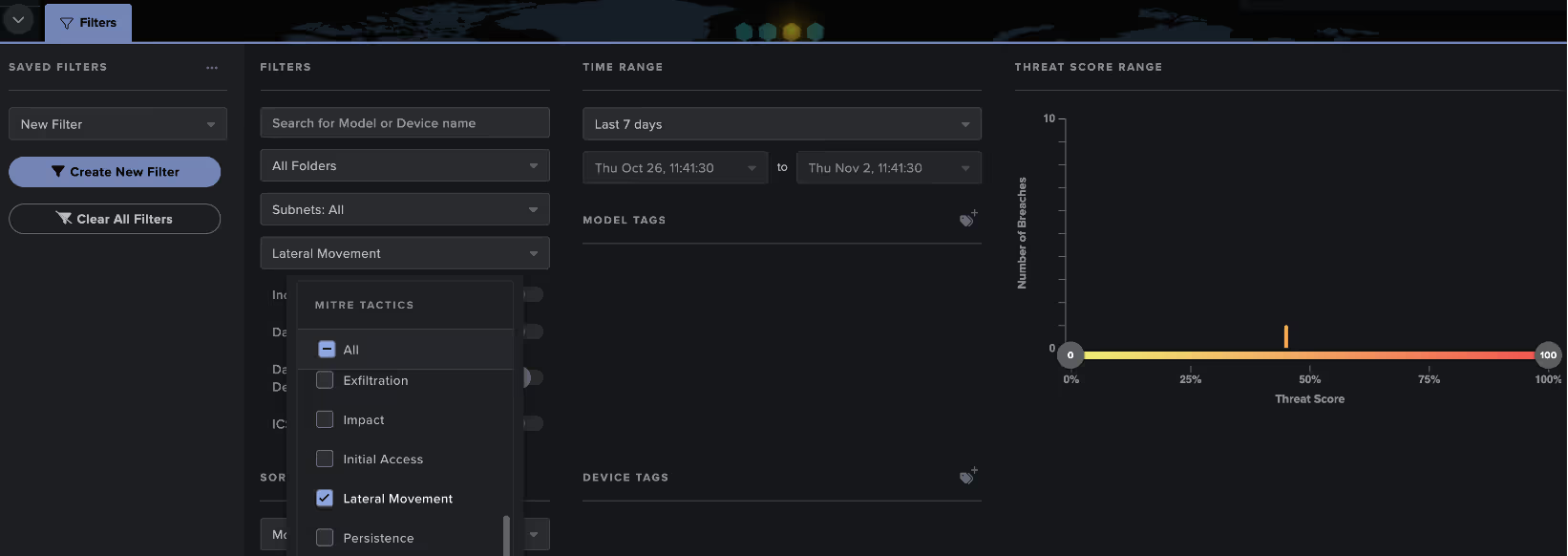
Figure 4: Search for the Lateral Movement MITRE Tactic on the model breach threat tray

Threat Identification

Once a threat hunter has identified connections, model breaches, or anomalies during the analysis phase, they can begin to conduct further investigation to determine if this may represent a security incident.

Threat hunters can use Darktrace to perform deeper analysis through generating packet captures, visualizing surrounding network traffic, and utilizing features like the VirusTotal lookup to consult open-source intelligence (OSINT).

Another powerful tool to augment the hunter’s investigation is the Darktrace Cyber AI Analyst, which assists human teams in the investigation and correlation of behaviors to identify threats. Cyber AI Analyst automatically launches an initial triage of every model breach in the Darktrace platform, but threat hunters can also leverage manual investigations to gain additional context on their findings.

For example, say that an unusual RDP connection of interest was identified through Advanced Search. The hunter can pivot back to the Threat Visualizer and launch an AI Analyst investigation for the source device at the time of the connection. The resulting investigation may provide the hunter with additional suspicious behavior observed around that time, without the need for manual log analysis.
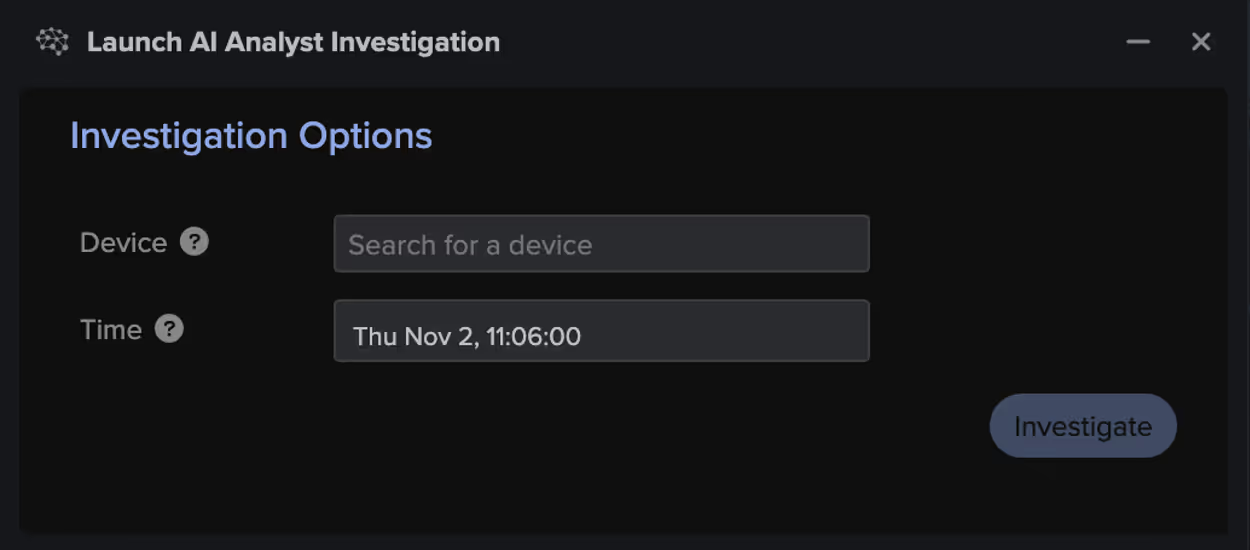
Figure 5: Manual Cyber AI Analyst investigations

Response

If a threat is detected within Darktrace and confirmed by the threat hunter, Darktrace's Autonomous Response can be leveraged to take either autonomous or manual action to contain the threat. This provides the security team with additional time to conduct further investigation, pull forensics, and remediate the threat. This process can be further supported through the bespoke, AI-generated playbooks offered by Darktrace / Incident Readiness & Recovery, allowing an efficient recovery back to normal.
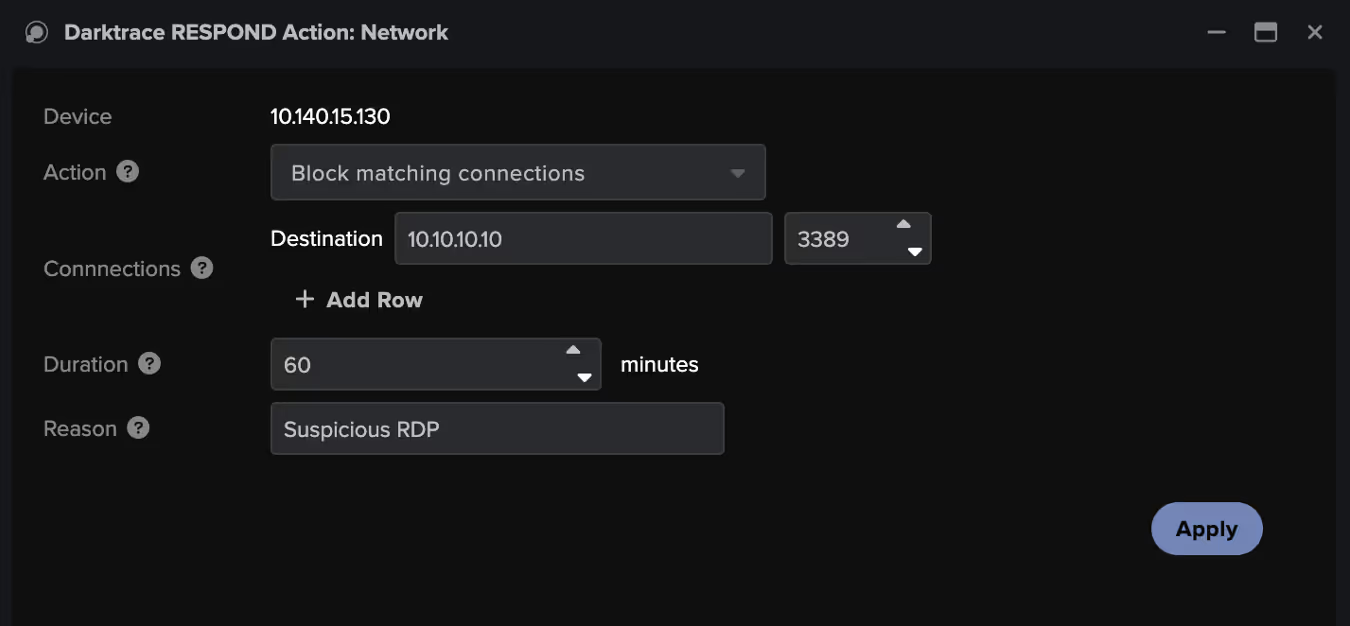
Figure 6: Example of a manual RESPOND action used to block suspicious connectivity on port 3389 to contain possible lateral movement

Documentation and Dissemination

An important final step is to document the threat hunting process and use the results to better improve automated security alerting and response. In Darktrace, reporting can be generated through the Cyber AI Analyst, Advanced Search exports, and model breach details to support documentation.

To improve existing alerting through Darktrace, this may mean creating a new detection model or increasing the priority of existing detections to ensure that these are escalated to the security team in the future. The Darktrace model editor provides users with full visibility into models and allows the creation of custom detections based on use cases or business requirements.
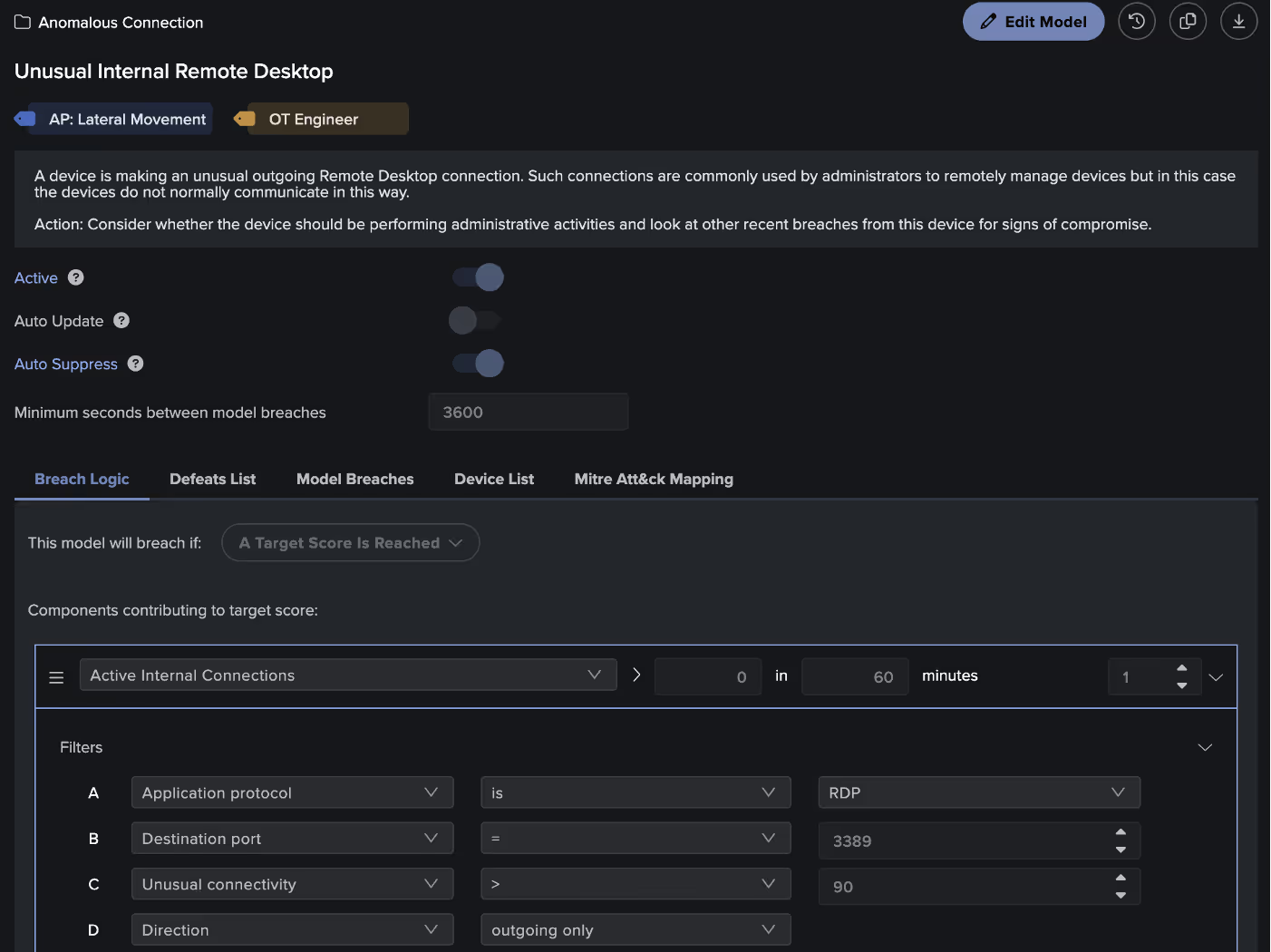
Figure 7: The Darktrace Model Editor showing the Breach Logic configuration

Conclusions

Proactive threat hunting is an important part of a cyber security approach to identify hidden threats, reduce dwell time, and improve incident response. Darktrace’s Self-Learning AI provides a powerful tool for identifying attacker TTPs and augmenting human threat hunters in their process. Utilizing the Darktrace platform, threat hunters can significantly reduce the time required to complete their hunts and mitigate identified threats.

[related-resource]

Get the latest insights on emerging cyber threats

Attackers are adapting, are you ready? This report explores the latest trends shaping the cybersecurity landscape and what defenders need to know

Inside the SOC
Darktrace cyber analysts are world-class experts in threat intelligence, threat hunting and incident response, and provide 24/7 SOC support to thousands of Darktrace customers around the globe. Inside the SOC is exclusively authored by these experts, providing analysis of cyber incidents and threat trends, based on real-world experience in the field.
Written by
Brianna Luong (Leddy)
Sr. Technical Alliances Manager

More in this series

No items found.

Blog

/

Network

/

July 27, 2026

Hiding in Plain Sight: Uncovering a Multi-Stage Ransomware Attack Through Behavioral Detection

ransomware attackDefault blog imageDefault blog image

Why ransomware has changed

Ransomware attacks have continued to increase globally, with 698 incidents reported in May 2026, representing a 48% rise compared to 472 incidents in May 2025 [1]. At the same time, the ransomware landscape is evolving. Several major ransomware groups, including LockBit [2], have been disrupted by successful joint law enforcement operations, resulting in a shift away from a small number of dominant actors towards a more fragmented and distributed ecosystem. This is increasingly composed of smaller groups who play a specialized role in the attack, such as initial access brokers, affiliates or developers.

As a result, ransomware tactics, techniques, and procedures (TTPs) are becoming more diverse and less predictable. On top of this, adversaries are leveraging native tools and legitimate penetration testing frameworks to evade detection. Anomaly-based detection is therefore critical to identify pre-ransomware activity, rather than relying on signatures associated with a handful of well-known ransomware groups.

As these attacks often unfold over several days, there is a critical window for defenders to act. In this context, behavioral-based detection plays a vital role in identifying suspicious pre-ransomware activity, and enabling early intervention before encryption or exfiltration occurs.

Inside a modern ransomware intrusion

In early 2026, Darktrace detected activity within a customer’s environment related to a multi-stage ransomware intrusion from the initial compromise. This activity does not appear to be attributable to a specific ransomware group, and no known ransomware payload was observed until the final stage.

The attack aligns with a broader industry trend in which compromised virtual private network (VPN) credentials are used as an entry point, followed by rapid internal reconnaissance and lateral movement using legitimate administrative tools. This growing preference for native tools and legitimate frameworks in cyber-attacks illustrates that it is increasingly unreliable to depend solely on traditional indicators of compromise such as known malware signatures or exploit detection.

The intrusion also involved the use of Sliver, an open-source adversary emulation framework, which is increasingly observed in real-world attacks. Originally designed for penetration testing and red teaming, Sliver has gained traction among threat actors as a stealthier alternative to more heavily signatured frameworks such as Cobalt Strike. As a legitimate framework, its use further complicates detection for security tools that rely on known malicious signatures.

Darktrace’s detection of a ransomware event in a customer’s environment

The initial compromise appears to have occurred via compromised credentials used over the VPN shortly before, or at the onset of the first indicators of suspicious activity. While it remains unclear as to how or when the threat actors gained access to these credentials, the use of initial access brokers (IABs) is a common feature of modern ransomware operations. This suggests that access to the environment may have been established several days or weeks beforehand.

The intrusion unfolded over three days, presenting multiple opportunities for early detection and intervention before ransomware deployment. The attack progressed through a compressed but structured sequence: initial access and reconnaissance were completed within hours, followed by privilege escalation and lateral movement the next day, and culminating in data exfiltration and encryption shortly thereafter. Throughout each stage, distinct behavioral anomalies emerged across the network providing clear indicators of malicious activity well before the ransomware was deployed.

While Darktrace’s Autonomous Response capability was enabled within the customer’s environment, it was not fully configured across the impacted devices, allowing the attack to progress to ransomware deployment. Had Autonomous Response been fully deployed across the affected systems, it could have taken targeted action against the earliest stages of malicious activity, potentially disrupting the intrusion before it escalated.

Figure 1: Timeline of the attack progression.

Day 1: Reconnaissance and privilege escalation

The threat actor gained access via compromised VPN credentials and initiated internal reconnaissance. Darktrace detected anomalous scanning behavior, including unusual port scanning activity and widespread network enumeration.

Specifically, Darktrace detected a high volume of east-west scanning activity across a broad range of ports, with TCP connections targeting ports 21, 80, 445, 4899 and 8080. Associated URIs suggested the use of Nmap, a widely used penetration testing tool. This highlights how attackers often leverage legitimate penetration testing tools for malicious reconnaissance, enabling them to blend into normal network activity and evade traditional signature-based detection methods.

Figure 2: Darktrace's detection of a sharp increase in anomalous internal connections, triggering multiple high-severity model alerts associated with reconnaissance activity.

Several devices were observed using administrative credentials to carry out privileged actions in a manner that was highly anomalous for the environment. This activity was accompanied by behavior consistent with SMB authentication scanning, suggesting efforts to identify and access additional systems. As the activity intensified, an increasing number of devices became involved, signalling lateral movement and further spread across the network.

Darktrace also identified privilege escalation through active directory (AD) replication abuse, specifically via the drsuapi::DRSGetNCChanges function. This technique allows an attacker with sufficient privileges to request directory replication data from a domain controller (DC), enabling them to extract credentials, including password hashes, without directly interacting with user accounts. Commonly associated with ‘DCSync’ attacks, this technique is frequently used to obtain highly privileged credentials and enable further escalation within an environment.

Figure 3: Darktrace’s detection of anomalous AD replication activity indicative of privilege escalation.

This activity was seen alongside the use of the now obsolete SMBv1, repeated NTLM authentication attempts using multiple variations of ‘Administrator’ credentials, reverse DNS scanning, and large-scale network scanning. Darktrace observed widespread use of SMBv1 across the customer’s environment, exposing a significant security weakness. As a legacy protocol with well-documented weaknesses, SMBv1 can be exploited to facilitate lateral movement, allowing the attackers to expand their access following initial compromise.

Day 3: Lateral Movement, Command & Control, and Exfiltration

Two days later, the attacker escalated privileges and expanded their foothold using living-off-the-land (LOTL) techniques such as PSExec, WMI, and RDP. Concurrently, Darktrace identified command-and-control (C2)-style communications consistent with the Sliver framework, alongside rare outbound connections to cloud infrastructure indicating potential data exfiltration. The volume and severity of observed activity increased as attack behavior intensified.

The device was observed conducting extensive lateral movement, leveraging LOTL techniques to evade detection. Activity included WMI execution (e.g. ExecQuery), DCE-RPC activity, SMB sessions and file writes, most of which were successful, as well as the deployment of PSEXESVC.exe via ADMIN$ shares and prolonged RDP sessions. Darktrace identified this behavior as highly anomalous for the environment. Such activity is commonly associated with the transfer of attacker tooling, remote command execution, and the establishment of persistent access across compromised systems.  

Figure 4: Darktrace’s detection of a spike in RPC binding events indicative of potential lateral movement.

On the same day, Darktrace detected C2-style SSL communications originating from multiple internal devices to rare external endpoints. These connections exhibited anomalous characteristics, including invalid SSL certificates and repeated connection patterns resembling beaconing. Analysis of the observed JA3 fingerprint further linked the activity to Sliver, the adversary simulation framework referenced earlier, as the hash has previously been associated with Sliver-related infrastructure [3]. The use of this framework reflects a broader trend of attackers repurposing legitimate offensive security tools for stealthy C2 communications. Connections to 137[.]220[.]59[.]55 (ASN AS20473 AS-VULTR) indicated that the communications were likely routed via a virtual private server (VPS) hosted by Vultr. Attackers often utilize VPS infrastructure from legitimate cloud providers like Vultr to obscure their true origin, blend into benign traffic, and evade IP-based detection mechanisms [4].

Figure 5: Darktrace’s Cyber AI Analyst detection of two linked unusual connections to Vultr infrastructure.

Darktrace also observed a device initiating SSL connections to safedata.s3[.]wasabisys[.]com, an endpoint associated with Wasabi cloud storage. Darktrace recognized that neither the destination nor the associated IP address had previously been observed within the environment.  More than 200 MB of data was subsequently uploaded externally to endpoints sharing the same JA3 client hash, indicating a sustained transfer session and potential data exfiltration to third-party storage. The apparent exfiltration prior to encryption is consistent with a double-extortion ransomware strategy.

Figure 6: Darktrace’s Cyber AI Analyst detection of more than 30 rare outbound connections to a Wasabi cloud storage endpoint, indicative of potential data exfiltration

Day 4: Encryption

The attack culminated in ransomware deployment, marking the transition from suspicious network activity to a business-impacting incident. Using SMB-based propagation, the threat actor encrypted thousands of files across the network, affecting multiple systems and disrupting normal operations. Throughout the encryption event, the legacy SMBv1 protocol was used extensively across multiple internal systems, resulting in a significant increase in newly encrypted files.

Figure 7: Darktrace’s detection of abnormal spikes in SMB activity and associated model alerts, indicative of ransomware encryption and propagation.

Darktrace’s Cyber AI Analyst automatically investigated and correlated the encryption activity and related events into a single incident narrative, providing the customer with real-time visibility into the attack while significantly reducing investigation time.

Figure 8: Darktrace’s Cyber AI Analyst’s investigation into the encryption activity. AI Analyst incident detailing example encryption activity in real time. Related events are automatically correlated and summarized into a clear narrative, reducing investigation time.

Defender action recommendations

What Could Have Stopped the Attack Earlier?

Although the attack ultimately resulted in ransomware deployment, there were multiple opportunities to detect, contain, and disrupt the intrusion before encryption occurred. The following actions could have significantly reduced the overall impact:

Detect and investigate indicators of reconnaissance and lateral movement

  • Unusual scanning
  • Active Directory replication anomalies consistent with DCSync activity
  • Anomalous use of native tools and processes indicative of LOTL attacks
  • Unusual use of common reconnaissance tools such as Nmap and NetScan

Contain compromised credentials and affected devices

  • Disable and reset compromised VPN credentials
  • Isolate devices performing anomalous scanning and lateral movement activity

Block suspicious external communications and data exfiltration

  • Use anomaly-based detection to detect and block repeated outbound connections to rare external infrastructure
  • Prevent data exfiltration to unauthorized cloud storage services such as Wasabi

Conclusion

The incident highlights the importance of anomaly-based detection, particularly against attacks that primarily use native or legitimate tools to evade traditional security measures. Darktrace identified suspicious activity from the first day of the compromise, providing multiple opportunities to disrupt the intrusion before it progressed to lateral movement and data exfiltration.

In this instance, detection was not the limiting factor; response time was. Prompt investigation and containment of devices exhibiting anomalous behavior could have prevented lateral movement, data exfiltration, and ultimately ransomware deployment.

As adversaries increasingly prioritize stealth over custom malware, relying instead on legitimate tools, valid credentials, and trusted infrastructure, traditional signature-based detection becomes less effective. Identifying subtle behavioral deviations early remains critical to disrupting attacks before they escalate into full-scale ransomware incidents.

Credit to Alexandra Evzona (Cyber Analyst), Priya Thapa (Senior Cyber Analyst)
Edited by Ryan Traill (Content Manager)

Appendices

References

[1] https://industrialcyber.co/ransomware/check-point-reports-ransomware-attacks-jump-48-year-over-year-despite-decline-in-overall-cyberattack-activity/

[2] https://www.europol.europa.eu/media-press/newsroom/news/law-enforcement-disrupt-worlds-biggest-ransomware-operation

[3] https://fieldeffect.com/blog/field-effect-mitigates-not-so-simplehelp-exploits-enabling-deployment-of-backdoors

[4] https://www.darktrace.com/blog/from-vps-to-phishing-how-darktrace-uncovered-saas-hijacks-through-virtual-infrastructure-abuse

Indicators of Compromise (IoCs)

IP Addresses

  • 137[.]220[.]59[.]55 – Potential C2 infrastructure (Vultr AS20473)
  • 38[.]27[.]106[.]123 – Wasabi cloud storage endpoint associated with potential data exfiltration
  • 38[.]27[.]106[.]128 – Wasabi cloud storage endpoint associated with potential data exfiltration
  • 38[.]27[.]106[.]117 – Wasabi cloud storage endpoint associated with potential data exfiltration

Domains

  • safedata[.]s3[.]wasabisys[.]com – Potential data exfiltration endpoint
  • *.wasabisys[.]com – Associated Wasabi cloud storage infrastructure

JA3 Fingerprint

  • d6828e30ab66774a91a96ae93be4ae4c – Associated with the Sliver adversary emulation framework

Files

  • Delete[.]me – File observed during reconnaissance activity, commonly associated with NetScan

Darktrace Model Coverage

·       Anomalous Connection / Active Remote Desktop Tunnel

·       Anomalous Connection / Anomalous Remote Registry Service Control

·       Anomalous Connection / Multiple Failed Windows UDP

·       Anomalous Connection / New or Uncommon Service Control

·       Anomalous Connection / New or Uncommon Service Enumeration

·       Anomalous Connection / New User Agent to IP Without Hostname

·       Anomalous Connection / SMB Enumeration

·       Anomalous Connection / Suspicious Activity On High Risk Device

·       Anomalous Connection / Suspicious Read Write Ratio

·       Anomalous Connection / Sustained MIME Type Conversion

·       Anomalous Connection / Uncommon 1 GiB Outbound

·       Anomalous Connection / Unusual Admin RDP Session

·       Anomalous Connection / Unusual Admin SMB Session

·       Anomalous Connection / Unusual SMB Version 1 Connectivity

·       Anomalous File / EXE from Rare External Location

·       Anomalous File / Internal / Additional Extension Appended to SMB File

·       Anomalous Server Activity / Outgoing from Server

·       Compromise / Beaconing Activity To External Rare

·       Compromise / Ransomware / Possible Ransom Note Read

·       Compromise / Ransomware / Ransom or Offensive Words Written to SMB

·       Compromise / Ransomware / Suspicious SMB Activity

·       Device / Anonymous NTLM Logins

·       Device / Attack and Recon Tools

·       Device / Initial Attack Chain Activity

·       Device / Large Number of Model Alerts

·       Device / Long Agent Connection to New Endpoint

·       Device / Multiple Lateral Movement Model Alerts

·       Device / Network Scan

·       Device / New or Uncommon SMB Named Pipe

·       Device / New or Unusual Remote Command Execution

·       Device / New User Agent

·       Device / Possible RPC Lateral Movement

·       Device / Possible SMB/NTLM Brute Force

·       Device / RDP Scan

·       Device / SMB Lateral Movement

·       Device / SMB Session Brute Force (Non-Admin)

·       Device / SMB Version 1 Access Failures

·       Device / Suspicious File Delete Activity

·       Device / Suspicious Network Scan Activity

·       Device / Unusual SMB Error Detected

·       Device / Unusual SMB To Critical Resource

·       Device / Unusual Winreg Operation

·       Unusual Activity / Multiple Failed Internal Connections

·       Unusual Activity / Possible RPC Recon Activity

·       Unusual Activity / Sustained Anomalous SMB Activity

·       Unusual Activity / Unusual External Data to New Endpoint

·       Unusual Activity / Unusual External Data Transfer

·       Unusual Activity / Unusual File Storage Data Transfer

·       Unusual Activity / Unusual Large Internal Transfer

·       User / New Admin Credentials on Client

·       User / NTLM Login from Unauthenticated Device

Autonomous Response Model Alerts

·       Antigena / Network / External Threat / Antigena Ransomware Block

·       Antigena / Network / External Threat / Antigena Suspicious File Block

·       Antigena / Network / Insider Threat / Antigena Active Threat SMB Write Block

·       Antigena / Network / Insider Threat / Antigena Internal Anomalous File Activity

·       Antigena / Network / Insider Threat / Antigena Large Data Volume Outbound Block

·       Antigena / Network / Insider Threat / Antigena Network Scan Block

·       Antigena / Network / Insider Threat / Antigena Unusual Privileged User Activities Block

·       Antigena / Network / Manual / Quarantine Device

·       Antigena / Network / Significant Anomaly / Antigena Alerts Over Time Block

·       Antigena / Network / Significant Anomaly / Antigena Controlled and Model Alert

·       Antigena / Network / Significant Anomaly / Antigena Enhanced Monitoring from Client Block

·       Antigena / Network / Significant Anomaly / Antigena Enhanced Monitoring from Server Block 100

·       Antigena / Network / Significant Anomaly / Antigena Significant Anomaly from Client Block

MITRE ATT&CK MAPPING

Command and control - Protocol Tunneling - T1572

Command and control – Web Protocols – T1071.001

Credential Access- Exploitation for Credential Access- T1212

Credential Access- Password Guessing- T1110

Discovery- File and Directory Discovery- T1083

Discovery- Network Service Discovery- T1046

Discovery- Network Share Discovery- T1135

Discovery- Remote System Discovery- T1018

Exfiltration- Exfiltration Over C2 Channel- T1041

Exfiltration- Exfiltration to Cloud Storage- T1567

Impact- Data Encrypted for Impact- T1486

Impact- Data Encrypted for Impact- T1486

Impact- Service Stop - T1489

Initial Access- Public-Facing Application- T1190

Lateral Movement- Exploitation of Remote Services- T1210

Lateral Movement- Remote Desktop Protocol- T1021

Lateral Movement- SMB/Windows Admin Shares- T1021

Lateral Movement- Taint Shared Content- T1080

Persistence- Modify Registry- T1112

Privilege Escalation- Exploitation for Privilege Escalation- T0890

Privilege Escalation- Valid Accounts- T1078

Reconnaissance- Scanning IP Blocks- T1595

Reconnaissance- Vulnerability Scanning- T1595

Resource Development- Malware- T1588

Stealth- File Deletion- T1070

Continue reading
About the author
Alexandra Evzona
Cyber Analyst

Blog

/

Email

/

July 24, 2026

Darktrace / EMAIL Expands Behavioral Defense Across Email and Collaboration Workflows

Default blog imageDefault blog image

Email and collaboration tools do more than carry messages. They are where organizations approve payments, share sensitive data, reset credentials, and make thousands of everyday decisions. Increasingly, they are interfaces through which humans direct AI agents in their daily activity. Email, Slack and Teams are high volume, rich with sensitive data, and an easy place to hide malicious activity.

The opportunity isn’t lost on bad actors. Darktrace / EMAIL detected more than 32 million high-confidence phishing emails globally in 2025, and 70% of those messages passed DMARC authentication.  Phishing is increasingly difficult to detect and familiar trust signals alone are not enough. People and security teams need to understand how a message fits the normal behavior of the sender, recipient, and organization. They also need to correlate activity across platforms to spot threats that span multiple channels.

To effectively secure against today’s evolved threats, security teams need to act at two levels: they need to help each employee make a safer decision ‘in the moment’, and they need to understand the wider patterns that may expose the business to risk.

Darktrace is introducing four new capabilities in Darktrace / EMAIL to address both challenges. The new features explain suspicious content more clearly to end users, strengthen the capabilities of Darktrace / Adaptive Human Defense with richer guidance, let organizations define their own patterns for detecting sensitive data in messages, and give security teams a process-level view of risk across email and collaboration workflows.

Darktrace / EMAIL Inbox Analysis highlights risky content within your emails

A warning is more useful when it explains what the user should look at. To help do that, we’ve expanded Darktrace / EMAIL’s Inbox Analysis Add-In to highlight potentially dangerous content within the body of emails that Darktrace / EMAIL flags as potentially suspicious or high risk.  

The add-in can highlight language designed to create urgency, financial references, requests for payment, suspicious links, and content that is unusual for the sender. Each highlighted element includes a pop up that explains why it may be suspicious. Instead of asking an employee to accept a verdict without context, the analysis helps them examine the message and make a more informed decision.

Enhanced Just-In-Time Training Banners in Darktrace / Adaptive Human Defense

Enhanced Just-In-Time Training Banners build on the same principle. The banners now include a contextual header, actionable advice, and specific detection context. This gives employees more useful guidance at the point of risk without adding unnecessary information or cognitive load.

Together, the capabilities help turn a warning into a short learning moment. Employees can see what looks unusual, understand what action to take, and build their judgment.

Custom Sensitive Data Detection in Darktrace / EMAIL - Data Loss Prevention

Sensitive data is different for every business. Standard categories such as payment card details or government identifiers matter, but organizations also have their own customer codes, project names, research formats, account structures, and internal identifiers.

Custom Sensitive Data Detection in Darktrace / EMAIL - Data Loss Prevention allows administrators to write custom expressions for the data their organization needs to protect. Matched content can trigger existing model actions and data loss prevention (DLP) workflows, extending Darktrace's DLP capabilities.

This extends data loss detection beyond a fixed library of common data types. Security teams can apply controls to information that is sensitive in the context of their own organization and adapt those controls as the business changes.

Introducing Email and Collaboration Workflow Risk Posture Dashboards

Some of the most important risks are not isolated events. They are repeated ways of working that create an opening for error, misuse, or attack. For example, a payment request may be one suspicious message, but a recurring approval workflow that relies on weak verification is a business process risk.

The new Email and Collaboration Workflow Risk Posture Dashboard analyzes email and collaboration data across Email, Microsoft Teams, Slack and Zoom to provide a process-level view of risk in the organization. These may include financial authorization workflows, sensitive data sharing patterns, and activity that could expose credentials.

The dashboard brings these patterns into a view and provides actionable recommendations. This helps security teams determine where to investigate or strengthen controls, where ownership needs to be clarified, and where the business may need to change a risky process. It gives CISOs a clearer view of how human and communication risk is embedded in everyday operations, not only where individual alerts occur.

Behavior connects the individual decision to the wider risk

These capabilities build on Darktrace’s unique behavioral approach to security. We use Adaptive AI to learn how people and AI normally behave within an organization, creating the context needed to recognize when activity changes.

Within the Darktrace Behavioral Defense Platform, Darktrace / EMAIL helps protect people against phishing, account takeover, data exfiltration, and human risk across email and collaboration tools. The new capabilities extend that protection in both directions. They give employees clearer context for the decision in front of them, while giving security leaders a broader view of the workflows and behavior that create risk across the organization.

The result is not simply more alerts. It is a better understanding of why something is risky, what action to take, and where the organization can reduce risk before a familiar process becomes an easy route for an attacker.

[related-resource]

Continue reading
About the author
Carlos Gray
Senior Product Marketing Manager, Email
Your data. Our AI.
Elevate your network security with Darktrace AI