Blog
/
Email
/
July 6, 2023

How Darktrace Foiled QR Code Phishing

Explore Darktrace's successful detection of QR code phishing. Understand the methods used to thwart these sophisticated cyber threats.
Inside the SOC
Darktrace cyber analysts are world-class experts in threat intelligence, threat hunting and incident response, and provide 24/7 SOC support to thousands of Darktrace customers around the globe. Inside the SOC is exclusively authored by these experts, providing analysis of cyber incidents and threat trends, based on real-world experience in the field.
Written by
Alexandra Sentenac
Cyber Analyst
Default blog imageDefault blog imageDefault blog imageDefault blog imageDefault blog imageDefault blog image
06
Jul 2023

What is a QR Code?

Invented by a Japanese company in 1994 to label automobile parts, Quick Response codes, best known as QR codes, are rapidly becoming ubiquitous everywhere in the world. Their design, inspired by the board and black and white pieces of the game of Go, permits the storage of more information than regular barcodes and to access that information more quickly. The COVID-19 pandemic contributed to their increased popularity as it conveniently replaced physical media of all types for the purpose of content sharing. It is now common to see them in restaurant menus, plane tickets, advertisements and even in stickers containing minimal to no text pasted on lamp posts and other surfaces, enticing passers-by to scan its content. 

QR Code Phishing Attacks (Quishing)

Recently, threat actors have been identified using QR codes too to embed malicious URLs leading the unsuspecting user to compromised websites containing malware or designed to harvest credentials. In the past month, Darktrace has observed an increase in the number of phishing emails leveraging malicious QR codes for malware distribution and/or credential harvesting, a new form of social engineering attack labelled “Quishing” (i.e., QR code phishing).

Between June 13 and June 22, 2023, Darktrace protected a tech company against one such Quishing attack when five of its senior employees were sent malicious emails impersonating the company’s IT department. The emails contained a QR code that led to a login page designed to harvest the credentials of these senior staff members. Fortunately for the customer, Darktrace / EMAIL thwarted this phishing campaign in the first instance and the emails never reached the employee inboxes. 

Trends in Quishing Attacks

The Darktrace/Email team have noticed a recent and rapid increase in QR code abuse, suggesting that it is a growing tactic used by threat actors to deliver malicious payload links. This trend has also been observed by other security solutions [1] [2] [3] [4]. The Darktrace/Email team has identified malicious emails abusing QR codes in multiple ways. Examples include embedded image links which load a QR code and QR code images being delivered as attachments, such as those explored in this case study. Darktrace/Email is continually refining its detection of malicious QR codes and QR code extraction capabilities so that it can detect and block them regardless of their size and location within the email.   

Quishing Attack Overview

The attack consisted of five emails, each sent from different sender and envelope addresses, displayed common points between them. The emails all conveyed a sense of urgency, either via the use of words such as “urgent”, “now”, “required” or “important” in the subject field or by marking the email as high priority, thus making the recipient believe the message is pressing and requires immediate attention. 

Additionally, the subject of three of the emails directly referred to two factor authentication (2FA) enabling or QR code activation. Another particularity of these emails was that three of them attempted to impersonate the internal IT team of the company by inserting the company domain alongside strings, such as “it-desk” and “IT”, into the personal field of the emails. Email header fields like this are often abused by attackers to trick users by pretending to be an internal department or senior employee, thus avoiding more thorough validation checks. Both instilling a sense of urgency and including a known domain or name in the personal field are techniques that help draw attention to the email and maximize the chances that it is opened and engaged by the recipient. 

However, threat actors also need to make sure that the emails actually reach the intended inboxes, and this can be done in several ways. In this case, several tactics were employed. Two of the five emails were sent from legitimate sender addresses that successfully passed SPF validation, suggesting they were sent from compromised accounts. SPF is a standard email authentication method that tells the receiving email servers whether emails have been sent from authorized servers for a given domain. Without SPF validation, emails are more likely to be categorized as spam and be sent to the junk folder as they do not come from authorized sources.

Another of the malicious emails, which also passed SPF checks, used a health care facility company domain in the header-from address field but was actually sent from a different domain (i.e., envelope domain), which lowers the value of the SPF authentication. However, the envelope domain observed in this instance belonged to a company recently acquired by the tech company targeted by the campaign.

This shows a high level of targeting from the attackers, who likely hoped that this detail would make the email more familiar and less suspicious. In another case, the sender domain (i.e., banes-gn[.]com) had been created just 6 days prior, thus lowering the chances of there being open-source intelligence (OSINT) available on the domain. This reduces the chances of the email being detected by traditional email security solutions relying on signatures and known-bad lists.

Darktrace Detects Quishing Attack

Despite its novelty, the domain was detected and assessed as highly suspicious by Darktrace. Darktrace/Email was able to recognize all of the emails as spoofing and impersonation attempts and applied the relevant tags to them, namely “IT Impersonation” and “Fake Account Alert”, depending on the choice of personal field and subject. The senders of the five emails had no prior history or association with the recipient nor the company as no previous correspondence had been observed between the sender and recipient. The tags applied informed on the likely intent and nature of the suspicious indicators present in the email, as shown in Figure 1. 
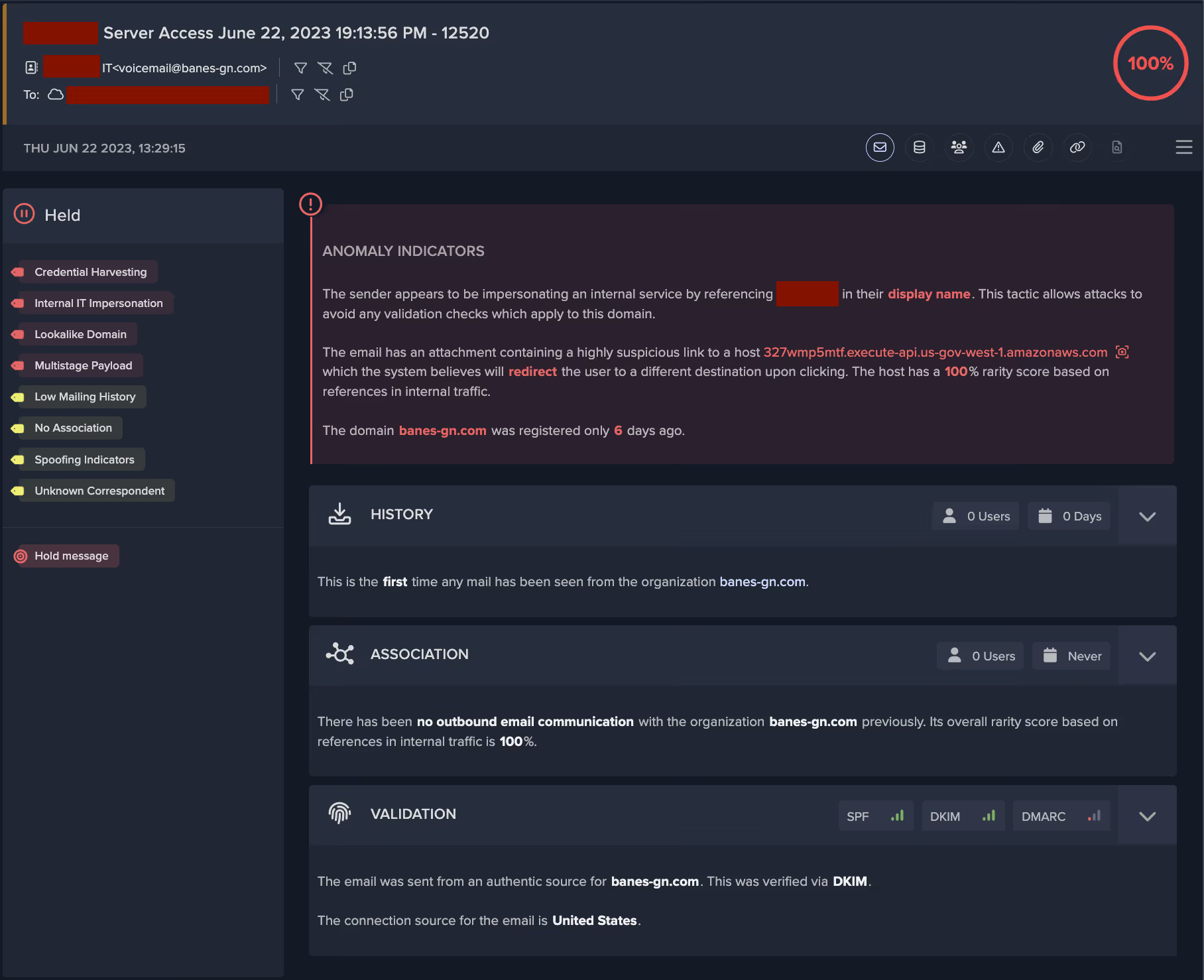
Darktrace/Email UI
Figure 1: Email log overview page, displaying important information clearly and concisely. 

Quishing Attack Tactics

Minimal Plain Text

Another characteristic shared by these emails was that they had little to no text included in the body of the email and they did not contain a plain text portion, as shown in Figure 2. For most normal emails sent by email clients and most automated programs, an email will contain an HTML component and a text component, in addition to any potential attachments present. All the emails had one image attachment, suggesting the bulk of the message was displayed in the image rather than the email body. This hinders textual analysis and filtering of the email for suspicious keywords and language that could reveal its phishing intent. Additionally, the emails were well-formatted and used the logo of the well-known corporation Microsoft, suggesting some level of technical ability on the part of the attackers. 
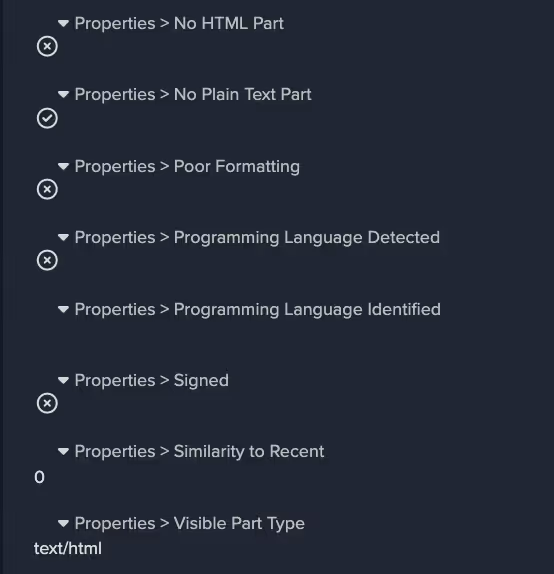
Figure 2: Email body properties giving additional insights into the content of the email. 

Attachment and link payloads

The threat actors employed some particularly innovative and novel techniques with regards to the attachments and link payloads within these emails. As previously stated, all emails contained an image attachment and one or two links. Figure 3 shows that Darktrace/Email detected that the malicious links present in these emails were located in the attachments, rather than the body of the email. This is a technique often employed by threat actors to bypass link analysis by security gateways. Darktrace/Email was also able to detect this link as a QR code link, as shown in Figure 4.
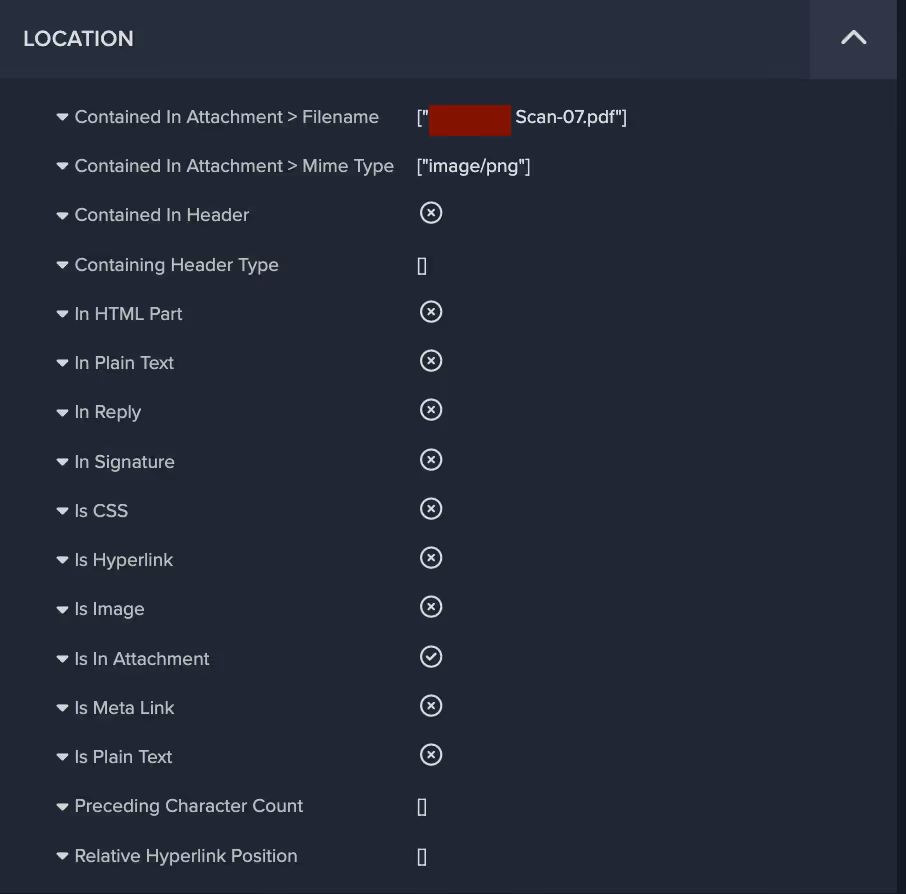
Figure 3: Further properties and metrics regarding the location of the link within the email. 
Figure 4: Darktrace / EMAIL analyzes multiple metrics and properties related to links, some of which are detailed here. 

The majority of the text, as well as the malicious payload, was contained within the image attachment, which for one of the emails looked like this: 

example of quishing email
Figure 5: Redacted screenshot of the image payload contained in one of the emails. 

Convincing Appearance

As shown, the recipient is asked to setup 2FA authentication for their account within two days if they don’t want to be locked out. The visual formatting of the image, which includes a corporate logo and Privacy Statement and Acceptable Use Policy notices, is well balanced and convincing. The payload, in this case the QR code containing a malicious link, is positioned in the centre so as to draw attention and encourage the user to scan and click. This is a type of email employees are increasingly accustomed to receiving in order to log into corporate networks and applications. Therefore, recipients of such malicious emails might assume represents expected business activity and thus engage with the QR code without questioning it, especially if the email is claiming to be from the IT department.  

Malicious Redirection

Two of the Quishing emails contained links to legitimate file storage and sharing solutions Amazon Web Services (AWS) and and InterPlanetary File System (IPFS), whose domains are less likely to be blocked by traditional security solutions. Additionally, the AWS domain link contained a redirect to a different domain that has been flagged as malicious by multiple security vendors [5]. Malicious redirection was observed in four of the five emails, initially from well-known and benign services’ domains such as bing[.]com and login[.]microsoftonline[.]com. This technique allows attackers to hide the real destination of the link from the user and increase the likelihood that the link is clicked. In two of the emails, the redirect domain had only recently been registered, and in one case, the redirect domain observed was hosted on the new .zip top level domain (i.e., docusafe[.]zip). The domain name suggests it is attempting to masquerade as a compressed file containing important documentation. As seen in Figure 6, a new Darktrace/Email feature allows customers to safely view the final destination of the link, which in this case was a seemingly fake Microsoft login page which could be used to harvest corporate credentials.

Figure 6: Safe preview available from the Darktrace/Email Console showing the destination webpage of one of the redirect links observed.

Gathering Account Credentials

Given the nature of the landing page, it is highly likely that this phishing campaign had the objective of stealing the recipients’ credentials, as further indicated by the presence of the recipients’ email addresses in the links. Additionally, these emails were sent to senior employees, likely in an attempt to gather high value credentials to use in future attacks against the company. Had they succeeded, this would have represented a serious security incident, especially considering that 61% of attacks in 2023 involved stolen or hacked credentials according to Verizon’s 2023 data breach investigations report [6]. However, these emails received the highest possible anomaly score (100%) and were held by Darktrace/Email, thus ensuring that their intended recipients were never exposed to them. 

Looking at the indicators of compromise (IoCs) identified in this campaign, it appears that several of the IPs associated with the link payloads have been involved in previous phishing campaigns. Exploring the relations tab for these IPs in Virus Total, some of the communicating files appear to be .eml files and others have generic filenames including strings such as “invoice” “remittance details” “statement” “voice memo”, suggesting they have been involved in other phishing campaigns seemingly related to payment solicitation and other fraud attempts.
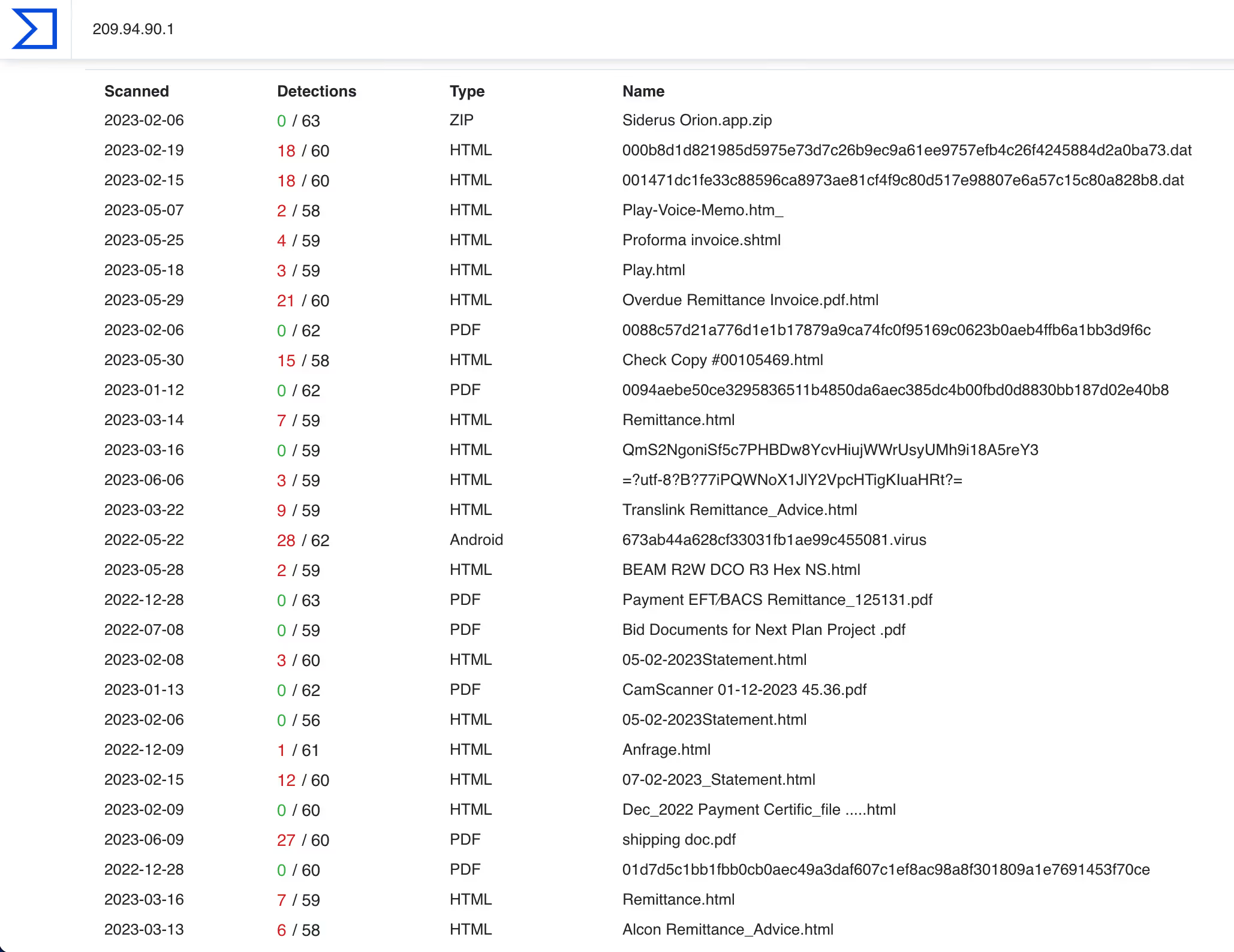
Figure 7: Virus Total’s relations tab for the IP 209.94.90[.]1 showing files communicating with the IP. 

Conclusion

Even though the authors of this Quishing campaign used all the tricks in the book to ensure that their emails would arrive unactioned by security tools to the targeted high value recipients’ inboxes, Darktrace/Email was able to immediately recognize the phishing attempts for what they were and block the emails from reaching their destination. 

This campaign used both classic and novel tactics, techniques, and procedures, but ultimately were detected and thwarted by Darktrace/Email. It is yet another example of the increasing attack sophistication mentioned in a previous Darktrace blog [7], wherein the attack landscape is moving from low-sophistication, low-impact, and generic phishing tactics to more targeted, sophisticated and higher impact attacks. Darktrace/Email does not rely on historical data nor known-bad lists and is best positioned to protect organizations from these highly targeted and sophisticated attacks.

References

[1] https://www.infosecurity-magazine.com/opinions/qr-codes-vulnerability-cybercrimes/ 

[2] https://www.helpnetsecurity.com/2023/03/21/qr-scan-scams/ 

[3] https://www.techtarget.com/searchsecurity/feature/Quishing-on-the-rise-How-to-prevent-QR-code-phishing 

[4] https://businessplus.ie/tech/qr-code-phishing-hp/ 

[5] https://www.virustotal.com/gui/domain/fistulacure.com

[6] https://www.verizon.com/business/en-gb/resources/reports/dbir/ ; https://www.verizon.com/business/en-gb/resources/reports/dbir/

[7] https://darktrace.com/blog/shifting-email-conversation 

Darktrace Model Detections 

Association models

No Sender or Content Association

New Sender

Unknown Sender

Low Sender Association

Link models

Focused Link to File Storage

Focused Rare Classified Links

New Unknown Hidden Redirect

High Risk Link + Low Sender Association

Watched Link Type

High Classified Link

File Storage From New

Hidden Link To File Storage

New Correspondent Classified Link

New Unknown Redirect

Rare Hidden Classified Link

Rare Hidden Link

Link To File Storage

Link To File Storage and Unknown Sender

Open Redirect

Unknown Sender Isolated Rare Link

Visually Prominent Link

Visually Prominent Link Unexpected For Sender

Low Link Association

Low Link Association and Unknown Sender

Spoof models

Fake Support Style

External Domain Similarities

Basic Known Entity Similarities

Unusual models

Urgent Request Banner

Urgent Request Banner + Basic Suspicious Sender

Very Young Header Domain

Young Header Domain

Unknown User Tracking

Unrelated Personal Name Address

Unrelated Personal Name Address + Freemail

Unusual Header TLD

Unusual Connection From Unknown

Unbroken Personal

Proximity models

Spam + Unknown Sender

Spam

Spam models

Unlikely Freemail Correspondence

Unlikely Freemail Personalization

General Indicators models

Incoming Mail Security Warning Message

Darktrace Model Tags

Credential Harvesting

Internal IT Impersonation

Multistage payload

Lookalike Domain

Phishing Link

Email Account Takeover

Fake Account Alert

Low Mailing History

No Association

Spoofing Indicators

Unknown Correspondent

VIP

Freemail

IoC - Type - Description & Confidence

fistulacure[.]com

domain

C2 Infrastructure

docusafe[.]zip

domain

Possible C2 Infrastructure

mwmailtec[.]com

domain

Possible C2 Infrastructure

czeromedia[.]com

domain

Possible C2 Infrastructure

192.40.165[.]109

IP address

Probable C2 Infrastructure

209.94.90[.]1

IP address

C2 Infrastructure

52.61.107[.]58

IP address

Possible C2 Infrastructure

40.126.32[.]133

IP address

Possible C2 Infrastructure

211.63.158[.]157

IP address

Possible C2 Infrastructure

119.9.27[.]129

IP address

Possible C2 Infrastructure

184.25.204[.]33

IP address

Possible C2 Infrastructure

40.107.8[.]107

IP address

Probable C2 Infrastructure

40.107.212[.]111

IP address

Possible Infrastructure

27.86.113[.]2

IP address

Possible C2 Infrastructure

192.40.191[.]19

IP address

Possible C2 Infrastructure

157.205.202[.]217

IP address

Possible C2 Infrastructure

a31f1f6063409ecebe8893e36d0048557142cbf13dbaf81af42bf14c43b12a48

SHA256 hash

Possible Malicious File

4c4fb35ab6445bf3749b9d0ab1b04f492f2bc651acb1bbf7af5f0a47502674c9

SHA256 hash

Possible Malicious File

f9c51d270091c34792b17391017a09724d9a7890737e00700dc36babeb97e252

SHA256 hash

Possible Malicious File

9f8ccfd616a8f73c69d25fd348b874d11a036b4d2b3fc7dbb99c1d6fa7413d9a

SHA256 hash

Possible Malicious File

b748894348c32d1dc5702085d70d846c6dd573296e79754df4857921e707c439

SHA256 hash

Possible Malicious File

Inside the SOC
Darktrace cyber analysts are world-class experts in threat intelligence, threat hunting and incident response, and provide 24/7 SOC support to thousands of Darktrace customers around the globe. Inside the SOC is exclusively authored by these experts, providing analysis of cyber incidents and threat trends, based on real-world experience in the field.
Written by
Alexandra Sentenac
Cyber Analyst

More in this series

No items found.

Blog

/

Endpoint

/

January 30, 2026

ClearFake: From Fake CAPTCHAs to Blockchain-Driven Payload Retrieval

fake captcha to blockchain driven palyload retrievalDefault blog imageDefault blog image

What is ClearFake?

As threat actors evolve their techniques to exploit victims and breach target networks, the ClearFake campaign has emerged as a significant illustration of this continued adaptation. ClearFake is a campaign observed using a malicious JavaScript framework deployed on compromised websites, impacting sectors such as e‑commerce, travel, and automotive. First identified in mid‑2023, ClearFake is frequently leveraged to socially engineer victims into installing fake web browser updates.

In ClearFake compromises, victims are steered toward compromised WordPress sites, often positioned by attackers through search engine optimization (SEO) poisoning. Once on the site, users are presented with a fake CAPTCHA. This counterfeit challenge is designed to appear legitimate while enabling the execution of malicious code. When a victim interacts with the CAPTCHA, a PowerShell command containing a download string is retrieved and executed.

Attackers commonly abuse the legitimate Microsoft HTML Application Host (MSHTA) in these operations. Recent campaigns have also incorporated Smart Chain endpoints, such as “bsc-dataseed.binance[.]org,” to obtain configuration code. The primary payload delivered through ClearFake is typically an information stealer, such as Lumma Stealer, enabling credential theft, data exfiltration, and persistent access [1].

Darktrace’s Coverage of ClearFake

Darktrace / ENDPOINT first detected activity likely associated with ClearFake on a single device on over the course of one day on November 18, 2025. The system observed the execution of “mshta.exe,” the legitimate Microsoft HTML Application Host utility. It also noted a repeated process command referencing “weiss.neighb0rrol1[.]ru”, indicating suspicious external activity. Subsequent analysis of this endpoint using open‑source intelligence (OSINT) indicated that it was a malicious, domain generation algorithm (DGA) endpoint [2].

The process line referencing weiss.neighb0rrol1[.]ru, as observed by Darktrace / ENDPOINT.
Figure 1: The process line referencing weiss.neighb0rrol1[.]ru, as observed by Darktrace / ENDPOINT.

This activity indicates that mshta.exe was used to contact a remote server, “weiss.neighb0rrol1[.]ru/rpxacc64mshta,” and execute the associated HTA file to initiate the next stage of the attack. OSINT sources have since heavily flagged this server as potentially malicious [3].

The first argument in this process uses the MSHTA utility to execute the HTA file hosted on the remote server. If successful, MSHTA would then run JavaScript or VBScript to launch PowerShell commands used to retrieve malicious payloads, a technique observed in previous ClearFake campaigns. Darktrace also detected unusual activity involving additional Microsoft executables, including “winlogon.exe,” “userinit.exe,” and “explorer.exe.” Although these binaries are legitimate components of the Windows operating system, threat actors can abuse their normal behavior within the Windows login sequence to gain control over user sessions, similar to the misuse of mshta.exe.

EtherHiding cover

Darktrace also identified additional ClearFake‑related activity, specifically a connection to bsc-testnet.drpc[.]org, a legitimate BNB Smart Chain endpoint. This activity was triggered by injected JavaScript on the compromised site www.allstarsuae[.]com, where the script initiated an eth_call POST request to the Smart Chain endpoint.

Example of a fake CAPTCHA on the compromised site www.allstarsuae[.]com.
Figure 2: Example of a fake CAPTCHA on the compromised site www.allstarsuae[.]com.

EtherHiding is a technique in which threat actors leverage blockchain technology, specifically smart contracts, as part of their malicious infrastructure. Because blockchain is anonymous, decentralized, and highly persistent, it provides threat actors with advantages in evading defensive measures and traditional tracking [4].

In this case, when a user visits a compromised WordPress site, injected base64‑encoded JavaScript retrieved an ABI string, which was then used to load and execute a contract hosted on the BNB Smart Chain.

JavaScript hosted on the compromised site www.allstaruae[.]com.
Figure 3: JavaScript hosted on the compromised site www.allstaruae[.]com.

Conducting malware analysis on this instance, the Base64 decoded into a JavaScript loader. A POST request to bsc-testnet.drpc[.]org was then used to retrieve a hex‑encoded ABI string that loads and executes the contract. The JavaScript also contained hex and Base64‑encoded functions that decoded into additional JavaScript, which attempted to retrieve a payload hosted on GitHub at “github[.]com/PrivateC0de/obf/main/payload.txt.” However, this payload was unavailable at the time of analysis.

Darktrace’s detection of the POST request to bsc-testnet.drpc[.]org.
Figure 4: Darktrace’s detection of the POST request to bsc-testnet.drpc[.]org.
Figure 5: Darktrace’s detection of the executable file and the malicious hostname.

Autonomous Response

As Darktrace’s Autonomous Response capability was enabled on this customer’s network, Darktrace was able to take swift mitigative action to contain the ClearFake‑related activity early, before it could lead to potential payload delivery. The affected device was blocked from making external connections to a number of suspicious endpoints, including 188.114.96[.]6, *.neighb0rrol1[.]ru, and neighb0rrol1[.]ru, ensuring that no further malicious connections could be made and no payloads could be retrieved.

Autonomous Response also acted to prevent the executable mshta.exe from initiating HTA file execution over HTTPS from this endpoint by blocking the attempted connections. Had these files executed successfully, the attack would likely have resulted in the retrieval of an information stealer, such as Lumma Stealer.

Autonomous Response’s intervention against the suspicious connectivity observed.
Figure 6: Autonomous Response’s intervention against the suspicious connectivity observed.

Conclusion

ClearFake continues to be observed across multiple sectors, but Darktrace remains well‑positioned to counter such threats. Because ClearFake’s end goal is often to deliver malware such as information stealers and malware loaders, early disruption is critical to preventing compromise. Users should remain aware of this activity and vigilant regarding fake CAPTCHA pop‑ups. They should also monitor unusual usage of MSHTA and outbound connections to domains that mimic formats such as “bsc-dataseed.binance[.]org” [1].

In this case, Darktrace was able to contain the attack before it could successfully escalate and execute. The attempted execution of HTA files was detected early, allowing Autonomous Response to intervene, stopping the activity from progressing. As soon as the device began communicating with weiss.neighb0rrol1[.]ru, an Autonomous Response inhibitor triggered and interrupted the connections.

As ClearFake continues to rise, users should stay alert to social engineering techniques, including ClickFix, that rely on deceptive security prompts.

Credit to Vivek Rajan (Senior Cyber Analyst) and Tara Gould (Malware Research Lead)

Edited by Ryan Traill (Analyst Content Lead)

Appendices

Darktrace Model Detections

Process / New Executable Launched

Endpoint / Anomalous Use of Scripting Process

Endpoint / New Suspicious Executable Launched

Endpoint / Process Connection::Unusual Connection from New Process

Autonomous Response Models

Antigena / Network::Significant Anomaly::Antigena Significant Anomaly from Client Block

List of Indicators of Compromise (IoCs)

  • weiss.neighb0rrol1[.]ru – URL - Malicious Domain
  • 188.114.96[.]6 – IP – Suspicious Domain
  • *.neighb0rrol1[.]ru – URL – Malicious Domain

MITRE Tactics

Initial Access, Drive-by Compromise, T1189

User Execution, Execution, T1204

Software Deployment Tools, Execution and Lateral Movement, T1072

Command and Scripting Interpreter, T1059

System Binary Proxy Execution: MSHTA, T1218.005

References

1.        https://www.kroll.com/en/publications/cyber/rapid-evolution-of-clearfake-delivery

2.        https://www.virustotal.com/gui/domain/weiss.neighb0rrol1.ru

3.        https://www.virustotal.com/gui/file/1f1aabe87e5e93a8fff769bf3614dd559c51c80fc045e11868f3843d9a004d1e/community

4.        https://www.packetlabs.net/posts/etherhiding-a-new-tactic-for-hiding-malware-on-the-blockchain/

Continue reading
About the author
Vivek Rajan
Cyber Analyst

Blog

/

Network

/

January 30, 2026

The State of Cybersecurity in the Finance Sector: Six Trends to Watch

Default blog imageDefault blog image

The evolving cybersecurity threat landscape in finance

The financial sector, encompassing commercial banks, credit unions, financial services providers, and cryptocurrency platforms, faces an increasingly complex and aggressive cyber threat landscape. The financial sector’s reliance on digital infrastructure and its role in managing high-value transactions make it a prime target for both financially motivated and state-sponsored threat actors.

Darktrace’s latest threat research, The State of Cybersecurity in the Finance Sector, draws on a combination of Darktrace telemetry data from real-world customer environments, open-source intelligence, and direct interviews with financial-sector CISOs to provide perspective on how attacks are unfolding and how defenders in the sector need to adapt.  

Six cybersecurity trends in the finance sector for 2026

1. Credential-driven attacks are surging

Phishing continues to be a leading initial access vector for attacks targeting confidentiality. Financial institutions are frequently targeted with phishing emails designed to harvest login credentials. Techniques including Adversary-in-The-Middle (AiTM) to bypass Multi-factor Authentication (MFA) and QR code phishing (“quishing”) are surging and are capable of fooling even trained users. In the first half of 2025, Darktrace observed 2.4 million phishing emails within financial sector customer deployments, with almost 30% targeted towards VIP users.  

2. Data Loss Prevention is an increasing challenge

Compliance issues – particularly data loss prevention -- remain a persistent risk. In October 2025 alone, Darktrace observed over 214,000 emails across financial sector customers that contained unfamiliar attachments and were sent to suspected personal email addresses highlighting clear concerns around data loss prevention. Across the same set of customers within the same time frame, more than 351,000 emails containing unfamiliar attachments were sent to freemail addresses (e.g. gmail, yahoo, icloud), highlighting clear concerns around DLP.  

Confidentiality remains a primary concern for financial institutions as attackers increasingly target sensitive customer data, financial records, and internal communications.  

3. Ransomware is evolving toward data theft and extortion

Ransomware is no longer just about locking systems, it’s about stealing data first and encrypting second. Groups such as Cl0p and RansomHub now prioritize exploiting trusted file-transfer platforms to exfiltrate sensitive data before encryption, maximizing regulatory and reputational fallout for victims.  

Darktrace’s threat research identified routine scanning and malicious activity targeting internet-facing file-transfer systems used heavily by financial institutions. In one notable case involving Fortra GoAnywhere MFT, Darktrace detected malicious exploitation behavior six days before the CVE was publicly disclosed, demonstrating how attackers often operate ahead of patch cycles

This evolution underscores a critical reality: by the time a vulnerability is disclosed publicly, it may already be actively exploited.

4. Attackers are exploiting edge devices, often pre-disclosure.  

VPNs, firewalls, and remote access gateways have become high-value targets, and attackers are increasingly exploiting them before vulnerabilities are publicly disclosed. Darktrace observed pre-CVE exploitation activity affecting edge technologies including Citrix, Palo Alto, and Ivanti, enabling session hijacking, credential harvesting, and privileged lateral movement into core banking systems.  

Once compromised, these edge devices allow adversaries to blend into trusted network traffic, bypassing traditional perimeter defenses. CISOs interviewed for the report repeatedly described VPN infrastructure as a “concentrated focal point” for attackers, especially when patching and segmentation lag behind operational demands.

5. DPRK-linked activity is growing across crypto and fintech.  

State-sponsored activity, particularly from DPRK-linked groups affiliated with Lazarus, continues to intensify across cryptocurrency and fintech organizations. Darktrace identified coordinated campaigns leveraging malicious npm packages, previously undocumented BeaverTail and InvisibleFerret malware, and exploitation of React2Shell (CVE-2025-55182) for credential theft and persistent backdoor access.  

Targeting was observed across the United Kingdom, Spain, Portugal, Sweden, Chile, Nigeria, Kenya, and Qatar, highlighting the global scope of these operations.  

6. Cloud complexity and AI governance gaps are now systemic risks.  

Finally, CISOs consistently pointed to cloud complexity, insider risk from new hires, and ungoverned AI usage exposing sensitive data as systemic challenges. Leaders emphasized difficulty maintaining visibility across multi-cloud environments while managing sensitive data exposure through emerging AI tools.  

Rapid AI adoption without clear guardrails has introduced new confidentiality and compliance risks, turning governance into a board-level concern rather than a purely technical one.

Building cyber resilience in a shifting threat landscape

The financial sector remains a prime target for both financially motivated and state-sponsored adversaries. What this research makes clear is that yesterday’s security assumptions no longer hold. Identity attacks, pre-disclosure exploitation, and data-first ransomware require adaptive, behavior-based defenses that can detect threats as they emerge, often ahead of public disclosure.

As financial institutions continue to digitize, resilience will depend on visibility across identity, edge, cloud, and data, combined with AI-driven defense that learns at machine speed.  

Learn more about the threats facing the finance sector, and what your organization can do to keep up in The State of Cybersecurity in the Finance Sector report here.  

Acknowledgements:

The State of Cybersecurity in the Finance sector report was authored by Calum Hall, Hugh Turnbull, Parvatha Ananthakannan, Tiana Kelly, and Vivek Rajan, with contributions from Emma Foulger, Nicole Wong, Ryan Traill, Tara Gould, and the Darktrace Threat Research and Incident Management teams.

[related-resource]  

Continue reading
About the author
Nathaniel Jones
VP, Security & AI Strategy, Field CISO
Your data. Our AI.
Elevate your network security with Darktrace AI