Blog
/
Email
/
August 11, 2021

How One Email Compromised an Entire Logistics Company

A single phishing email led to a massive compromise at a logistics company in Europe. Discover the importance of email security with increasing SaaS usage.
No items found.
Inside the SOC
Darktrace cyber analysts are world-class experts in threat intelligence, threat hunting and incident response, and provide 24/7 SOC support to thousands of Darktrace customers around the globe. Inside the SOC is exclusively authored by these experts, providing analysis of cyber incidents and threat trends, based on real-world experience in the field.
No items found.
Default blog imageDefault blog imageDefault blog imageDefault blog imageDefault blog imageDefault blog image
11
Aug 2021

Organizations are only as secure as their weakest link. In many cases, that weak link arises in the various cloud applications an organization relies on. Several high-profile groups including APT28 are known to exploit commonly-used passwords to bruteforce their way into businesses around the world. These ‘spray’ campaigns often target Microsoft Office 365 accounts and will only become more frequent as the use of SaaS increases.

This blog analyses how a single phishing email slipped under the radar of the gateway and other traditional tools in place, and eventually led to mass compromise at a logistics company in Europe.

Logistical nightmare

Logistics operators play a critical role across every industry sector. Managing the distribution of goods and services from the seller to the customer, they enable – or bottleneck – an efficient supply chain. Inevitably, logistics companies have become an attractive target for cyber-criminals, due to the high number of organizations they interact with, the pressure they’re under to deliver on time, and the sensitive data they often handle.

It is a simple equation for attackers: do they put in the hard work to infiltrate 20 well-defended organizations, or compromise just one, and from there gain access to all 20 or more? The majority of cyber-threats Darktrace has observed this year have gone for the latter – exploiting less protected third parties to gain a foothold across a range of businesses.

The vaccine supply in particular has fallen under attack, numerous times. Last autumn, threat actors infiltrated a German biomedical organization and launched a phishing campaign to harvest credentials and compromise several organizations involved in the COVID-19 cold chain.

Alongside ransomware, phishing attacks are one of the most pressing concerns facing the industry.

Breaking the chain

At a medium-sized logistics company, a user received one phishing email from a hijacked third party. The email came from a trusted source with a well established history of sending emails, so it easily passed the gateway.

Once the phishing email had reached the inbox, the user clicked on the malicious link and was led to a fake login page, where they were tricked into divulging their credentials.

Four days later, the attacker logged into the account from an unusual location, and proceeded to read files with sensitive information.

The next day, Darktrace detected a new email rule from another unusual location. Almost immediately, a large volume of outbound emails was sent from the account, all containing the suspicious link.

Figure 1: Timeline of the attack — the total dwell time was five days.

Supply and disrupt

Once you are inside an organization’s digital ecosystem, it is easy to move around and compromise more accounts. Most security tools and employees do not question an internal email sent by a trusted user, especially if the user is a senior figure with authority.

So, after this set of outbound emails, unusual activity from anomalous locations was duly seen on other company accounts. These users had been tricked into giving away their details from the emails supposedly sent by their colleague.

More sensitive customer files were read, followed by a second spike in outbound emails from these hijacked accounts.

This time, the emails were sent not internally, but to external contacts. The contacts likely were conducting business with the logistics company at the time, and so were used to receiving emails from the accounts.

In total, over 450 phishing emails were sent to a wide range of third parties. Many of these third parties in turn had their credentials compromised – repeating the cycle once again.

Figure 2: Cyber AI Analyst investigates the suspicious activity of a compromised user, providing a detailed summary with the unusual login location and actions carried out.

Hanging by a thread: The threat of third-party attacks

The source of the initial phishing email that kickstarted this attack was itself from a legitimate third party known to the customer, where presumably the same thing had occured.

This form of Vendor Email Compromise, which can be rinsed and repeated to form a vicious loop, is notoriously difficult for email security solutions to detect, and can lead to heavy reputational and financial damage. To complicate matters, acting against a suspicious email from a known sender can also cause severe business disruption if it turns out to be legitimate.

Because of this, security must move beyond the binary approach of ‘good’ and ‘bad’, towards a more holistic understanding of the contextual setting surrounding any email interaction.

Darktrace accurately detected the multiple anomalies when comparing it to other emails from senders of the same domain. It sent high-priority alerts to the security team, but could not prevent the email from reaching the inbox because it was only in detection mode.

Figure 3: Darktrace’s automatic summary of the initial phishing email gives an overview of the suspicious aspects of the email.

The phishing links during the attack used a third-party tool called Piktochart, designed to create various type of files such as infographics, charts, and forms. While Piktochart has several legitimate applications, it can also be exploited. Gateways thus have a hard time distinguishing between legitimate and malicious Piktochart links. In this case, the gateway rewrote the initial link for analysis, but did not identify it as malicious.

In comparison, Darktrace for Email easily identified the email to be suspicious because it noticed it was out of character for that particular sender, and because the link itself was suspicious. In active mode, the AI would have locked the link and moved the email to the Junk folder, effectively preventing the very first step of the attack and avoiding any further compromise.
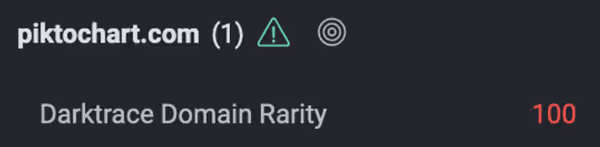
Figure 4: Piktochart was rarely seen on the deployment up until this point – the domain was 100% rare. Darktrace therefore easily detected the anomalous nature of this third-party tool usage.

The butterfly effect

Most cyber-attacks begin with just a single point of entry – that is all an attacker requires. One phishing email can be enough to bring a whole supply chain to its knees. With 94% of cyber-attacks beginning in the inbox, and suppliers and vendors in constant communication over multiple SaaS platforms – including Microsoft Teams and Google Cloud – email security tools must be capable of detecting when a trusted third party is acting abnormally.

Especially with the rise of remote working, SaaS usage has surged in businesses worldwide and many have been forced to turn to cloud and SaaS to enable a flexible workforce. While there are obvious benefits, these additions have expanded the attack surface and stretched the limits of traditional security and human security teams.

When it comes to logistics companies – who often act as the middle man in global operations – credential harvesting not only has serious consequences for the customer, but for anyone in the customer’s email contacts, and can lead to major breaches for numerous people and businesses.

Figure 5: Darktrace’s user interface reveals the two spikes in outbound emails that were sent out by compromised company accounts.

Thanks to Darktrace analyst Emma Foulger for her insights on the above threat find.

Learn more about the threats facing logistics providers

Darktrace model detections:

  • SaaS / Compliance / New Email Rule
  • SaaS / Unusual Login and New Email Rule
  • Antigena Email models included
  • Unusual / Unusual Login Location and New Unknown Link
  • Link / Account Hijack Link
  • Link / Outlook Hijack
  • Internal Compromise / Recipient Surge from Unusual Login Location (outbound emails)
  • Internal Compromise / Recipient Surge with Suspicious Content (outbound emails)

No items found.
Inside the SOC
Darktrace cyber analysts are world-class experts in threat intelligence, threat hunting and incident response, and provide 24/7 SOC support to thousands of Darktrace customers around the globe. Inside the SOC is exclusively authored by these experts, providing analysis of cyber incidents and threat trends, based on real-world experience in the field.
No items found.

More in this series

No items found.

Blog

/

Network

/

February 3, 2026

Darktrace Malware Analysis: Unpacking SnappyBee

darktace malware analysis snappybeeDefault blog imageDefault blog image

Introduction

The aim of this blog is to be an educational resource, documenting how an analyst can perform malware analysis techniques such as unpacking. This blog will demonstrate the malware analysis process against well-known malware, in this case SnappyBee.

SnappyBee (also known as Deed RAT) is a modular backdoor that has been previously attributed to China-linked cyber espionage group Salt Typhoon, also known as Earth Estries [1] [2]. The malware was first publicly documented by TrendMicro in November 2024 as part of their investigation into long running campaigns targeting various industries and governments by China-linked threat groups.

In these campaigns, SnappyBee is deployed post-compromise, after the attacker has already obtained access to a customer's system, and is used to establish long-term persistence as well as deploying further malware such as Cobalt Strike and the Demodex rootkit.

To decrease the chance of detection, SnappyBee uses a custom packing routine. Packing is a common technique used by malware to obscure its true payload by hiding it and then stealthily loading and executing it at runtime. This hinders analysis and helps the malware evade detection, especially during static analysis by both human analysts and anti-malware services.

This blog is a practical guide on how an analyst can unpack and analyze SnappyBee, while also learning the necessary skills to triage other malware samples from advanced threat groups.

First principles

Packing is not a new technique, and threat actors have generally converged on a standard approach. Packed binaries typically feature two main components: the packed data and an unpacking stub, also called a loader, to unpack and run the data.

Typically, malware developers insert a large blob of unreadable data inside an executable, such as in the .rodata section. This data blob is the true payload of the malware, but it has been put through a process such as encryption, compression, or another form of manipulation to render it unreadable. Sometimes, this data blob is instead shipped in a different file, such as a .dat file, or a fake image. When this happens, the main loader has to read this using a syscall, which can be useful for analysis as syscalls can be easily identified, even in heavily obfuscated binaries.

In the main executable, malware developers will typically include an unpacking stub that takes the data blob, performs one or more operations on it, and then triggers its execution. In most samples, the decoded payload data is loaded into a newly allocated memory region, which will then be marked as executable and executed. In other cases, the decoded data is instead dropped into a new executable on disk and run, but this is less common as it increases the likelihood of detection.

Finding the unpacking routine

The first stage of analysis is uncovering the unpacking routine so it can be reverse engineered. There are several ways to approach this, but it is traditionally first triaged via static analysis on the initial stages available to the analyst.

SnappyBee consists of two components that can be analyzed:

  • A Dynamic-link Library (DLL) that acts as a loader, responsible for unpacking the malicious code
  • A data file shipped alongside the DLL, which contains the encrypted malicious code

Additionally, SnappyBee includes a legitimate signed executable that is vulnerable to DLL side-loading. This means that when the executable is run, it will inadvertently load SnappyBee’s DLL instead of the legitimate one it expects. This allows SnappyBee to appear more legitimate to antivirus solutions.

The first stage of analysis is performing static analysis of the DLL. This can be done by opening the DLL within a disassembler such as IDA Pro. Upon opening the DLL, IDA will display the DllMain function, which is the malware’s initial entry point and the first code executed when the DLL is loaded.

The DllMain function
Figure 1: The DllMain function

First, the function checks if the variable fdwReason is set to 1, and exits if it is not. This variable is set by Windows to indicate why the DLL was loaded. According to Microsoft Developer Network (MSDN), a value of 1 corresponds to DLL_PROCESS_ATTACH, meaning “The DLL is being loaded into the virtual address space of the current process as a result of the process starting up or as a result of a call to LoadLibrary” [3]. Since SnappyBee is known to use DLL sideloading for execution, DLL_PROCESS_ATTACH is the expected value when the legitimate executable loads the malicious DLL.

SnappyBee then uses the GetModule and GetProcAddress to dynamically resolve the address of the VirtualProtect in kernel32 and StartServiceCtrlDispatcherW in advapi32. Resolving these dynamically at runtime prevents them from showing up as a static import for the module, which can help evade detection by anti-malware solutions. Different regions of memory have different permissions to control what they can be used for, with the main ones being read, write, and execute. VirtualProtect is a function that changes the permissions of a given memory region.

SnappyBee then uses VirtualProtect to set the memory region containing the code for the StartServiceCtrlDispatcherW function as writable. It then inserts a jump instruction at the start of this function, redirecting the control flow to one of the SnappyBee DLL’s other functions, and then restores the old permissions.

In practice, this means when the legitimate executable calls StartServiceCtrlDispatcherW, it will immediately hand execution back to SnappyBee. Meanwhile, the call stack now appears more legitimate to outside observers such as antimalware solutions.

The hooked-in function then reads the data file that is shipped with SnappyBee and loads it into a new memory allocation. This pattern of loading the file into memory likely means it is responsible for unpacking the next stage.

The start of the unpacking routine that reads in dbindex.dat.
Figure 2: The start of the unpacking routine that reads in dbindex.dat.

SnappyBee then proceeds to decrypt the memory allocation and execute the code.

The memory decryption routine.
Figure 3: The memory decryption routine.

This section may look complex, however it is fairly straight forward. Firstly, it uses memset to zero out a stack variable, which will be used to store the decryption key. It then uses the first 16 bytes of the data file as a decryption key to initialize the context from.

SnappyBee then calls the mbed_tls_arc4_crypt function, which is a function from the mbedtls library. Documentation for this function can be found online and can be referenced to better understand what each of the arguments mean [4].

The documentation for mbedtls_arc4_crypt.
Figure 4: The documentation for mbedtls_arc4_ crypt.

Comparing the decompilation with the documentation, the arguments SnappyBee passes to the function can be decoded as:

  • The context derived from 16-byte key at the start of the data is passed in as the context in the first parameter
  • The file size minus 16 bytes (to account for the key at the start of the file) is the length of the data to be decrypted
  • A pointer to the file contents in memory, plus 16 bytes to skip the key, is used as the input
  • A pointer to a new memory allocation obtained from VirtualAlloc is used as the output

So, putting it all together, it can be concluded that SnappyBee uses the first 16 bytes as the key to decrypt the data that follows , writing the output into the allocated memory region.

SnappyBee then calls VirtualProtect to set the decrypted memory region as Read + Execute, and subsequently executes the code at the memory pointer. This is clearly where the unpacked code containing the next stage will be placed.

Unpacking the malware

Understanding how the unpacking routine works is the first step. The next step is obtaining the actual code, which cannot be achieved through static analysis alone.

There are two viable methods to retrieve the next stage. The first method is implementing the unpacking routine from scratch in a language like Python and running it against the data file.

This is straightforward in this case, as the unpacking routine in relatively simple and would not require much effort to re-implement. However, many unpacking routines are far more complex, which leads to the second method: allowing the malware to unpack itself by debugging it and then capturing the result. This is the approach many analysts take to unpacking, and the following will document this method to unpack SnappyBee.

As SnappyBee is 32-bit Windows malware, debugging can be performed using x86dbg in a Windows sandbox environment to debug SnappyBee. It is essential this sandbox is configured correctly, because any mistake during debugging could result in executing malicious code, which could have serious consequences.

Before debugging, it is necessary to disable the DYNAMIC_BASE flag on the DLL using a tool such as setdllcharacteristics. This will stop ASLR from randomizing the memory addresses each time the malware runs and ensures that it matches the addresses observed during static analysis.

The first place to set a breakpoint is DllMain, as this is the start of the malicious code and the logical place to pause before proceeding. Using IDA, the functions address can be determined; in this case, it is at offset 10002DB0. This can be used in the Goto (CTRL+G) dialog to jump to the offset and place a breakpoint. Note that the “Run to user code” button may need to be pressed if the DLL has not yet been loaded by x32dbg, as it spawns a small process to load the DLL as DLLs cannot be executed directly.

The program can then run until the breakpoint, at which point the program will pause and code recognizable from static analysis can be observed.

Figure 5: The x32dbg dissassembly listing forDllMain.

In the previous section, this function was noted as responsible for setting up a hook, and in the disassembly listing the hook address can be seen being loaded at offset 10002E1C. It is not necessary to go through the whole hooking process, because only the function that gets hooked in needs to be run. This function will not be naturally invoked as the DLL is being loaded directly rather than via sideloading as it expects. To work around this, the Extended Instruction Pointer (EIP) register can be manipulated to point to the start of the hook function instead, which will cause it to run instead of the DllMain function.

To update EIP, the CRTL+G dialog can again be used to jump to the hook function address (10002B50), and then the EIP register can be set to this address by right clicking the first instruction and selecting “Set EIP here”. This will make the hook function code run next.

Figure 6: The start of the hookedin-in function

Once in this function, there are a few addresses where breakpoints should be set in order to inspect the state of the program at critical points in the unpacking process. These are:

-              10002C93, which allocates the memory for the data file and final code

-              10002D2D, which decrypts the memory

-              10002D81, which runs the unpacked code

Setting these can be done by pressing the dot next to the instruction listing, or via the CTRL+G Goto menu.

At the first breakpoint, the call to VirtualAlloc will be executed. The function returns the memory address of the created memory region, which is stored in the EAX register. In this case, the region was allocated at address 00700000.

Figure 7: The result of the VirtualAlloc call.

It is possible to right click the address and press “Follow in dump” to pin the contents of the memory to the lower pane, which makes it easy to monitor the region as the unpacking process continues.

Figure 8: The allocated memory region shown in x32dbg’s dump.

Single-stepping through the application from this point eventually reaches the call to ReadFile, which loads the file into the memory region.

Figure 9: The allocated memory region after the file is read into it, showing high entropy data.

The program can then be allowed to run until the next breakpoint, which after single-stepping will execute the call to mbedtls_arc4_crypt to decrypt the memory. At this point, the data in the dump will have changed.

Figure 10: The same memory region after the decryption is run, showing lower entropy data.

Right-clicking in the dump and selecting "Disassembly” will disassemble the data. This yields valid shell code, indicating that the unpacking succeeded, whereas corrupt or random data would be expected if the unpacking had failed.

Figure 11: The disassembly view of the allocated memory.

Right-clicking and selecting “Follow in memory map” will show the memory allocation under the memory map view. Right-clicking this then provides an option to dump the entire memory block to file.

Figure 12: Saving the allocated memory region.

This dump can then be opened in IDA, enabling further static analysis of the shellcode. Reviewing the shellcode, it becomes clear that it performs another layer of unpacking.

As the debugger is already running, the sample can be allowed to execute up to the final breakpoint that was set on the call to the unpacked shellcode. Stepping into this call will then allow debugging of the new shellcode.

The simplest way to proceed is to single-step through the code, pausing on each call instruction to consider its purpose. Eventually, a call instruction that points to one of the memory regions that were assigned will be reached, which will contain the next layer of unpacked code. Using the same disassembly technique as before, it can be confirmed that this is more unpacked shellcode.

Figure 13: The unpacked shellcode’s call to RDI, which points to more unpacked shellcode. Note this screenshot depicts the 64-bit variant of SnappyBee instead of 32-bit, however the theory is the same.

Once again, this can be dumped out and analyzed further in IDA. In this case, it is the final payload used by the SnappyBee malware.

Conclusion

Unpacking remains one of the most common anti-analysis techniques and is a feature of most sophisticated malware from threat groups. This technique of in-memory decryption reduces the forensic “surface area” of the malware, helping it to evade detection from anti-malware solutions. This blog walks through one such example and provides practical knowledge on how to unpack malware for deeper analysis.

In addition, this blog has detailed several other techniques used by threat actors to evade analysis, such as DLL sideloading to execute code without arising suspicion, dynamic API resolving to bypass static heuristics, and multiple nested stages to make analysis challenging.

Malware such as SnappyBee demonstrates a continued shift towards highly modular and low-friction malware toolkits that can be reused across many intrusions and campaigns. It remains vital for security teams  to maintain the ability to combat the techniques seen in these toolkits when responding to infections.

While the technical details of these techniques are primarily important to analysts, the outcomes of this work directly affect how a Security Operations Centre (SOC) operates at scale. Without the technical capability to reliably unpack and observe these samples, organizations are forced to respond without the full picture.

The techniques demonstrated here help close that gap. This enables security teams to reduce dwell time by understanding the exact mechanisms of a sample earlier, improve detection quality with behavior-based indicators rather than relying on hash-based detections, and increase confidence in response decisions when determining impact.

Credit to Nathaniel Bill (Malware Research Engineer)
Edited by Ryan Traill (Analyst Content Lead)

Indicators of Compromise (IoCs)

SnappyBee Loader 1 - 25b9fdef3061c7dfea744830774ca0e289dba7c14be85f0d4695d382763b409b

SnappyBee Loader 2 - b2b617e62353a672626c13cc7ad81b27f23f91282aad7a3a0db471d84852a9ac          

SnappyBee Payload - 1a38303fb392ccc5a88d236b4f97ed404a89c1617f34b96ed826e7bb7257e296

References

[1] https://www.trendmicro.com/en_gb/research/24/k/earth-estries.html

[2] https://www.darktrace.com/blog/salty-much-darktraces-view-on-a-recent-salt-typhoon-intrusion

[3] https://learn.microsoft.com/en-us/windows/win32/dlls/dllmain#parameters

[4] https://mbed-tls.readthedocs.io/projects/api/en/v2.28.4/api/file/arc4_8h/#_CPPv418mbedtls_arc4_cryptP20mbedtls_arc4_context6size_tPKhPh

Continue reading
About the author
Nathaniel Bill
Malware Research Engineer

Blog

/

/

February 4, 2026

The State of AI Cybersecurity 2026: Unveiling insights from over 1,500 security leaders

The State of AI Cybersecurity 2026Default blog imageDefault blog image

2025 was the year enterprise AI went mainstream. In 2026, it’s made its way into every facet of the organizational structure – transforming workflows, revolutionizing productivity, and creating new value streams. In short, it’s opened up a whole new attack surface.  

At the same time, AI has accelerated the pace of cybersecurity arms race on both sides: adversaries are innovating using the latest AI technologies at their disposal while defenders scramble to outmaneuver them and stay ahead of AI-powered threats.  

That’s why Darktrace publishes this research every year. The State of AI Cybersecurity 2026 provides an annual snapshot of how the AI threat landscape is shifting, where organizations are adopting AI to maximum advantage, and how they are securing AI in the enterprise.

What is the State of AI Cybersecurity 2026?

We surveyed over 1,500 CISOs, IT leaders, administrators, and practitioners from a range of industries and different countries to uncover their attitudes, understanding, and priorities when it comes to AI threats, agents, tools, and operations in 2026. ​

The results show a fast-changing picture, as security leaders race to navigate the challenges and opportunities at play. Since last year, there has been enormous progress towards maturity in areas like AI literacy and confidence in AI-powered defense, while issues around AI governance remain inconclusive.

Let’s look at some of the key findings for 2026.

What’s the impact of AI on the attack surface?

Security leaders are seeing the adoption of AI agents across the workforce, and are increasingly concerned about the security implications.

  • 44% are extremely or very concerned with the security implications of third-party LLMs (like Copilot or ChatGPT)
  • 92% are concerned about the use of AI agents across the workforce and their impact on security

The rapid expansion of generative AI across the enterprise is outpacing the security frameworks designed to govern it. AI systems behave in ways that traditional defenses are not designed to monitor, introducing new risks around data exposure, unauthorized actions, and opaque decision-making as employees embed generative AI and autonomous agents into everyday workflows.  

Their top concerns? Sensitive data exposure ranks top (61%), while regulatory compliance violations are a close second (56%). These risks tend to have the fastest and most material fallout – ranging from fines to reputational harm – and are more likely to materialize in environments where AI governance is still evolving.

What’s the impact of AI on the cyber threat landscape?

AI is now being used to expedite every stage of the attack kill chain – from initial intrusion to privilege escalation and data exfiltration. 

“73% say that AI-powered threats are already having a significant impact on their organization.”

With AI, attackers can launch novel attacks at scale, and this is significantly increasing the number of threats requiring attention by the security team – often to the point of overwhelm.  

Traditional security solutions relying on historical attack data were never designed to handle an environment where attacks continuously evolve, multiply, and optimize at machine speed, so it’s no surprise that 92% agree that AI-powered cyber-threats are forcing them to significantly upgrade their defenses.

How is AI reshaping cybersecurity operations?

Cybersecurity workflows are still in flux as security leaders get used to the integration of AI agents into everyday operations.  

“Generative AI is now playing a role in 77% of security stacks.” But only 35% are using unsupervised machine learning.

AI technologies are diverse, ranging from LLMs to NLP systems, GANs, and unsupervised machine learning, with each type offering specific capabilities and facing particular limitations. The lack of familiarity with the different types of AI used within the security stack may be holding some practitioners back from using these new technologies to their best advantage.  

It also creates a lack of trust between humans and AI systems: only 14% of security professionals allow AI to take independent remediation actions in the SOC with no human in the loop.

Another new trend for this year is a strong preference (85%) for relying on Managed Security Service Providers (MSSPs) for SOC services instead of in-house teams, as organizations aim to secure expert, always-on support without the cost and operational burden of running an internal operation.

What impact is AI having on cybersecurity tools?

“96% of cybersecurity professionals agree that AI can significantly improve the speed and efficiency with which they work.”

The capacity of AI for augmenting security efforts is undisputed. But as vendor AI claims become far-reaching, it falls to security leaders to clarify which AI tools offer true value and can help solve their specific security challenges.  

Security professionals are aligned on the biggest area of impact: 72% agree that AI excels at detecting anomalies thanks to its advanced pattern recognition. This enables it to identify unusual behavior that may signal a threat, even when the specific attack has never been encountered or recorded in existing datasets.  

“When purchasing new security capabilities, 93% prefer ones that are part of a broader platform over individual point products.”

Like last year, the drive towards platform consolidation remains strong. Fewer vendors can mean tighter integrations, less console switching, streamlined management, and stronger cross-domain threat insights. The challenge is finding vendors that perform well across the board.

See the full report for more statistics and insights into how security leaders are responding to the AI landscape in 2026.

Learn more about securing AI in your enterprise.

Continue reading
About the author
The Darktrace Community
Your data. Our AI.
Elevate your network security with Darktrace AI