
Blog
/
/
March 6, 2018

How Malware Abused Sixt.com and Breitling.com

See how Darktrace neutralized an advanced malware infection on a customer's devices by pinpointing the source of communication and anomalous behavior.
Inside the SOC
Darktrace cyber analysts are world-class experts in threat intelligence, threat hunting and incident response, and provide 24/7 SOC support to thousands of Darktrace customers around the globe. Inside the SOC is exclusively authored by these experts, providing analysis of cyber incidents and threat trends, based on real-world experience in the field.
Written by
Max Heinemeyer
Global Field CISO
Default blog imageDefault blog imageDefault blog imageDefault blog imageDefault blog imageDefault blog image
06
Mar 2018

Introduction

Last month Darktrace identified an advanced malware infection on a customer’s device, which used a sophisticated Command & Control (C2) channel to communicate with the attacker. The attacker spent a lot of effort in engineering a C2 channel that was meant to stay covert for months.

The malware used changing domains generated by Domain Generation Algorithms (DGAs). It also sent HTTP POST requests to malicious IP addresses while using reputable domain names for the hostname of the HTTP requests in order to blend in with normal web browsing. The attacker effectively tried to make the C2 communication look like a user browsing the well-known car rental website sixt.com and the luxury watch manufacturer breitling.com. Without using blacklists or signatures, Darktrace instantly identified this anomalous behavior, and as a result, the security team immediately isolated the infected device.

Beaconing to DGA websites

A laptop appeared on the network and made anomalous HTTP requests. The initial HTTP requests were made to the DGA domain tequbvchrjar[.]com on IP address 66.220.23[.]114. Within the next two days, several hundred HTTP POST requests were made to either this domain or to jckdxdvvm[.]com or cqyegwug[.]com, all hosted on the IP 66.220.23[.]114. Darktrace identified this behavior as beaconing – repeated connections often used in C2 communication – to DGA-domains.

What made this even more suspicious is that the POST requests used 5 different Internet Explorer User Agents for the HTTP requests. This was unusual behavior for the laptop as Darktrace had previously only observed Google Chrome User Agents. Darktrace’s unsupervised machine learning identified the User Agents as new and in conjunction with the DGA-domains as unusual activity.

The beaconing followed a steady pattern during afternoon to evening hours when the laptop was being used. This is visualized in the following graph over several days:

Malicious beaconing to reputable domains

In addition to beaconing to the DGA-domains, the device made several hundred HTTP POST requests using the hostnames sixt.com and breitling.com. Both domains are rather well-known and no public record exists of these domains having been compromised. The HTTP POST requests were made without prior GET requests and continued for several days – this is highly unusual behavior and does not resemble a user browsing those websites.

Upon closer inspection it became clear that the malware used indeed the hostnames sixt.com and breitling.com for the HTTP requests – but it was sending the HTTP requests to IP addresses owned by the attacker, not to the IP addresses that sixt.com and breitling.com resolve to on non-infected devices.

The requests for sixt.com were sent to the IP 184.105.76[.]250 while the requests for breitling.com were sent to 64.71.188[.]178. These two IP addresses, as well as the IP address hosting the DGA-domains, were hosted in the same ASN, AS6939 Hurricane Electric, which made this behavior even more suspicious. It is unlikely that all domains would be hosted in the same ASN by chance.

The malware authors used the trick of beaconing to well-known hostnames to circumvent reputation-based security controls and domain-based filters such as domain-blacklists, and to divert attention from security analysts investigating the beaconing. After all, the behavior looked on the surface like a user was browsing rental cars and luxury watches.

Further rapid investigation

Darktrace quickly revealed more details about the C2 communication. All requests were made to suspiciously-looking PHP endpoints and returned HTTP status code 200, ‘OK’, in all cases. The following shows an example of requests to three domains.

Darktrace instantly alerted on this as anomalous behavior:

A PCAP was directly downloaded from the Darktrace interface to inspect the suspicious C2 traffic:

The actual POST data appears to be encoded. Using an encoded POST request and a Content-Type of ‘x-www-form-urlencoded’ is commonly seen in malware communication.

Actively developed malware strain

It appears that this malware strain is under active development.

Open source research suggests that malware that behaves similarly has been circulated at least since the end of 2016. Some sources have attributed the malware families Razy and Nymaim to the executables seen. However, little research on these strains exist and both malware strains are generic in nature. Below are two samples from 2016:

Sample 1: [reverse.it]
Sample 2: [hybrid-analysis.com]

These pieces of malware likely represent a prior version of the malware identified by Darktrace. The 2016 version also communicated with sixt.com and breitling.com, but also made HTTP requests to carvezine.com and sievecnda.com. No DGA domains were observed in the 2016 version.

The PHP endpoints in the URI have also changed. In the version from 2016, the PHP endpoints always ended in ‘/[DGA-string]/index.php’. C2 traffic is often seen to be sent to ‘index.php’ endpoints. Defenders started monitoring the static URI Indicator of Compromise (IoC) ‘index.php’. The malware authors know this as well and have adapted their C2 communication accordingly. As shown in the above screenshots, the PHP endpoint is now in the format of ‘[DGA-string].php’. This further shows that legacy controls – such as static monitoring for quickly outdated Indicators of Compromise – do not scale in today’s threat landscape.

Conclusion

Although the malware authors intended for their implant to stay covert and defeat common security controls, Darktrace instantly alerted on the anomalous behavior. Darktrace’s detections could not have been clearer. The following graphic shows a part of the communication exhibited by the infected device around the time of the infection. Blue lines represent outgoing connections from the device. Every colored dot represents a high-level Darktrace alert:
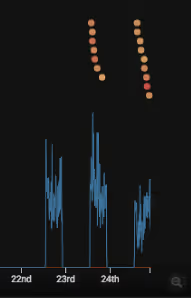
Using no blacklists or signatures, Darktrace detected this highly anomalous malware behavior instantly. A piece of malware that was meant to stay covert for months was quickly identified using anomaly detection on network data.

Indicators of Compromise:

tequbvchrjar[.]com
jckdxdvvm[.]com
cqyegwug[.]com
66.220.23[.]114
64.71.188[.]178
184.105.76[.]250

Inside the SOC
Darktrace cyber analysts are world-class experts in threat intelligence, threat hunting and incident response, and provide 24/7 SOC support to thousands of Darktrace customers around the globe. Inside the SOC is exclusively authored by these experts, providing analysis of cyber incidents and threat trends, based on real-world experience in the field.
Written by
Max Heinemeyer
Global Field CISO

More in this series

No items found.

Blog

/

Network

/

December 4, 2025

Atomic Stealer: Darktrace’s Investigation of a Growing macOS Threat

Atomic Stealer: Darktrace’s Investigation of a Growing macOS ThreatDefault blog imageDefault blog image

The Rise of Infostealers Targeting Apple Users

In a threat landscape historically dominated by Windows-based threats, the growing prevalence of macOS information stealers targeting Apple users is becoming an increasing concern for organizations. Infostealers are a type of malware designed to steal sensitive data from target devices, often enabling attackers to extract credentials and financial data for resale or further exploitation. Recent research identified infostealers as the largest category of new macOS malware, with an alarming 101% increase in the last two quarters of 2024 [1].

What is Atomic Stealer?

Among the most notorious is Atomic macOS Stealer (or AMOS), first observed in 2023. Known for its sophisticated build, Atomic Stealer can exfiltrate a wide range of sensitive information including keychain passwords, cookies, browser data and cryptocurrency wallets.

Originally marketed on Telegram as a Malware-as-a-Service (MaaS), Atomic Stealer has become a popular malware due to its ability to target macOS. Like other MaaS offerings, it includes services like a web panel for managing victims, with reports indicating a monthly subscription cost between $1,000 and $3,000 [2]. Although Atomic Stealer’s original intent was as a standalone MaaS product, its unique capability to target macOS has led to new variants emerging at an unprecedented rate

Even more concerning, the most recent variant has now added a backdoor for persistent access [3]. This backdoor presents a significant threat, as Atomic Stealer campaigns are believed to have reached an around 120 countries. The addition of a backdoor elevates Atomic Stealer to the rare category of backdoor deployments potentially at a global scale, something only previously attributed to nation-state threat actors [4].

This level of sophistication is also evident in the wide range of distribution methods observed since its first appearance; including fake application installers, malvertising and terminal command execution via the ClickFix technique. The ClickFix technique is particularly noteworthy: once the malware is downloaded onto the device, users are presented with what appears to be a legitimate macOS installation prompt. In reality, however, the user unknowingly initiates the execution of the Atomic Stealer malware.

This blog will focus on activity observed across multiple Darktrace customer environments where Atomic Stealer was detected, along with several indicators of compromise (IoCs). These included devices that successfully connected to endpoints associated with Atomic Stealer, those that attempted but failed to establish connections, and instances suggesting potential data exfiltration activity.

Darktrace’s Coverage of Atomic Stealer

As this evolving threat began to spread across the internet in June 2025, Darktrace observed a surge in Atomic Stealer activity, impacting numerous customers in 24 different countries worldwide. Initially, most of the cases detected in 2025 affected Darktrace customers within the Europe, Middle East, and Africa (EMEA) region. However, later in the year, Darktrace began to observe a more even distribution of cases across EMEA, the Americas (AMS), and Asia Pacific (APAC). While multiple sectors were impacted by Atomic Stealer, Darktrace customers in the education sector were the most affected, particularly during September and October, coinciding with the return to school and universities after summer closures. This spike likely reflects increased device usage as students returned and reconnected potentially compromised devices to school and campus environments.

Starting from June, Darktrace detected multiple events of suspicious HTTP activity to external connections to IPs in the range 45.94.47.0/24. Investigation by Darktrace’s Threat Research team revealed several distinct patterns ; HTTP POST requests to the URI “/contact”, identical cURL User Agents and HTTP requests to “/api/tasks/[base64 string]” URIs.

Within one observed customer’s environment in July, Darktrace detected two devices making repeated initiated HTTP connections over port 80 to IPs within the same range. The first, Device A, was observed making GET requests to the IP 45.94.47[.]158 (AS60781 LeaseWeb Netherlands B.V.), targeting the URI “/api/tasks/[base64string]” using the “curl/8.7.2” user agent. This pattern suggested beaconing activity and triggered the ‘Beaconing Activity to External Rare' model alert in Darktrace / NETWORK, with Device A’s Model Event Log showing repeated connections. The IP associated with this endpoint has since been flagged by multiple open-source intelligence (OSINT) vendors as being associated with Atomic Stealer [5].

Darktrace’s detection of Device A showing repeated connections to the suspicious IP address over port 80, indicative of beaconing behavior.
Figure 1: Darktrace’s detection of Device A showing repeated connections to the suspicious IP address over port 80, indicative of beaconing behavior.

Darktrace’s Cyber AI Analyst subsequently launched an investigation into the activity, uncovering that the GET requests resulted in a ‘503 Service Unavailable’ response, likely indicating that the server was temporarily unable to process the requests.

Cyber AI Analyst Incident showing the 503 Status Code, indicating that the server was temporarily unavailable.
Figure 2: Cyber AI Analyst Incident showing the 503 Status Code, indicating that the server was temporarily unavailable.

This unusual activity prompted Darktrace’s Autonomous Response capability to recommend several blocking actions for the device in an attempt to stop the malicious activity. However, as the customer’s Autonomous Response configuration was set to Human Confirmation Mode, Darktrace was unable to automatically apply these actions. Had Autonomous Response been fully enabled, these connections would have been blocked, likely rendering the malware ineffective at reaching its malicious command-and-control (C2) infrastructure.

Autonomous Response’s suggested actions to block suspicious connectivity on Device A in the first customer environment.
Figure 3: Autonomous Response’s suggested actions to block suspicious connectivity on Device A in the first customer environment.

In another customer environment in August, Darktrace detected similar IoCs, noting a device establishing a connection to the external endpoint 45.94.47[.]149 (ASN: AS57043 Hostkey B.V.). Shortly after the initial connections, the device was observed making repeated requests to the same destination IP, targeting the URI /api/tasks/[base64string] with the user agent curl/8.7.1, again suggesting beaconing activity. Further analysis of this endpoint after the fact revealed links to Atomic Stealer in OSINT reporting [6].

Cyber AI Analyst investigation finding a suspicious URI and user agent for the offending device within the second customer environment.
Figure 4:  Cyber AI Analyst investigation finding a suspicious URI and user agent for the offending device within the second customer environment.

As with the customer in the first case, had Darktrace’s Autonomous Response been properly configured on the customer’s network, it would have been able to block connectivity with 45.94.47[.]149. Instead, Darktrace suggested recommended actions that the customer’s security team could manually apply to help contain the attack.

Autonomous Response’s suggested actions to block suspicious connectivity to IP 45.94.47[.]149 for the device within the second customer environment.
Figure 5: Autonomous Response’s suggested actions to block suspicious connectivity to IP 45.94.47[.]149 for the device within the second customer environment.

In the most recent case observed by Darktrace in October, multiple instances of Atomic Stealer activity were seen across one customer’s environment, with two devices communicating with Atomic Stealer C2 infrastructure. During this incident, one device was observed making an HTTP GET request to the IP 45.94.47[.]149 (ASN: AS60781 LeaseWeb Netherlands B.V.). These connections targeted the URI /api/tasks/[base64string, using the user agent curl/8.7.1.  

Shortly afterward, the device began making repeated connections over port 80 to the same external IP, 45.94.47[.]149. This activity continued for several days until Darktrace detected the device making an HTTP POST request to a new IP, 45.94.47[.]211 (ASN: AS57043 Hostkey B.V.), this time targeting the URI /contact, again using the curl/8.7.1 user agent. Similar to the other IPs observed in beaconing activity, OSINT reporting later linked this one to information stealer C2 infrastructure [7].

Darktrace’s detection of suspicious beaconing connectivity with the suspicious IP 45.94.47.211.
Figure 6: Darktrace’s detection of suspicious beaconing connectivity with the suspicious IP 45.94.47.211.

Further investigation into this customer’s network revealed that similar activity had been occurring as far back as August, when Darktrace detected data exfiltration on a second device. Cyber AI Analyst identified this device making a single HTTP POST connection to the external IP 45.94.47[.]144, another IP with malicious links [8], using the user agent curl/8.7.1 and targeting the URI /contact.

Cyber AI Analyst investigation finding a successful POST request to 45.94.47[.]144 for the device within the third customer environment.
Figure 7:  Cyber AI Analyst investigation finding a successful POST request to 45.94.47[.]144 for the device within the third customer environment.

A deeper investigation into the technical details within the POST request revealed the presence of a file named “out.zip”, suggesting potential data exfiltration.

Advanced Search log in Darktrace / NETWORK showing “out.zip”, indicating potential data exfiltration for a device within the third customer environment.
Figure 8: Advanced Search log in Darktrace / NETWORK showing “out.zip”, indicating potential data exfiltration for a device within the third customer environment.

Similarly, in another environment, Darktrace was able to collect a packet capture (PCAP) of suspected Atomic Stealer activity, which revealed potential indicators of data exfiltration. This included the presence of the “out.zip” file being exfiltrated via an HTTP POST request, along with data that appeared to contain details of an Electrum cryptocurrency wallet and possible passwords.

Read more about Darktrace’s full deep dive into a similar case where this tactic was leveraged by malware as part of an elaborate cryptocurrency scam.

PCAP of an HTTP POST request showing the file “out.zip” and details of Electrum Cryptocurrency wallet.
Figure 9: PCAP of an HTTP POST request showing the file “out.zip” and details of Electrum Cryptocurrency wallet.

Although recent research attributes the “out.zip” file to a new variant named SHAMOS [9], it has also been linked more broadly to Atomic Stealer [10]. Indeed, this is not the first instance where Darktrace has seen the “out.zip” file in cases involving Atomic Stealer either. In a previous blog detailing a social engineering campaign that targeted cryptocurrency users with the Realst Stealer, the macOS version of Realst contained a binary that was found to be Atomic Stealer, and similar IoCs were identified, including artifacts of data exfiltration such as the “out.zip” file.

Conclusion

The rapid rise of Atomic Stealer and its ability to target macOS marks a significant shift in the threat landscape and should serve as a clear warning to Apple users who were traditionally perceived as more secure in a malware ecosystem historically dominated by Windows-based threats.

Atomic Stealer’s growing popularity is now challenging that perception, expanding its reach and accessibility to a broader range of victims. Even more concerning is the emergence of a variant embedded with a backdoor, which is likely to increase its appeal among a diverse range of threat actors. Darktrace’s ability to adapt and detect new tactics and IoCs in real time delivers the proactive defense organizations need to protect themselves against emerging threats before they can gain momentum.

Credit to Isabel Evans (Cyber Analyst), Dylan Hinz (Associate Principal Cyber Analyst)
Edited by Ryan Traill (Analyst Content Lead)

Appendices

References

1.     https://www.scworld.com/news/infostealers-targeting-macos-jumped-by-101-in-second-half-of-2024

2.     https://www.kandji.io/blog/amos-macos-stealer-analysis

3.     https://www.broadcom.com/support/security-center/protection-bulletin/amos-stealer-adds-backdoor

4.     https://moonlock.com/amos-backdoor-persistent-access

5.     https://www.virustotal.com/gui/ip-address/45.94.47.158/detection

6.     https://www.trendmicro.com/en_us/research/25/i/an-mdr-analysis-of-the-amos-stealer-campaign.html

7.     https://www.virustotal.com/gui/ip-address/45.94.47.211/detection

8.     https://www.virustotal.com/gui/ip-address/45.94.47.144/detection

9.     https://securityaffairs.com/181441/malware/over-300-entities-hit-by-a-variant-of-atomic-macos-stealer-in-recent-campaign.html

10.   https://binhex.ninja/malware-analysis-blogs/amos-stealer-atomic-stealer-malware.html

Darktrace Model Detections

Darktrace / NETWORK

  • Compromise / Beaconing Activity To External Rare
  • Compromise / HTTP Beaconing to New IP
  • Compromise / HTTP Beaconing to Rare Destination
  • Anomalous Connection / New User Agent to IP Without Hostname
  • Device / New User Agent
  • Compromise / Sustained TCP Beaconing Activity To Rare Endpoint
  • Compromise / Slow Beaconing Activity To External Rare
  • Anomalous Connection / Posting HTTP to IP Without Hostname
  • Compromise / Quick and Regular Windows HTTP Beaconing

Autonomous Response

  • Antigena / Network / Significant Anomaly::Antigena Alerts Over Time Block
  • Antigena / Network / Significant Anomaly::Antigena Significant Anomaly from Client Block
  • Antigena / Network / External Threat::Antigena Suspicious Activity Block

List of IoCs

  • 45.94.47[.]149 – IP – Atomic C2 Endpoint
  • 45.94.47[.]144 – IP – Atomic C2 Endpoint
  • 45.94.47[.]158 – IP – Atomic C2 Endpoint
  • 45.94.47[.]211 – IP – Atomic C2 Endpoint
  • out.zip - File Output – Possible ZIP file for Data Exfiltration

MITRE ATT&CK Mapping:

Tactic –Technique – Sub-Technique

Execution - T1204.002 - User Execution: Malicious File

Credential Access - T1555.001 - Credentials from Password Stores: Keychain

Credential Access - T1555.003 - Credentials from Web Browsers

Command & Control - T1071 - Application Layer Protocol

Exfiltration - T1041 - Exfiltration Over C2 Channel

Continue reading
About the author
Dylan Hinz
Cyber Analyst

Blog

/

Email

/

December 3, 2025

Darktrace Named as a Leader in 2025 Gartner® Magic Quadrant™ for Email Security Platforms

Default blog imageDefault blog image

Darktrace is proud to be named as a Leader in the Gartner® Magic Quadrant™ for Email Security Platforms (ESP). We believe this recognition reflects what our customers already know: our product is exceptional – and so is the way we deliver it.

In July 2025, Darktrace was named a Customers’ Choice in the Gartner® Peer Insights™ Voice of the Customer for Email Security, a distinction given to vendors who have scores that meet or exceed the market average for both axes (User Interest and Adoption, and Overall Experience). To us, both achievements are testament to the customer-first approach that has fueled our rapid growth. We feel this new distinction from Gartner validates the innovation, efficacy, and customer-centric delivery that set Darktrace apart.

A Gartner Magic Quadrant is a culmination of research in a specific market, giving you a wide-angle view of the relative positions of the market’s competitors. CIOs and CISOs can use this research to make informed decisions about which email security platform can best accomplish their goals. We encourage our customers to read the full report to get the complete picture.

This acknowledgement follows the recent recognition of Darktrace / NETWORK, also designated a Leader in the Gartner Magic Quadrant for Network Detection & Response and named the only Customers’ Choice in its category.

Leaders are recognized for strong market adoption, financial stability, and established integrations with major collaboration platforms.

Why do we believe Darktrace is leading in the email security market?

Our relentless innovation which drives proven results  

At Darktrace we continue to push the frontier of email security, with industry-first AI-native detection and response capabilities that go beyond traditional SEG approaches. How do we do it?

  • With a proven approach that gets results. Darktrace’s unique business-centric anomaly detection catches advanced phishing, supply chain compromises, and BEC attacks – detecting them on average 13 days earlier than attack-centric solutions. That’s why 75% of our customers have removed their SEG and now rely on their native email security provider combined with Darktrace.
  • By offering comprehensive protection beyond the inbox. Darktrace / EMAIL goes further than traditional inbound filtering, delivering account and messaging protection, DLP, and DMARC capabilities, ensuring best-in-class security across inbound, outbound, and domain protection scenarios.  
  • Continuous innovation. We are ranked second highest in the Gartner Critical Capabilities research for core email security function, likely thanks to our product strategy and rapid pace of innovation. We’ve release major capabilities twice a year for nearly five years, including advanced AI models and expanded coverage for collaboration platforms.

We deliver exceptional customer experiences worldwide

Darktrace’s leadership isn’t just about excelling in technology, it’s about delivering an outstanding experience that customers value. Let’s dig into what makes our customers tick.

  • Proven loyalty from our base. Recognition from Gartner Peer Insights as a Customers’ Choice, combined with a 4.8-star rating (based on 340 reviews as of November 2025), demonstrates for us the trust of thousands of organizations worldwide, not just the analysts.  
  • Customer-first support. Darktrace goes beyond ticket-only models with dedicated account teams and award-winning service, backed by significant headcount growth in technical support and analytics roles over the past year.
  • Local expertise. With offices spanning continents, Darktrace is able to provide regional language support and tailored engagement from teams on the ground, ensuring personalized service and a human-first experience.

Darktrace enhances security stacks with a partner-first architecture

There are plenty of tools out there than encourage a siloed approach. Darktrace / EMAIL plays well with others, enhancing your native security provider and allowing you to slim down your stack. It’s designed to set you up for future growth, with:

  • A best-in-breed platform approach. Natively built on Self-Learning AI, Darktrace / EMAIL delivers deep integration with our / NETWORK, / IDENTITY, and / CLOUD products as part of a unified platforms – that enables and enhances comprehensive enterprise-wise security.
  • Optimized workflows. Darktrace integrates tightly with an extended ecosystem of security tools – including a strategic partnership with Microsoft enabling unified threat response and quarantine capabilities – bringing constant innovation to all of your SOC workflows.  
  • A channel-first strategy. Darktrace is making significant investments in partner-driven architectures, enabling integrated ecosystems that deliver maximum value and future-ready security for our customers.

Analyst recognized. Customer approved.  

Darktrace / EMAIL is not just another inbound email security tool; it’s an advanced email security platform trusted by thousands of users to protect them against advanced phishing, messaging, and account-level attacks.  

As a Leader, we believe we owe our positioning to our customers and partners for supporting our growth. In the upcoming years we will continue to innovate to serve the organizations who depend on Darktrace for threat protection.  

To learn more about Darktrace’s position as a Leader, view a complimentary copy of the Magic Quadrant report, register for the Darktrace Innovation Webinar on 9 December, 2025, or simply request a demo.

Gartner, Gartner® Magic Quadrant™ for Email Security Platforms, Max Taggett, Nikul Patel, 3 December 2025

GARTNER is a registered trademark and service mark of Gartner, Inc. and/or its affiliates in the U.S. and internationally and is used herein with permission. All rights reserved. Magic Quadrant is a registered trademark of Gartner, Inc. and/or its affiliates and is used herein with permission. All rights reserved.

Gartner does not endorse any vendor, product or service depicted in its research publications, and does not advise technology users to select only those vendors with the highest ratings or other designation. Gartner research publications consist of the opinions of Gartner’s research organization and should not be construed as statements of fact. Gartner disclaims all warranties, expressed or implied, with respect to this research, including any warranties of merchantability or fitness for a particular purpose.

This graphic was published by Gartner, Inc. as part of a larger research document and should be evaluated in the context of the entire document. The Gartner document is available upon request from Darktrace.

[related-resource]

Continue reading
About the author
Carlos Gray
Senior Product Marketing Manager, Email
Your data. Our AI.
Elevate your network security with Darktrace AI




