Blog
/
Network
/
May 10, 2024

Exploitation of ConnectWise ScreenConnect Vulnerabilities

Uncover the tactics used to exploit ConnectWise vulnerabilities and strategies to protect your systems.
Inside the SOC
Darktrace cyber analysts are world-class experts in threat intelligence, threat hunting and incident response, and provide 24/7 SOC support to thousands of Darktrace customers around the globe. Inside the SOC is exclusively authored by these experts, providing analysis of cyber incidents and threat trends, based on real-world experience in the field.
Written by
Justin Torres
Cyber Analyst
Default blog imageDefault blog imageDefault blog imageDefault blog imageDefault blog imageDefault blog image
10
May 2024

Introduction

Across an ever changing cyber landscape, it is common place for threat actors to actively identify and exploit newly discovered vulnerabilities within commonly utilized services and applications. While attackers are likely to prioritize developing exploits for the more severe and global Common Vulnerabilities and Exposures (CVEs), they typically have the most success exploiting known vulnerabilities within the first couple years of disclosure to the public.

Addressing these vulnerabilities in a timely manner reduces the effectiveness of known vulnerabilities, decreasing the pace of malicious actor operations and forcing pursuit of more costly and time-consuming methods, such as zero-day related exploits or attacking software supply chain operations. While actors also develop tools to exploit other vulnerabilities, developing exploits for critical and publicly known vulnerabilities gives actors impactful tools at a low cost they are able to use for quite some time.

Between January and March 2024, the Darktrace Threat Research team investigated one such example that involved indicators of compromise (IoCs) suggesting the exploitation of vulnerabilities in ConnectWise’s remote monitoring and management (RMM) software ScreenConnect.

What are the ConnectWise ScreenConnect vulnerabilities?

CVE-2024-1708 is an authentication bypass vulnerability in ScreenConnect 23.9.7 (and all earlier versions) that, if exploited, would enable an attacker to execute remote code or directly impact confidential information or critical systems. This exploit would pave the way for a second ScreenConnect vunerability, CVE-2024-1709, which allows attackers to directly access confidential information or critical systems [1].

ConnectWise released a patch and automatically updated cloud versions of ScreenConnect 23.9.9, while urging security temas to update on-premise versions immediately [3].

If exploited in conjunction, these vulnerabilities could allow a malicious actor to create new administrative accounts on publicly exposed instances by evading existing security measures. This, in turn, could enable attackers to assume an administrative role and disable security tools, create backdoors, and disrupt RMM processes. Access to an organization’s environment in this manner poses serious risk, potentially leading to significant consequences such as deploying ransomware, as seen in various incidents involving the exploitation of ScreenConnect [2]

Darktrace Coverage of ConnectWise Exploitation

Darktrace’s anomaly-based detection was able to identify evidence of exploitation related to CVE-2024-1708 and CVE-2024-1709 across two distinct timelines; these detections included connectivity with endpoints that were later confirmed to be malicious by multiple open-source intelligence (OSINT) vendors. The activity observed by Darktrace suggests that threat actors were actively exploiting these vulnerabilities across multiple customer environments.

In the cases observed across the Darktrace fleet, Darktrace DETECT™ and Darktrace RESPOND™ were able to work in tandem to pre-emptively identify and contain network compromises from the onset. While Darktrace RESPOND was enabled in most customer environments affected by the ScreenConnect vulnerabilities, in the majority of cases it was configured in Human Confirmation mode. Whilst in Human Confirmation mode, RESPOND will provide recommended actions to mitigate ongoing attacks, but these actions require manual approval from human security teams.

When enabled in autonomous response mode, Darktrace RESPOND will take action automatically, shutting down suspicious activity as soon as it is detected without the need for human intervention. This is the ideal end state for RESPOND as actions can be taken at machine speed, without any delays waiting for user approval.

Looking within the patterns of activity observed by Darktrace , the typical  attack timeline included:

Darktrace observed devices on affected customer networks performing activity indicative of ConnectWise ScreenConnect usage, for example connections over 80 and 8041, connections to screenconnect[.]com, and the use of the user agent “LabTech Agent”. OSINT research suggests that this user agent is an older name for ConnectWise Automate [5] which also includes ScreenConnect as standard [6].

Darktrace DETECT model alert highlighting the use of a remote management tool, namely “screenconnect[.]com”.
Figure 1: Darktrace DETECT model alert highlighting the use of a remote management tool, namely “screenconnect[.]com”.

This activity was typically followed by anomalous connections to the external IP address 108.61.210[.]72 using URIs of the form “/MyUserName_DEVICEHOSTNAME”, as well as additional connections to another external, IP 185.62.58[.]132. Both of these external locations have since been reported as potentially malicious [14], with 185.62.58[.]132 in particular linked to ScreenConnect post-exploitation activity [2].

Figure 2: Darktrace DETECT model alert highlighting the unusual connection to 185.62.58[.]132 via port 8041.
Figure 3: Darktrace DETECT model alert highlighting connections to 108.61.210[.]72 using a new user agent and the “/MyUserName_DEVICEHOSTNAME” URI.

Same Exploit, Different Tactics?  

While the majority of instances of ConnectWise ScreenConnect exploitation observed by Darktrace followed the above pattern of activity, Darktrace was able to identify some deviations from this.

In one customer environment, Darktrace’s detection of post-exploitation activity began with the same indicators of ScreenConnect usage, including connections to screenconnect[.]com via port 8041, followed by connections to unusual domains flagged as malicious by OSINT, in this case 116.0.56[.]101 [16] [17]. However, on this deployment Darktrace also observed threat actors downloading a suspicious AnyDesk installer from the endpoint with the URI “hxxp[:]//116.0.56[.]101[:]9191/images/Distribution.exe”.

Figure 4: Darktrace DETECT model alert highlighting the download of an unusual executable file from 116.0.56[.]101.

Further investigation by Darktrace’s Threat Research team revealed that this endpoint was associated with threat actors exploiting CVE-2024-1708 and CVE-2024-1709 [1]. Darktrace was additionally able to identify that, despite the customer being based in the United Kingdom, the file downloaded came from Pakistan. Darktrace recognized that this represented a deviation from the device’s expected pattern of activity and promptly alerted for it, bringing it to the attention of the customer.
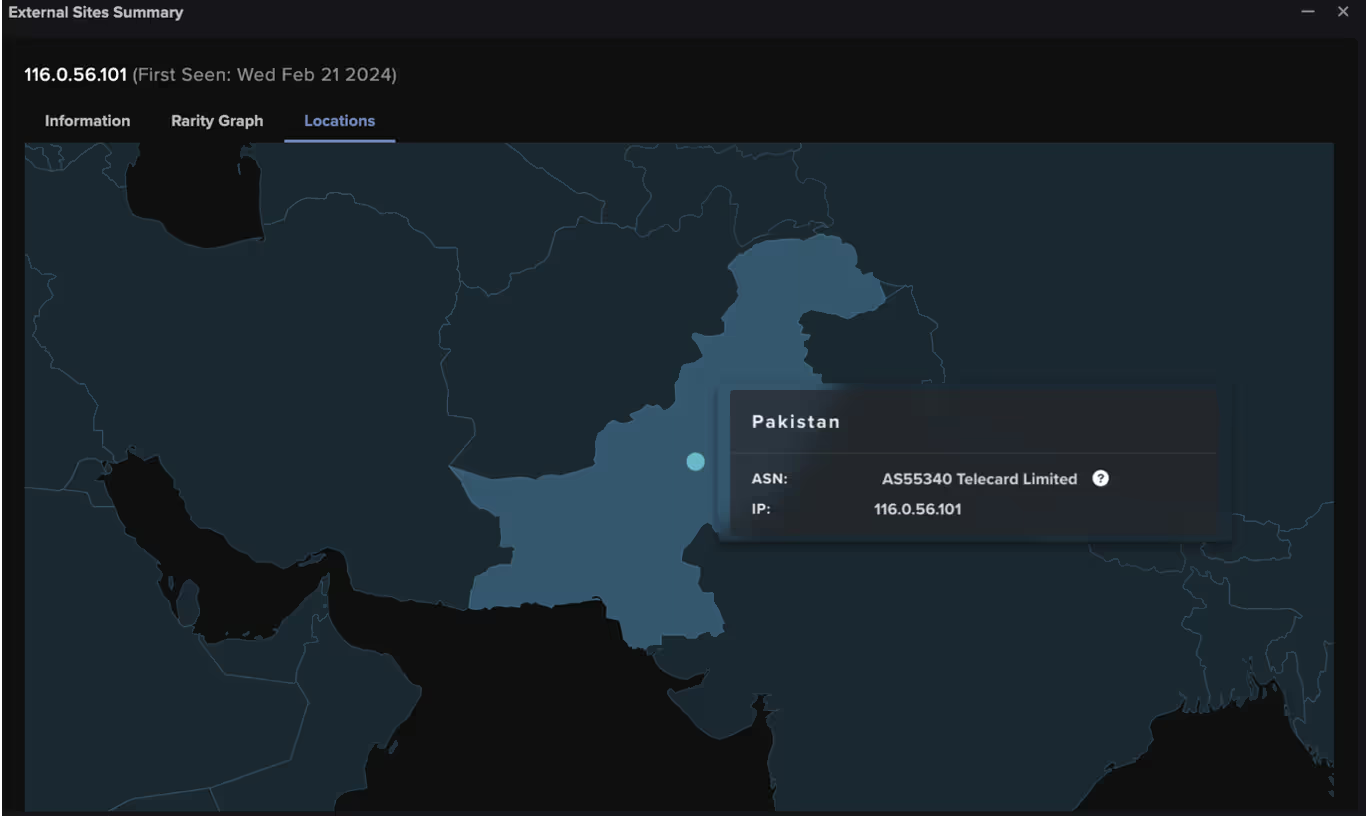
Figure 5: External Sites Summary within the Darktrace UI pinpointing the geographic locations of external endpoints, in this case highlighting a file download from Pakistan.

Darktrace’s Autonomous Response

In this instance, the customer had Darktrace enabled in autonomous response mode and the post-exploitation activity was swiftly contained, preventing the attack from escalating.

As soon as the suspicious AnyDesk download was detected, Darktrace RESPOND applied targeted measures to prevent additional malicious activity. This included blocking connections to 116.0.56[.]101 and “*.56.101”, along with blocking all outgoing traffic from the device. Furthermore, RESPOND enforced a “pattern of life” on the device, restricting its activity to its learned behavior, allowing connections that are considered normal, but blocking any unusual deviations.

Figure 6: Darktrace RESPOND enforcing a “pattern of life” on the offending device after detecting the suspicious AnyDesk download.
Figure 7: Darktrace RESPOND blocking connections to the suspicious endpoint 116.0.56[.]101 and “*.56.101” following the download of the suspicious AnyDesk installer.

The customer was later able to use RESPOND to manually quarantine the offending device, ensuring that all incoming and outgoing traffic to or from the device was prohibited, thus preventing ay further malicious communication or lateral movement attempts.

Figure 8: The actions applied by Darktrace RESPOND in response to the post-exploitation activity related to the ScreenConnect vulnerabilities, including the manually applied “Quarantine device” action.

Conclusion

In the observed cases of the ConnectWise ScreenConnect vulnerabilities being exploited across the Darktrace fleet, Darktrace was able to pre-emptively identify and contain network compromises from the onset, offering vital protection against disruptive cyber-attacks.

While much of the post-exploitation activity observed by Darktrace remained the same across different customer environments, important deviations were also identified suggesting that threat actors may be adapting their tactics, techniques and procedures (TTPs) from campaign to campaign.

While new vulnerabilities will inevitably surface and threat actors will continually look for novel ways to evolve their methods, Darktrace’s Self-Learning AI and behavioral analysis offers organizations full visibility over new or unknown threats. Rather than relying on existing threat intelligence or static lists of “known bads”, Darktrace is able to detect emerging activity based on anomaly and respond to it without latency, safeguarding customer environments whilst causing minimal disruption to business operations.

Credit: Emma Foulger, Principal Cyber Analyst for their contribution to this blog.

Appendices

Darktrace Model Coverage

DETECT Models

Compromise / Agent Beacon (Medium Period)

Compromise / Agent Beacon (Long Period)

Anomalous File / EXE from Rare External Location

Device / New PowerShell User Agent

Anomalous Connection / Powershell to Rare External

Anomalous Connection / New User Agent to IP Without Hostname

User / New Admin Credentials on Client

Device / New User Agent

Anomalous Connection / Multiple HTTP POSTs to Rare Hostname

Anomalous Server Activity / Anomalous External Activity from Critical Network Device

Compromise / Suspicious Request Data

Compliance / Remote Management Tool On Server

Anomalous File / Anomalous Octet Stream (No User Agent)

RESPOND Models

Antigena / Network::External Threat::Antigena Suspicious File Block

Antigena / Network::External Threat::Antigena File then New Outbound Block

Antigena / Network::Significant Anomaly::Antigena Enhanced Monitoring from Client Block

Antigena / Network::Significant Anomaly::Antigena Significant Anomaly from Client Block

Antigena / Network::Significant Anomaly::Antigena Controlled and Model Breach

Antigena / Network::Insider Threat::Antigena Unusual Privileged User Activities Block

Antigena / Network / External Threat / Antigena Suspicious File Pattern of Life Block

Antigena / Network / Insider Threat / Antigena Unusual Privileged User Activities Pattern of Life Block

List of IoCs

IoC - Type - Description + Confidence

185.62.58[.]132 – IP- IP linked with threat actors exploiting CVE-2024-1708 and CVE-2024-17091

108.61.210[.]72- IP - IP linked with threat actors exploiting CVE-2024-1708 and CVE-2024-17091

116.0.56[.]101    - IP - IP linked with threat actors exploiting CVE-2024-1708 and CVE-2024-17091

/MyUserName_ DEVICEHOSTNAME – URI - URI linked with threat actors exploiting CVE-2024-1708 and CVE-2024-17091

/images/Distribution.exe – URI - URI linked with threat actors exploiting CVE-2024-1708 and CVE-2024-17091

24780657328783ef50ae0964b23288e68841a421 - SHA1 Filehash - Filehash linked with threat actors exploiting CVE-2024-1708 and CVE-2024-17091

a21768190f3b9feae33aaef660cb7a83 - MD5 Filehash - Filehash linked with threat actors exploiting CVE-2024-1708 and CVE-2024-17091

MITRE ATT&CK Mapping

Technique – Tactic – ID - Sub-technique of

Web Protocols - COMMAND AND CONTROL - T1071.001 - T1071

Web Services      - RESOURCE DEVELOPMENT - T1583.006 - T1583

Drive-by Compromise - INITIAL ACCESS - T1189 – NA

Ingress Tool Transfer   - COMMAND AND CONTROL - T1105 - NA

Malware - RESOURCE DEVELOPMENT - T1588.001- T1588

Exploitation of Remote Services - LATERAL MOVEMENT - T1210 – NA

PowerShell – EXECUTION - T1059.001 - T1059

Pass the Hash      - DEFENSE EVASION, LATERAL MOVEMENT     - T1550.002 - T1550

Valid Accounts - DEFENSE EVASION, PERSISTENCE, PRIVILEGE ESCALATION, INITIAL ACCESS - T1078 – NA

Man in the Browser – COLLECTION - T1185     - NA

Exploit Public-Facing Application - INITIAL ACCESS - T1190         - NA

Exfiltration Over C2 Channel – EXFILTRATION - T1041 – NA

IP Addresses – RECONNAISSANCE - T1590.005 - T1590

Remote Access Software - COMMAND AND CONTROL - T1219 – NA

Lateral Tool Transfer - LATERAL MOVEMENT - T1570 – NA

Application Layer Protocol - COMMAND AND CONTROL - T1071 – NA

References:

[1] https://unit42.paloaltonetworks.com/connectwise-threat-brief-cve-2024-1708-cve-2024-1709/  

[2] https://www.huntress.com/blog/slashandgrab-screen-connect-post-exploitation-in-the-wild-cve-2024-1709-cve-2024-1708    

[3] https://www.huntress.com/blog/a-catastrophe-for-control-understanding-the-screenconnect-authentication-bypass

[4] https://www.speedguide.net/port.php?port=8041  

[5] https://www.connectwise.com/company/announcements/labtech-now-connectwise-automate

[6] https://www.connectwise.com/solutions/software-for-internal-it/automate

[7] https://www.securityweek.com/slashandgrab-screenconnect-vulnerability-widely-exploited-for-malware-delivery/

[8] https://arcticwolf.com/resources/blog/cve-2024-1709-cve-2024-1708-follow-up-active-exploitation-and-pocs-observed-for-critical-screenconnect-vulnerabilities/https://success.trendmicro.com/dcx/s/solution/000296805?language=en_US&sfdcIFrameOrigin=null

[9] https://www.connectwise.com/company/trust/security-bulletins/connectwise-screenconnect-23.9.8

[10] https://socradar.io/critical-vulnerabilities-in-connectwise-screenconnect-postgresql-jdbc-and-vmware-eap-cve-2024-1597-cve-2024-22245/

[11] https://www.trendmicro.com/en_us/research/24/b/threat-actor-groups-including-black-basta-are-exploiting-recent-.html

[12] https://otx.alienvault.com/indicator/ip/185.62.58.132

[13] https://www.virustotal.com/gui/ip-address/185.62.58.132/community

[14] https://www.virustotal.com/gui/ip-address/108.61.210.72/community

[15] https://otx.alienvault.com/indicator/ip/108.61.210.72

[16] https://www.virustotal.com/gui/ip-address/116.0.56[.]101/community

[17] https://otx.alienvault.com/indicator/ip/116.0.56[.]101

Inside the SOC
Darktrace cyber analysts are world-class experts in threat intelligence, threat hunting and incident response, and provide 24/7 SOC support to thousands of Darktrace customers around the globe. Inside the SOC is exclusively authored by these experts, providing analysis of cyber incidents and threat trends, based on real-world experience in the field.
Written by
Justin Torres
Cyber Analyst

More in this series

No items found.

Blog

/

/

Introducing Darktrace / SECURE AI: Complete AI Security Across Your Enterprise

Darktrace Secure AIDefault blog imageDefault blog image

Why securing AI can’t wait

AI is entering the enterprise faster than IT and security teams can keep up, appearing in SaaS tools, embedded in core platforms, and spun up by teams eager to move faster.  

As this adoption accelerates, it introduces unpredictable behaviors and expands the attack surface in ways existing security tools can’t see or control, startup or platform, they all lack one trait. These new types of risks command the attention of security teams and boardrooms, touching everything from business integrity to regulatory exposure.

Securing AI demands a fundamentally different approach, one that understands how AI behaves, how it interacts with data and users, and how risk emerges in real time. That shift is at the core of how organizations should be thinking about securing AI across the enterprise.

What is the current state of securing AI?

In Darktrace’s latest State of AI in Cybersecurity Report research across 1,500 cybersecurity professionals shows that the percentage of organizations without an AI adoption policy grew from 55% last year to 63% this year.

More troubling, the percentage of organizations without any plan to create an AI policy nearly tripled from 3% to 8%. Without clear policies, businesses are effectively accelerating blindfolded.

When we analyzed activity across our own customer base, we saw the same patterns playing out in their environments. Last October alone, we saw a 39% month-over-month increase in anomalous data uploads to generative AI services, with the average upload being 75MB. Given the size and frequency of these uploads, it's almost certain that much of this data should never be leaving the enterprise.

Many security teams still lack visibility into how AI is being used across their business; how it’s behaving, what it’s accessing, and most importantly, whether it’s operating safely. This unsanctioned usage quietly expands, creating pockets of AI activity that fall completely outside established security controls. The result is real organizational exposure with almost no visibility, underscoring just how widespread AI use has already become given the absence of formal policies.

This challenge doesn’t stop internally. Shadow AI extends into third-party tools, vendor platforms, and partner systems, where AI features are embedded without clear oversight.

Meanwhile, attackers are now learning to exploit AI’s unique characteristics, compounding the risks organizations are already struggling to manage.

The leader in AI cybersecurity now secures AI

Darktrace brings more than a decade of behavioral AI expertise built on an enterprise‑wide platform designed to operate in the complex, ambiguous environments where today’s AI now lives.  

Other cybersecurity technologies try to predict each new attack based on historical attacks. The problem is AI operates like humans do. Every action introduces new information that changes how AI behaves, its unpredictable, and historical attack tactics are now only a small part of the equation, forcing vendors to retrofit unproven acquisitions to secure AI.  

Darktrace is fundamentally different. Our Self‑Learning AI learns what “normal” looks like for your unique business: how your users, systems, applications, and now AI agents behave, how they communicate, and how data flows. This allows us to spot even the smallest shifts when something changes in meaningful ways. Long before AI agents were introduced, our technology was already interpreting nuance, detecting drift, uncovering hidden relationships, and making sense of ambiguous activity across networks, cloud, SaaS, email, OT, identities, and endpoints.

As AI introduces new behaviors, unstructured interactions, invisible pathways, and the rise of Shadow AI, these challenges have only intensified. But this is exactly the environment our platform was built for. Securing AI isn’t a new direction for Darktrace — it’s the natural evolution of the behavioral intelligence we’ve delivered to thousands of organizations worldwide.

Introducing Darktrace / SECURE AI – Complete AI security across your enterprise

We are proud to introduce Darktrace / SECURE AI, the newest product in the Darktrace ActiveAI Security Platform designed to secure AI across the whole enterprise.

This marks the next chapter in our mission to secure organizations from cyber threats and emerging risks. By combining full visibility, intelligent behavioral oversight, and real-time control, Darktrace is enabling enterprises to safely adopt, manage, and build AI within their business. This ensures that AI usage, data access, and behavior remain aligned to security baselines, compliance, and business goals.

Darktrace / SECURE AI can bring every AI interaction into a single view, helping teams understand intent, assess risk, protect sensitive data, and enforce policy across both human and AI Agent activity. Now organizations can embrace AI with confidence, with visibility to ensure it is operating safely, responsibly, and in alignment with their security and compliance needs.  

Because securing AI spans multiple areas and layers of complexity, Darktrace / SECURE AI is built around four foundational use cases that ensure your whole enterprise and every AI use affecting your business, whether owned or through third parties, is protected, they are:

  • Monitoring the prompts driving GenAI agents and assistants
  • Securing business AI agent identities in real time
  • Evaluating AI risks in development and deployment
  • Discovering and controlling Shadow AI

Monitoring the prompts driving GenAI agents and assistants

For AI systems, prompts are one of the most active and sensitive points of interaction—spanning human‑AI exchanges where users express intent and AI‑AI interactions where agents generate internal prompts to reason and coordinate. Because prompt language effectively is behavior, and because it relies on natural language rather than a fixed, finite syntax, the attack surface is open‑ended. This makes prompt‑driven risks far more complex than traditional API‑based vulnerabilities tied to CVEs.

Whether an attacker is probing for weaknesses, an employee inadvertently exposes sensitive data, or agents generate their own sub‑tasks to drive complex workflows, security teams must understand how prompt behavior shapes model behavior—and where that behavior can go wrong. Without that behavioral understanding, organizations face heightened risks of exploitation, drift, and cascading failures within their AI systems.

Darktrace / SECURE AI brings together all prompt activity across enterprise AI systems, including Microsoft Copilot and ChatGPT Enterprise, low‑code environments like Microsoft Copilot Studio, SaaS providers like Salesforce and Microsoft 365, and high‑code platforms such as AWS Bedrock and SageMaker, into a single, unified layer of visibility.  

Beyond visibility, Darktrace applies behavioral analytics to understand whether a prompt is unusual or risky in the context of the user, their peers, and the broader organization. Because AI attacks are far more complex and conversational than traditional exploits against fixed APIs – sharing more in common with email and Teams/Slack interactions, —this behavioral understanding is essential. By treating prompts as behavioral signals, Darktrace can detect conversational attacks, malicious chaining, and subtle prompt‑injection attempts, and where integrations allow, intervene in real time to block unsafe prompts or prevent harmful model actions as they occur.

Securing business AI agent identities in real time

As organizations adopt more AI‑driven workflows, we’re seeing a rapid rise in autonomous and semi‑autonomous agents operating across the business. These agents operate within existing identities, with the capability to access systems, read and write data, and trigger actions across cloud platforms, internal infrastructure, applications, APIs, and third‑party services. Some identities are controlled, like users, others like the ones mentioned, can appear anywhere, with organizations having limited visibility into how they’re configured or how their permissions evolve over time.  

Darktrace / SECURE AI gives organizations a real‑time, identity‑centric understanding of what their AI agents are doing, not just what they were designed to do. It automatically discovers live agent identities operating across SaaS, cloud, network, endpoints, OT, and email, including those running inside third‑party environments.  

The platform maps how each agent is configured, what systems it accesses, and how it communicates, including activity such as MCP usage or interactions with storage services where sensitive data may reside.  

By continuously observing agent behavior across all domains, Darktrace / SECURE AI highlights when unnecessary or risky permissions are granted, when activity patterns deviate, or when agents begin chaining together actions in unintended ways. This real‑time audit trail allows organizations to evaluate whether agent actions align with intended operational parameters and catch anomalous or risky behavior early.    

Evaluating AI risks in development and deployment

In the build phase, new identities are created, entitlements accumulate, components are stitched together across SaaS, cloud, and internal environments, and logic starts taking shape through prompts and configurations.  

It’s a highly dynamic and often fragmented process, and even small missteps here, such as a misconfiguration in a created agent identity, can become major security issues once the system is deployed. This is why evaluating AI risk during development and deployment is critical.

Darktrace / SECURE AI brings clarity and control across this entire lifecycle — from the moment an AI system starts taking shape to the moment it goes live. It allows you to gain visibility into created identities and their access across hyperscalers, low‑code SaaS, and internal labs, supported by AI security posture management that surfaces misconfigurations, over‑entitlement, and anomalous building events. Darktrace/ SECURE AI then connects these development insights directly to prompt oversight, connecting how AI is being built to how it will behave once deployed.  The result is a safer, more predictable AI lifecycle where risks are discovered early, guardrails are applied consistently, and innovations move forward with confidence rather than guesswork.

Discovering and controlling Shadow AI

Shadow AI has now appeared across every corner of the enterprise. It’s not just an employee pasting internal data into an external chatbot; it includes unsanctioned agent builders, hidden MCP servers, rogue model deployments, and AI‑driven workflows running on devices or services no one expected to be using AI.  

Darktrace / SECURE AI brings this frontier into view by continuously analyzing interactions across cloud, networks, endpoints, OT, and SASE environments. It surfaces unapproved AI usage wherever it appears and distinguishes legitimate activity in sanctioned tools from misuse or high‑risk behavior. The system identifies hidden AI components and rogue agents, reveals unauthorized deployments and unexpected connections to external AI systems, and highlights risky data flows that deviate from business norms.

When the behavior warrants a response, Darktrace / SECURE AI enables policy enforcement that guides users back toward sanctioned options while containing unsafe or ungoverned adoption. This closes one of the fastest‑expanding security gaps in modern enterprises and significantly reduces the attack surface created by shadow AI.

Conclusion

What’s needed now along with policies and frameworks for AI adoption is the right tooling to detect threats based on AI behavior across shadow use, prompt risks, identity misuse, and AI development.  

Darktrace is uniquely positioned to secure AI, we’ve spent over a decade building AI that learns your business – understanding subtle behavior across the entire enterprise long before AI agents arrived. With over 10,000 customers relying on Darktrace as the last line of defense to capture threats others cannot, Securing AI isn’t a pivot for us, it's not an acquisition; it’s the natural extension of the behavioral expertise and enterprise‑wide intelligence our platform was built on from the start.  

To learn more about how to secure AI at your organization we curated a readiness program that brings together IT and security leaders navigating this responsibility, providing a forum to prepare for high-impact decisions, explore guardrails, and guide the business amid growing uncertainty and pressure.

Sign up for the Secure AI Readiness Program here: This gives you exclusive access to the latest news on the latest AI threats, updates on emerging approaches shaping AI security, and insights into the latest innovations, including Darktrace’s ongoing work in this area.

Ready to talk with a Darktrace expert on securing AI? Register here to receive practical guidance on the AI risks that matter most to your business, paired with clarity on where to focus first across governance, visibility, risk reduction, and long-term readiness.  

Continue reading
About the author
Brittany Woodsmall
Product Marketing Manager, AI

Blog

/

Endpoint

/

February 1, 2026

ClearFake: From Fake CAPTCHAs to Blockchain-Driven Payload Retrieval

fake captcha to blockchain driven palyload retrievalDefault blog imageDefault blog image

What is ClearFake?

As threat actors evolve their techniques to exploit victims and breach target networks, the ClearFake campaign has emerged as a significant illustration of this continued adaptation. ClearFake is a campaign observed using a malicious JavaScript framework deployed on compromised websites, impacting sectors such as e‑commerce, travel, and automotive. First identified in mid‑2023, ClearFake is frequently leveraged to socially engineer victims into installing fake web browser updates.

In ClearFake compromises, victims are steered toward compromised WordPress sites, often positioned by attackers through search engine optimization (SEO) poisoning. Once on the site, users are presented with a fake CAPTCHA. This counterfeit challenge is designed to appear legitimate while enabling the execution of malicious code. When a victim interacts with the CAPTCHA, a PowerShell command containing a download string is retrieved and executed.

Attackers commonly abuse the legitimate Microsoft HTML Application Host (MSHTA) in these operations. Recent campaigns have also incorporated Smart Chain endpoints, such as “bsc-dataseed.binance[.]org,” to obtain configuration code. The primary payload delivered through ClearFake is typically an information stealer, such as Lumma Stealer, enabling credential theft, data exfiltration, and persistent access [1].

Darktrace’s Coverage of ClearFake

Darktrace / ENDPOINT first detected activity likely associated with ClearFake on a single device on over the course of one day on November 18, 2025. The system observed the execution of “mshta.exe,” the legitimate Microsoft HTML Application Host utility. It also noted a repeated process command referencing “weiss.neighb0rrol1[.]ru”, indicating suspicious external activity. Subsequent analysis of this endpoint using open‑source intelligence (OSINT) indicated that it was a malicious, domain generation algorithm (DGA) endpoint [2].

The process line referencing weiss.neighb0rrol1[.]ru, as observed by Darktrace / ENDPOINT.
Figure 1: The process line referencing weiss.neighb0rrol1[.]ru, as observed by Darktrace / ENDPOINT.

This activity indicates that mshta.exe was used to contact a remote server, “weiss.neighb0rrol1[.]ru/rpxacc64mshta,” and execute the associated HTA file to initiate the next stage of the attack. OSINT sources have since heavily flagged this server as potentially malicious [3].

The first argument in this process uses the MSHTA utility to execute the HTA file hosted on the remote server. If successful, MSHTA would then run JavaScript or VBScript to launch PowerShell commands used to retrieve malicious payloads, a technique observed in previous ClearFake campaigns. Darktrace also detected unusual activity involving additional Microsoft executables, including “winlogon.exe,” “userinit.exe,” and “explorer.exe.” Although these binaries are legitimate components of the Windows operating system, threat actors can abuse their normal behavior within the Windows login sequence to gain control over user sessions, similar to the misuse of mshta.exe.

EtherHiding cover

Darktrace also identified additional ClearFake‑related activity, specifically a connection to bsc-testnet.drpc[.]org, a legitimate BNB Smart Chain endpoint. This activity was triggered by injected JavaScript on the compromised site www.allstarsuae[.]com, where the script initiated an eth_call POST request to the Smart Chain endpoint.

Example of a fake CAPTCHA on the compromised site www.allstarsuae[.]com.
Figure 2: Example of a fake CAPTCHA on the compromised site www.allstarsuae[.]com.

EtherHiding is a technique in which threat actors leverage blockchain technology, specifically smart contracts, as part of their malicious infrastructure. Because blockchain is anonymous, decentralized, and highly persistent, it provides threat actors with advantages in evading defensive measures and traditional tracking [4].

In this case, when a user visits a compromised WordPress site, injected base64‑encoded JavaScript retrieved an ABI string, which was then used to load and execute a contract hosted on the BNB Smart Chain.

JavaScript hosted on the compromised site www.allstaruae[.]com.
Figure 3: JavaScript hosted on the compromised site www.allstaruae[.]com.

Conducting malware analysis on this instance, the Base64 decoded into a JavaScript loader. A POST request to bsc-testnet.drpc[.]org was then used to retrieve a hex‑encoded ABI string that loads and executes the contract. The JavaScript also contained hex and Base64‑encoded functions that decoded into additional JavaScript, which attempted to retrieve a payload hosted on GitHub at “github[.]com/PrivateC0de/obf/main/payload.txt.” However, this payload was unavailable at the time of analysis.

Darktrace’s detection of the POST request to bsc-testnet.drpc[.]org.
Figure 4: Darktrace’s detection of the POST request to bsc-testnet.drpc[.]org.
Figure 5: Darktrace’s detection of the executable file and the malicious hostname.

Autonomous Response

As Darktrace’s Autonomous Response capability was enabled on this customer’s network, Darktrace was able to take swift mitigative action to contain the ClearFake‑related activity early, before it could lead to potential payload delivery. The affected device was blocked from making external connections to a number of suspicious endpoints, including 188.114.96[.]6, *.neighb0rrol1[.]ru, and neighb0rrol1[.]ru, ensuring that no further malicious connections could be made and no payloads could be retrieved.

Autonomous Response also acted to prevent the executable mshta.exe from initiating HTA file execution over HTTPS from this endpoint by blocking the attempted connections. Had these files executed successfully, the attack would likely have resulted in the retrieval of an information stealer, such as Lumma Stealer.

Autonomous Response’s intervention against the suspicious connectivity observed.
Figure 6: Autonomous Response’s intervention against the suspicious connectivity observed.

Conclusion

ClearFake continues to be observed across multiple sectors, but Darktrace remains well‑positioned to counter such threats. Because ClearFake’s end goal is often to deliver malware such as information stealers and malware loaders, early disruption is critical to preventing compromise. Users should remain aware of this activity and vigilant regarding fake CAPTCHA pop‑ups. They should also monitor unusual usage of MSHTA and outbound connections to domains that mimic formats such as “bsc-dataseed.binance[.]org” [1].

In this case, Darktrace was able to contain the attack before it could successfully escalate and execute. The attempted execution of HTA files was detected early, allowing Autonomous Response to intervene, stopping the activity from progressing. As soon as the device began communicating with weiss.neighb0rrol1[.]ru, an Autonomous Response inhibitor triggered and interrupted the connections.

As ClearFake continues to rise, users should stay alert to social engineering techniques, including ClickFix, that rely on deceptive security prompts.

Credit to Vivek Rajan (Senior Cyber Analyst) and Tara Gould (Malware Research Lead)

Edited by Ryan Traill (Analyst Content Lead)

Appendices

Darktrace Model Detections

Process / New Executable Launched

Endpoint / Anomalous Use of Scripting Process

Endpoint / New Suspicious Executable Launched

Endpoint / Process Connection::Unusual Connection from New Process

Autonomous Response Models

Antigena / Network::Significant Anomaly::Antigena Significant Anomaly from Client Block

List of Indicators of Compromise (IoCs)

  • weiss.neighb0rrol1[.]ru – URL - Malicious Domain
  • 188.114.96[.]6 – IP – Suspicious Domain
  • *.neighb0rrol1[.]ru – URL – Malicious Domain

MITRE Tactics

Initial Access, Drive-by Compromise, T1189

User Execution, Execution, T1204

Software Deployment Tools, Execution and Lateral Movement, T1072

Command and Scripting Interpreter, T1059

System Binary Proxy Execution: MSHTA, T1218.005

References

1.        https://www.kroll.com/en/publications/cyber/rapid-evolution-of-clearfake-delivery

2.        https://www.virustotal.com/gui/domain/weiss.neighb0rrol1.ru

3.        https://www.virustotal.com/gui/file/1f1aabe87e5e93a8fff769bf3614dd559c51c80fc045e11868f3843d9a004d1e/community

4.        https://www.packetlabs.net/posts/etherhiding-a-new-tactic-for-hiding-malware-on-the-blockchain/

Continue reading
About the author
Vivek Rajan
Cyber Analyst
Your data. Our AI.
Elevate your network security with Darktrace AI