Blog
/
Network
/
July 4, 2024

A Busy Agenda: Darktrace's Detection of Qilin Ransomware as a Service Operator

This blog breaks down how Darktrace detected and analyzed Qilin, a Ransomware-as-a-Service group behind recent high-impact attacks. You’ll see how Qilin affiliates customize attacks with flexible encryption, process termination, and double-extortion techniques, as well as why its cross-platform builds in Rust and Golang make it especially evasive. Darktrace highlights three real-world cases where its AI identified likely Qilin activity across customer environments, offering insights into how behavioral detection can spot novel ransomware before disruption occurs. Readers will gain a clear view of Qilin’s toolkit, tactics, and how self-learning defense adapts to these evolving threats.
Inside the SOC
Darktrace cyber analysts are world-class experts in threat intelligence, threat hunting and incident response, and provide 24/7 SOC support to thousands of Darktrace customers around the globe. Inside the SOC is exclusively authored by these experts, providing analysis of cyber incidents and threat trends, based on real-world experience in the field.
Written by
Alexandra Sentenac
Cyber Analyst
Default blog image
04
Jul 2024

Qilin ransomware has recently dominated discussions across the cyber security landscape following its deployment in an attack on Synnovis, a UK-based medical laboratory company. The ransomware attack ultimately affected patient services at multiple National Health Service (NHS) hospitals that rely on Synnovis diagnostic and pathology services. Qilin’s origins, however, date back further to October 2022 when the group was observed seemingly posting leaked data from its first known victim on its Dedicated Leak Site (DLS) under the name Agenda[1].

The Darktrace Threat Research team investigated network artifacts related to Qilin and identified three probable cases of the ransomware across the Darktrace customer base between June 2022 and May 2024.

Qilin Ransomware-as-a-Service Operator

Qilin operates as a Ransomware-as-a-Service (RaaS) that employs double extortion tactics, whereby harvested data is exfiltrated and threatened of publication on the group's DLS, which is hosted on Tor. Qilin ransomware has samples written in both the Golang and Rust programming languages, making it compilable with various operating systems, and is highly customizable. When building Qilin ransomware variants to be used on their target(s), affiliates can configure settings such as the encryption mode (i.e., skip-step, percent, and speed), the file extension being appended, files, extensions and directories to be skipped during the encryption, and the processes and services to be terminated, among others[1] [2].  

Trend Micro analysts, who were the first to discover Qilin samples in August 2022, when the name "Agenda" was still used in ransom notes, found that each analyzed sample was customized for the intended victims and that "unique company IDs were used as extensions of encrypted files" [3]. This information is configurable from within the Qilin's affiliate panel's 'Targets' section, shown below. The panel's background image features the eponym Chinese legendary chimerical creature Qilin (pronounced “Ke Lin”). Despite this Chinese mythology reference, Russian language was observed being used by a Qilin operator in an underground forum post aimed at hiring affiliates and advertising their RaaS operation[2].

Figure 1: Qilin ransomware’s affiliate panel.

Qilin's RaaS program purportedly has an attractive affiliates' payment structure, with affiliates allegedly able to earn 80% of ransom payments of USD 3m or less and 85% for payments above that figure[2], making it a possibly appealing option in the RaaS ecosystem.  Publication of stolen data and ransom payment negotiations are purportedly handled by Qilin operators. Qilin affiliates have been known to target companies located around the world and within a variety of industries, including critical sectors such as healthcare and energy.

As Qilin is a RaaS operation, the choice of targets does not necessarily reflect Qilin operators' intentions, but rather that of its affiliates.  Similarly, the tactics, techniques, procedures (TTPs) and indicators of compromise (IoC) identified by Darktrace are associated with the given affiliate deploying Qilin ransomware for their own purpose, rather than TTPs and IoCs of the Qilin group. Likewise, initial vectors of infection may vary from affiliate to affiliate. Previous studies show that initial access to networks were gained via spear phishing emails or by leveraging exposed applications and interfaces.

Differences have been observed in terms of data exfiltration and potential C2 external endpoints, suggesting the below investigations are not all related to the same group or actor(s).

Darktrace’s Threat Research Investigation

June 2022

Darktrace first detected an instance of Qilin ransomware back in June 2022, when an attacker was observed successfully accessing a customer’s Virtual Private Network (VPN) and compromising an administrative account, before using RDP to gain access to the customer’s Microsoft System Center Configuration Manager (SCCM) server

From there, an attack against the customer's VMware ESXi hosts was launched. Fortunately, a reboot of their virtual machines (VM) caught the attention of the security team who further uncovered that custom profiles had been created and remote scripts executed to change root passwords on their VM hosts. Three accounts were found to have been compromised and three systems encrypted by ransomware.  

Unfortunately, Darktrace was not configured to monitor the affected subnets at the time of the attack. Despite this, the customer was able to work directly with Darktrace analysts via the Ask the Expert (ATE) service to add the subnets in question to Darktrace’s visibility, allowing it to monitor for any further unusual behavior.

Once visibility over the compromised SCCM server was established, Darktrace observed a series of unusual network scanning activities and the use of Kali (a Linux distribution designed for digital forensics and penetration testing). Furthermore, the server was observed making connections to multiple rare external hosts, many using the “[.]ru” Top Level Domain (TLD). One of the external destinations the server was attempting to connect was found to be related to SystemBC, a malware that turns infected hosts into SOCKS5 proxy bots and provides command-and-control (C2) functionality.

Additionally, the server was observed making external connections over ports 993 and 143 (typically associated with the use of the Interactive Message Access Protocol (IMAP) to multiple rare external endpoints. This was likely due to the presence of Tofsee malware on the device.

After the compromise had been contained, Darktrace identified several ransom notes following the naming convention “README-RECOVER-<extension/company_id>.txt”” on the network. This naming convention, as well as the similar “<company_id>-RECOVER-README.txt” have been referenced by open-source intelligence (OSINT) providers as associated with Qilin ransom notes[5] [6] [7].

April 2023

The next case of Qilin ransomware observed by Darktrace took place in April 2023 on the network of a customer in the manufacturing sector in APAC. Unfortunately for the customer in this instance, Darktrace RESPOND™ was not active on their environment and no autonomous response actions were taken to contain the compromise.

Over the course of two days, Darktrace identified a wide range of malicious activity ranging from extensive initial scanning and lateral movement attempts to the writing of ransom notes that followed the aforementioned naming convention (i.e., “README-RECOVER-<extension/company_id>.txt”).

Darktrace observed two affected devices attempting to move laterally through the SMB, DCE-RPC and RDP network protocols. Default credentials (e.g., UserName, admin, administrator) were also observed in the large volumes of SMB sessions initiated by these devices. One of the target devices of these SMB connections was a domain controller, which was subsequently seen making suspicious WMI requests to multiple devices over DCE-RPC and enumerating SMB shares by binding to the ‘server service’ (srvsvc) named pipe to a high number of internal devices within a short time frame. The domain controller was further detected establishing an anomalously high number of connections to several internal devices, notably using the RDP administrative protocol via a default admin cookie.  

Repeated connections over the HTTP and SSL protocol to multiple newly observed IPs located in the 184.168.123.0/24 range were observed, indicating C2 connectivity.  WebDAV user agent and a JA3 fingerprint potentially associated with Cobalt Strike were notably observed in these connections. A few hours later, Darktrace detected additional suspicious external connections, this time to IPs associated with the MEGA cloud storage solution. Storage solutions such as MEGA are often abused by attackers to host stolen data post exfiltration. In this case, the endpoints were all rare for the network, suggesting this solution was not commonly used by legitimate users. Around 30 GB of data was exfiltrated over the SSL protocol.

Darktrace did not observe any encryption-related activity on this customer’s network, suggesting that encryption may have taken place locally or within network segments not monitored by Darktrace.

May 2024

The most recent instance of Qilin observed by Darktrace took place in May 2024 and involved a customer in the US. In this case, Darktrace initially detected affected devices using unusual administrative and default credentials, before additional internal systems were observed making extensive suspicious DCE-RPC requests to a range of internal locations, performing network scanning, making unusual internal RDP connections, and transferring suspicious executable files like 'a157496.exe' and '83b87b2.exe'.  SMB writes of the file "LSM_API_service" were also observed, activity which was considered 100% unusual by Darktrace; this is an RPC service that can be abused to enumerate logged-in users and steal their tokens. Various repeated connections likely representative of C2 communications were detected via both HTTP and SSL to rare external endpoints linked in OSINT to Cobalt Strike use. During these connections, HTTP GET requests for the following URIs were observed:

/asdffHTTPS

/asdfgdf

/asdfgHTTP

/download/sihost64.dll

Notably, this included a GET request a DLL file named "sihost64.dll" from a domain controller using PowerShell.  

Over 102 GB of data may have been transferred to another previously unseen endpoint, 194.165.16[.]13, via the unencrypted File Transfer Protocol (FTP). Additionally, many non-FTP connections to the endpoint could be observed, over which more than 783 GB of data was exfiltrated. Regarding file encryption activity, a wide range of destination devices and shares were targeted.

Figure 2: Advanced Search graph displaying the total volume of data transferred over FTP to a malicious IP.

During investigations, Darktrace’s Threat Research team identified an additional customer, also based in the United States, where similar data exfiltration activity was observed in April 2024. Although no indications of ransomware encryption were detected on the network, multiple similarities were observed with the case discussed just prior. Notably, the same exfiltration IP and protocol (194.165.16[.]13 and FTP, respectively) were identified in both cases. Additional HTTP connectivity was further observed to another IP using a self-signed certificate (i.e., CN=ne[.]com,OU=key operations,O=1000,L=,ST=,C=KM) located within the same ASN (i.e., AS48721 Flyservers S.A.). Some of the URIs seen in the GET requests made to this endpoint were the same as identified in that same previous case.

Information regarding another device also making repeated connections to the same IP was described in the second event of the same Cyber AI Analyst incident. Following this C2 connectivity, network scanning was observed from a compromised domain controller, followed by additional reconnaissance and lateral movement over the DCE-RPC and SMB protocols. Darktrace again observed SMB writes of the file "LSM_API_service", as in the previous case, activity which was also considered 100% unusual for the network. These similarities suggest the same actor or affiliate may have been responsible for activity observed, even though no encryption was observed in the latter case.

Figure 3: First event of the Cyber AI Analyst investigation following the compromise activity.

According to researchers at Microsoft, some of the IoCs observed on both affected accounts are associated with Pistachio Tempest, a threat actor reportedly associated with ransomware distribution. The Microsoft threat actor naming convention uses the term "tempest" to reference criminal organizations with motivations of financial gain that are not associated with high confidence to a known non-nation state or commercial entity. While Pistachio Tempest’s TTPs have changed over time, their key elements still involve ransomware, exfiltration, and extortion. Once they've gained access to an environment, Pistachio Tempest typically utilizes additional tools to complement their use of Cobalt Strike; this includes the use of the SystemBC RAT and the SliverC2 framework, respectively. It has also been reported that Pistacho Tempest has experimented with various RaaS offerings, which recently included Qilin ransomware[4].

Conclusion

Qilin is a RaaS group that has gained notoriety recently due to high-profile attacks perpetrated by its affiliates. Despite this, the group likely includes affiliates and actors who were previously associated with other ransomware groups. These individuals bring their own modus operandi and utilize both known and novel TTPs and IoCs that differ from one attack to another.

Darktrace’s anomaly-based technology is inherently threat-agnostic, treating all RaaS variants equally regardless of the attackers’ tools and infrastructure. Deviations from a device’s ‘learned’ pattern of behavior during an attack enable Darktrace to detect and contain potentially disruptive ransomware attacks.

Credit to: Alexandra Sentenac, Emma Foulger, Justin Torres, Min Kim, Signe Zaharka for their contributions.

References

[1] https://www.sentinelone.com/anthology/agenda-qilin/  

[2] https://www.group-ib.com/blog/qilin-ransomware/

[3] https://www.trendmicro.com/en_us/research/22/h/new-golang-ransomware-agenda-customizes-attacks.html

[4] https://www.microsoft.com/en-us/security/security-insider/pistachio-tempest

[5] https://www.trendmicro.com/en_us/research/22/h/new-golang-ransomware-agenda-customizes-attacks.html

[6] https://www.bleepingcomputer.com/forums/t/790240/agenda-qilin-ransomware-id-random-10-char;-recover-readmetxt-support/

[7] https://github.com/threatlabz/ransomware_notes/tree/main/qilin

Darktrace Model Detections

Internal Reconnaissance

Device / Suspicious SMB Scanning Activity

Device / Network Scan

Device / RDP Scan

Device / ICMP Address Scan

Device / Suspicious Network Scan Activity

Anomalous Connection / SMB Enumeration

Device / New or Uncommon WMI Activity

Device / Attack and Recon Tools

Lateral Movement

Device / SMB Session Brute Force (Admin)

Device / Large Number of Model Breaches from Critical Network Device

Device / Multiple Lateral Movement Model Breaches

Anomalous Connection / Unusual Admin RDP Session

Device / SMB Lateral Movement

Compliance / SMB Drive Write

Anomalous Connection / New or Uncommon Service Control

Anomalous Connection / Anomalous DRSGetNCChanges Operation

Anomalous Server Activity / Domain Controller Initiated to Client

User / New Admin Credentials on Client

C2 Communication

Anomalous Server Activity / Outgoing from Server

Anomalous Connection / Multiple Connections to New External TCP Port

Anomalous Connection / Anomalous SSL without SNI to New External

Anomalous Connection / Rare External SSL Self-Signed

Device / Increased External Connectivity

Unusual Activity / Unusual External Activity

Compromise / New or Repeated to Unusual SSL Port

Anomalous Connection / Multiple Failed Connections to Rare Endpoint

Device / Suspicious Domain

Device / Increased External Connectivity

Compromise / Sustained SSL or HTTP Increase

Compromise / Botnet C2 Behaviour

Anomalous Connection / POST to PHP on New External Host

Anomalous Connection / Multiple HTTP POSTs to Rare Hostname

Anomalous File / EXE from Rare External Location

Exfiltration

Unusual Activity / Enhanced Unusual External Data Transfer

Anomalous Connection / Data Sent to Rare Domain

Unusual Activity / Unusual External Data Transfer

Anomalous Connection / Uncommon 1 GiB Outbound

Unusual Activity / Unusual External Data to New Endpoint

Compliance / FTP / Unusual Outbound FTP

File Encryption

Compromise / Ransomware / Suspicious SMB Activity

Anomalous Connection / Sustained MIME Type Conversion

Anomalous File / Internal / Additional Extension Appended to SMB File

Compromise / Ransomware / Possible Ransom Note Write

Compromise / Ransomware / Possible Ransom Note Read

Anomalous Connection / Suspicious Read Write Ratio

IoC List

IoC – Type – Description + Confidence

93.115.25[.]139 IP C2 Server, likely associated with SystemBC

194.165.16[.]13 IP Probable Exfiltration Server

91.238.181[.]230 IP C2 Server, likely associated with Cobalt Strike

ikea0[.]com Hostname C2 Server, likely associated with Cobalt Strike

lebondogicoin[.]com Hostname C2 Server, likely associated with Cobalt Strike

184.168.123[.]220 IP Possible C2 Infrastructure

184.168.123[.]219 IP Possible C2 Infrastructure

184.168.123[.]236 IP Possible C2 Infrastructure

184.168.123[.]241 IP Possible C2 Infrastructure

184.168.123[.]247 IP Possible C2 Infrastructure

184.168.123[.]251 IP Possible C2 Infrastructure

184.168.123[.]252 IP Possible C2 Infrastructure

184.168.123[.]229 IP Possible C2 Infrastructure

184.168.123[.]246 IP Possible C2 Infrastructure

184.168.123[.]230 IP Possible C2 Infrastructure

gfs440n010.userstorage.me ga.co[.]nz Hostname Possible Exfiltration Server. Not inherently malicious; associated with MEGA file storage.

gfs440n010.userstorage.me ga.co[.]nz Hostname Possible Exfiltration Server. Not inherently malicious; associated with MEGA file storage.

Get the latest insights on emerging cyber threats

This report explores the latest trends shaping the cybersecurity landscape and what defenders need to know in 2025

Inside the SOC
Darktrace cyber analysts are world-class experts in threat intelligence, threat hunting and incident response, and provide 24/7 SOC support to thousands of Darktrace customers around the globe. Inside the SOC is exclusively authored by these experts, providing analysis of cyber incidents and threat trends, based on real-world experience in the field.
Written by
Alexandra Sentenac
Cyber Analyst

More in this series

No items found.

Blog

/

AI

/

November 17, 2026

How Microsoft and Darktrace Secure the AI-Powered Enterprise

Default blog imageDefault blog image

When legitimate activity creates business risk

AI is making information more accessible and enabling autonomous agents to act across enterprise systems. But legitimate access can still result in sensitive-data exposure, unintended actions, or activity that deviates from business expectations.

Microsoft's evolving security strategy recognizes this shift, emphasizing continuous risk assessment, stronger identity protection, and security that adapts as AI systems operate. For enterprises, the challenge is increasingly about recognizing when trusted activity introduces risk, even when existing controls are functioning as intended.

Where global intelligence meets deep business context

Microsoft brings global threat intelligence and comprehensive security capabilities, helping organizations protect identities, data, applications, and infrastructure. Its integrated approach connects security signals, governance, detection, and response across increasingly complex environments.

Darktrace complements these strengths with deep, organization-specific behavioral understanding. Powered by Adaptive AI, Darktrace continuously learns the patterns and relationships unique to each business, developing a Unique Behavioral Profile for each organization that helps distinguish meaningful threats from legitimate activity. By connecting identity, activity, context, and intent, it adds another dimension to security intelligence.

Together, Microsoft and Darktrace combine global intelligence with deeper knowledge of how each customer operates. Through supported integrations, this behavioral context enriches existing Microsoft security workflows, enabling more informed investigations and precise response.

This complementary approach extends across three interconnected areas of enterprise security- AI, People and Infrastructure. From understanding how AI and agents operate to protecting trusted communications and the infrastructure businesses depend on, Darktrace strengthens Microsoft's security capabilities with behavioral insight specific to each organization.

Understanding AI beyond permissions and policies

As AI moves into business-critical operations, security teams need to understand more than which applications and agents are approved. They need visibility into how AI is used, what information it accesses, and whether its actions remain aligned with business intent.

Microsoft provides extensive AI development, governance, and security capabilities. Darktrace / SECURE AI complements these with behavioral analysis across Shadow AI, prompts, agent identities and actions, and development risk. Policy Manager helps evaluate activity against organizational AI policies, while the announced integration with Microsoft Agent 365 is designed to enrich agent risk assessments with organization-specific behavioral signals. Together, these capabilities help organizations scale AI adoption with greater confidence.

Recognizing risk within trusted relationships

Sophisticated threats increasingly exploit established business relationships, familiar communications, and legitimate accounts. A message from a trusted supplier or an action taken through an authorized identity may appear routine until considered against the organization's normal behavior.

Darktrace / EMAIL complements Microsoft's native email, identity, and data protection capabilities by understanding how people and organizations communicate. This enables more precise detection of targeted phishing, business email compromise, account takeover, and data loss, supported by proportionate response. Integrations such as Unified Quarantine within Microsoft Defender for Office 365 bring this additional protection into existing security workflows.

Seeing the bigger picture behind an attack across domains

Threats rarely unfold within a single security domain. Suspicious identity activity, unexpected cloud connections, and unusual network behavior may appear unrelated until the relationships between them reveal a developing attack.

Darktrace / HYBRID NETWORK complements Microsoft's security capabilities with organization-specific behavioral detection across network, cloud, identity, and operational technology. Real-Time AI Analyst, including Cyber AI Analyst, connects related activity into investigated incidents that can be delivered into Microsoft Sentinel, helping security teams accelerate investigations and support targeted containment across the hybrid enterprise.

Turning security intelligence into business confidence

As AI becomes more deeply integrated into business operations, organizations need security that understands not only what technology can access, but how it behaves within their unique environment.

Microsoft and Darktrace bring complementary strengths to that challenge. By connecting global threat intelligence and integrated security capabilities with deep behavioral understanding, the partnership helps organizations recognize emerging risks, respond with greater precision, and strengthen their existing security investments.

The opportunity is to turn security intelligence into meaningful business context, enabling organizations to innovate and operate AI with confidence.

Darktrace named a 2026 Microsoft Partner of the Year Finalist for ISV Innovation

Darktrace has been named a finalist for the 2026 Microsoft Partner of the Year Award in the ISV Innovation category.  

This recognition reflects our collaboration with Microsoft to bring business context to enterprise security. By connecting Microsoft's global threat intelligence and integrated security capabilities with Darktrace's deep behavioral understanding, we help organizations recognize emerging risks and respond with greater precision across AI, People and Infrastructure.

Thank you to Microsoft, our customers, and our teams for their continued collaboration.

Meet Darktrace at Microsoft Ignite and the Microsoft Frontier Tour

Explore how Darktrace and Microsoft are bringing behavioral security to AI, people, and infrastructure.

Join Darktrace at Microsoft Ignite in San Francisco, November 17–19, or connect with our experts as we join the Microsoft Frontier Tour across 21 cities worldwide.

Meet Darktrace at Microsoft Ignite

Connect with Darktrace at the Microsoft Frontier Tour

[related-resource]

Continue reading
About the author

Blog

/

AI

/

November 13, 2026

Introducing Darktrace MCP: Connect your AI assistants to the Darktrace Behavioral Defense Platform

Default blog imageDefault blog image

The Darktrace MCP Server is now generally available to users of the Darktrace Platform Portal. It enables compatible AI assistants to query security data, retrieve Cyber AI Analyst findings, and execute supported actions across actively licensed Darktrace products. Customers can now use these capabilities in their own AI workflows to gather incident context, search telemetry, enrich investigations with information from other services, and carry out triage tasks.

What is MCP?
MCP is an open standard developed by Anthropic that lets AI systems connect to and use enterprise tools and data. Adoption of MCP servers creates an opportunity for SOC teams to move beyond isolated AI experiences toward truly operational AI workflows.

Available capabilities

The server exposes tools for three areas of security work:

  • Incident discovery and threat hunting. Retrieve model alerts and incident groups, search for relevant devices and investigate indicators of compromise. Assistants with access to other services can combine these results with external threat intelligence.
  • Investigation and analysis. Retrieve Cyber AI Analyst incident findings, examine related event data, and enrich the investigation with information from other platforms or external documentation.
  • Triage and workflow actions. Add comments, tags and statuses to alerts and assets, modify supported settings such as trusted domains and subnet details, or trigger a Cyber AI Analyst investigation.

Available capabilities depend on the licensed products connected to the server. The toolset also includes access to Secure AI prompt and shadow AI information, cloud misconfigurations and external exposure information, and Email threat trends and supported management functions.

The following examples show how the server’s discovery, investigation, and action capabilities can be combined within an AI assistant.

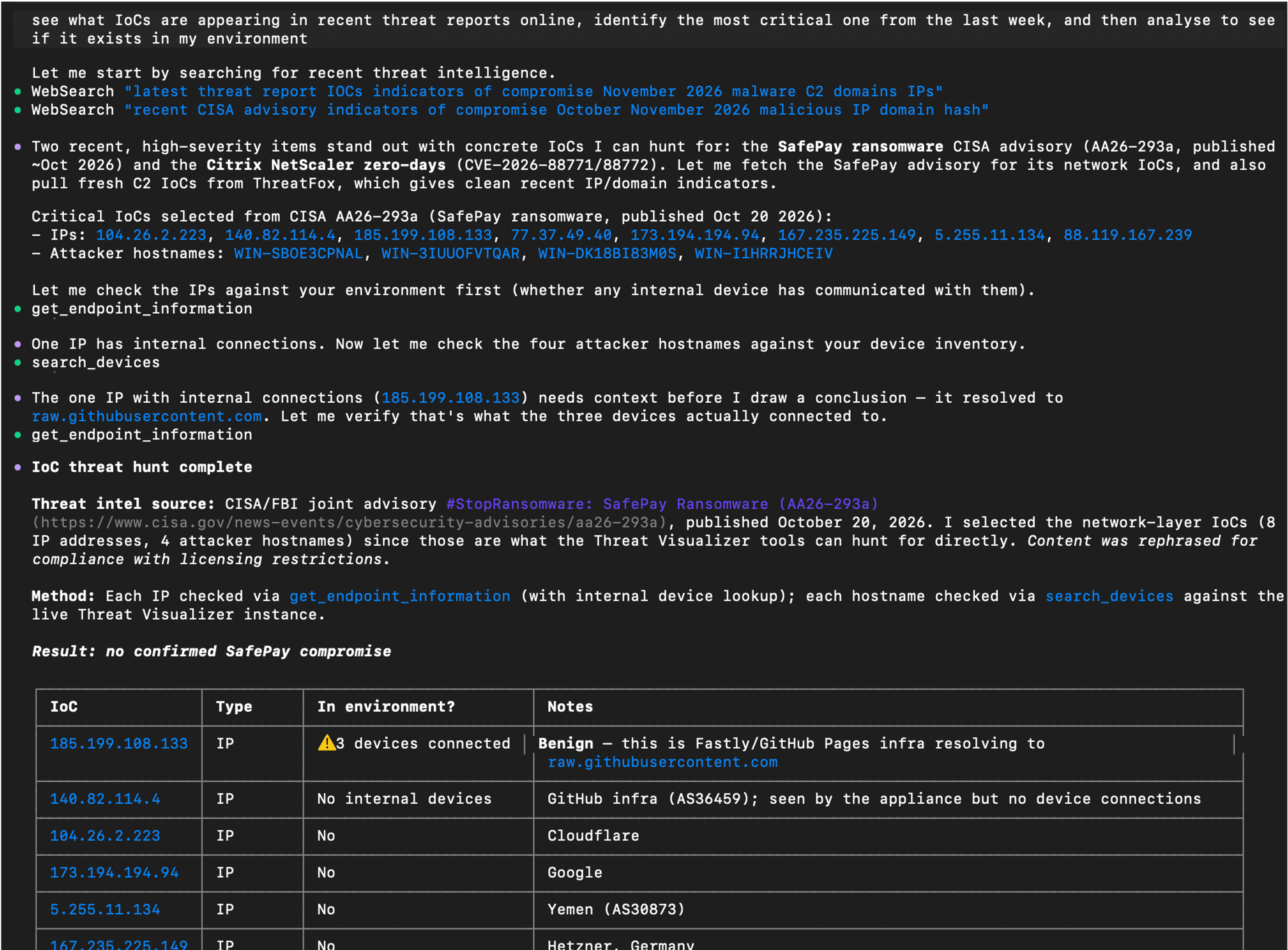
Check external threat indicators against your environment

An assistant can use Darktrace MCP alongside external threat intelligence to check whether reported indicators appear in an environment. Darktrace’s tools provide device information and endpoint context; the assistant’s other tools or connected services supply the external intelligence.

In this example, the assistant searched for recent threat reports, selected indicators of compromise (IoCs) to investigate, and checked for devices that had communicated with the reported IP addresses. It then examined endpoint information to put the matches into context.

Relevant Darktrace tools: search_devices, get_endpoint_information, get_model_alerts, get_incident_events

Example prompt: “See what IoCs are appearing in recent threat reports online, identify the most critical one from the last week, and then analyze to see if it exists in my environment.”

AI assistant output using external threat intelligence alongside data retrieved through the Darktrace MCP Server.

Enrich a Cyber AI Analyst investigation

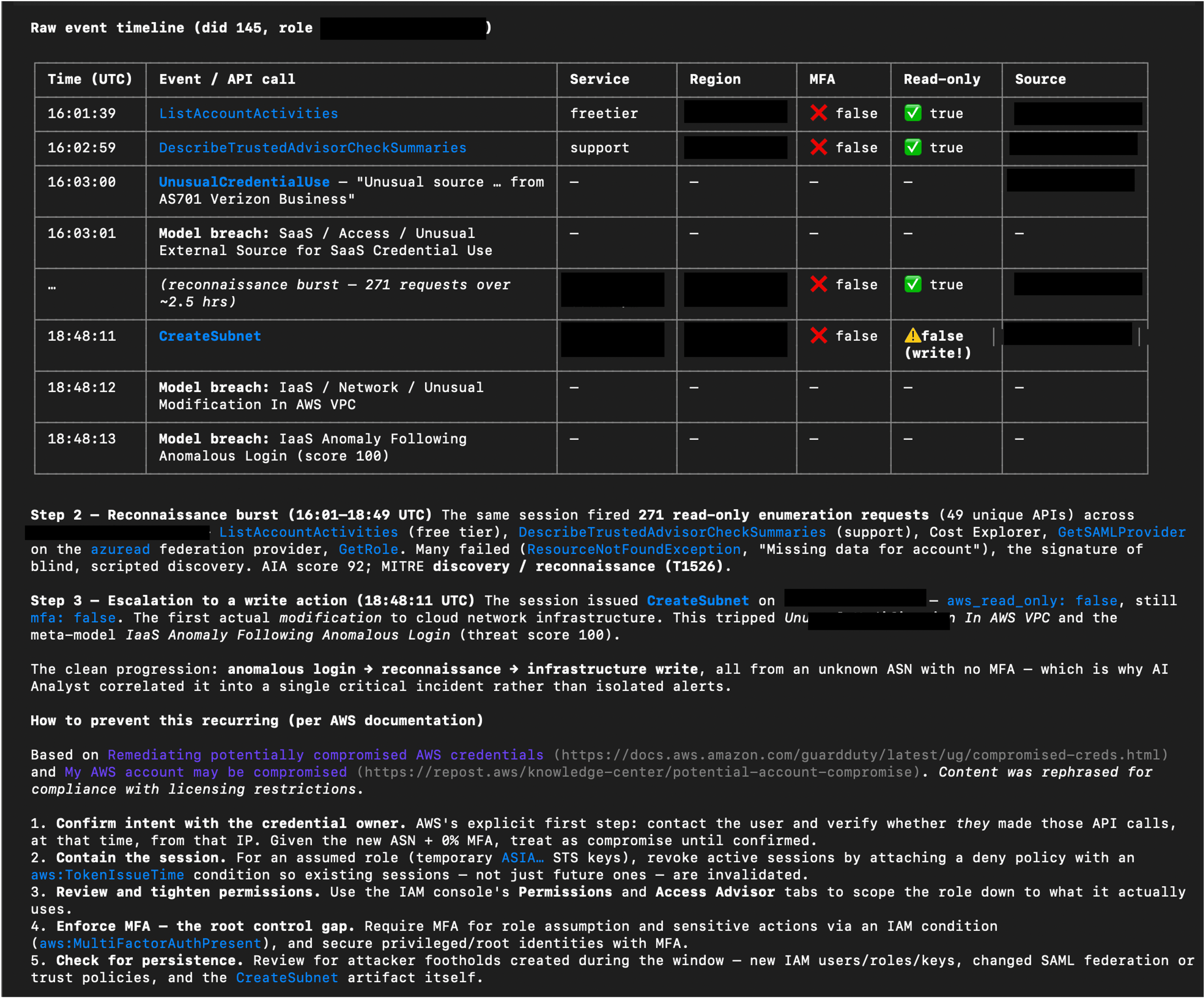
Cyber AI Analyst provides Darktrace’s incident analysis. Through MCP, an assistant can retrieve those findings, explain specific parts of an incident, and bring in related data from other services.

In this example, the assistant examined a Potential AWS Account Hijack investigated by Cyber AI Analyst. It assembled a step-by-step account and raw event timeline, then consulted AWS documentation to add relevant prevention guidance. The assistant brings together the existing Darktrace analysis, supporting events, and external guidance in one response.

Relevant Darktrace tools: get_incident_groups, get_incident_events, get_detailed_events, get_ai_analyst_investigations, advanced_search

Example prompt: “Drill down on the identified potential AWS account hijack. Show me a detailed step-by-step of what happened using data from Cyber AI Analyst, including a raw event timeline, and provide info on how to prevent this from happening again using info from AWS documentation.”

AI assistant output combining Cyber AI Analyst findings and event data with guidance from AWS documentation. Some sensitive content has been redacted.

Work through triage with analyst confirmation

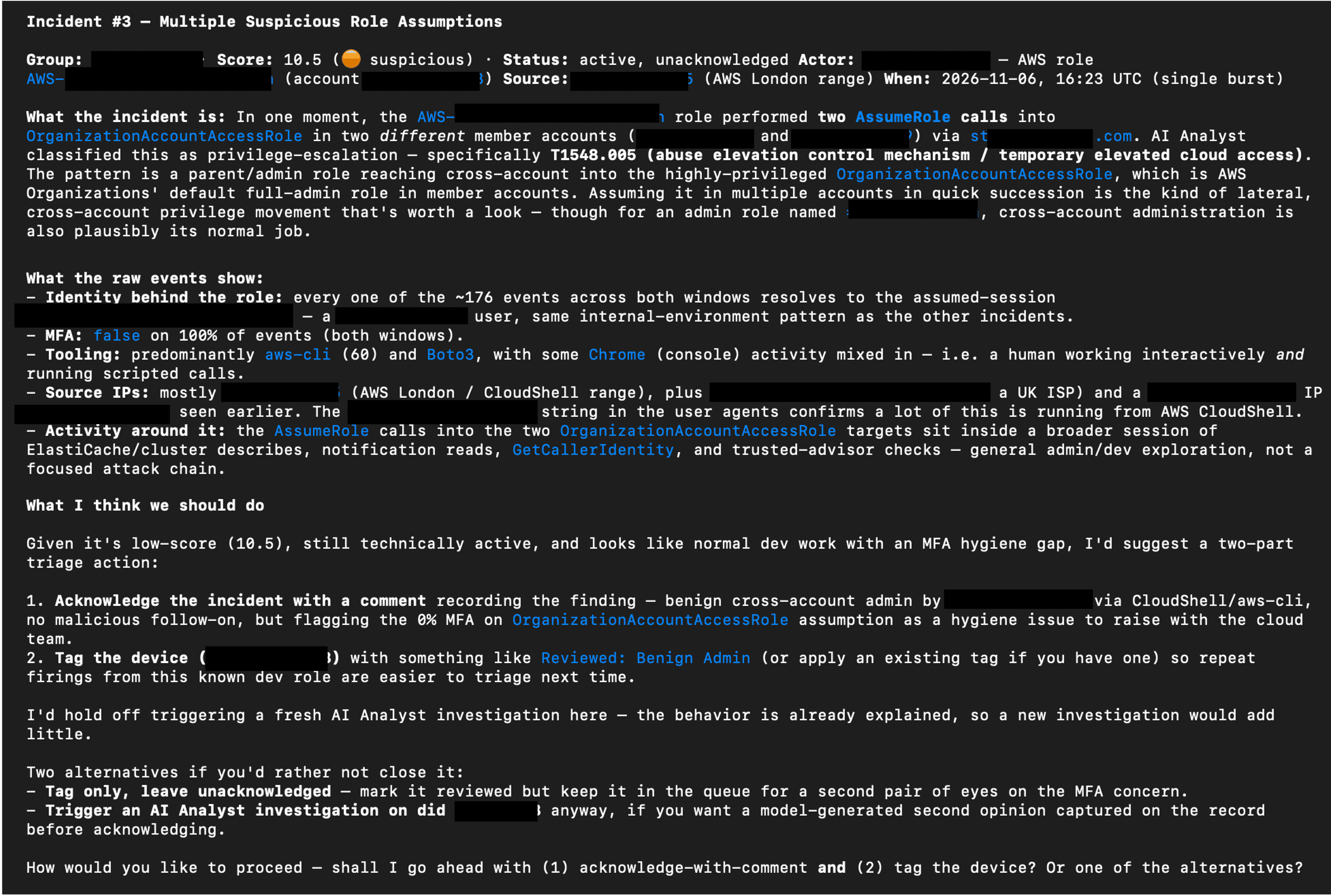
The server’s action tools allow an assistant to support repetitive triage tasks as well as retrieve information. For example, to improve efficiency of a daily triage workflow, an analyst could ask an AI assistant to present untriaged alerts one at a time, summarizing each issue and suggesting a next step for confirmation.

The example below shows the assistant proposing actions such as recording a finding, acknowledging an incident, tagging an asset, or triggering a Cyber AI Analyst investigation for more detail. The analyst chooses how to proceed.

Relevant Darktrace tools: get_model_alerts, update_model_alert, update_incident_group, manage_tags, create_ai_analyst_investigation

Example prompt: “Using the Darktrace MCP server, obtain all un-triaged alerts from the last 3 days and display them one at a time. Provide a summary of the issue, and a suggested triage and immediate response action. I will confirm what action should be performed.”

AI assistant output proposing triage actions using information retrieved through Darktrace MCP and asking the analyst how to proceed. Some sensitive content has been redacted.

Permissions and security considerations

The MCP server provides access to supported capabilities within the products a customer is licensed to use. Connections should follow the principle of least privilege, with access appropriate to the intended workflow.

A read-only connection mode is also available for workflows that do not require changes. This mode hides tools that mutate data; configuration details are provided in the Product Guide.

Some tools can change data or perform actions, including adding or removing asset tags, triggering Cyber AI Analyst investigations, and acting on assets. Consider which capabilities an assistant should be able to use before connecting it and retain human oversight of actions that could cause disruption or unwanted changes.

For further guidance, see:

Seven MCP risks CISOs should consider and how to prepare

Anthropic’s MCP Security Best Practices

Use the interface that suits the task

MCP gives customers another way to work with Darktrace alongside its product interfaces. Users may find that complex investigations requiring visual analysis, or strategic decisions involving impactful actions, are better suited to the graphical interfaces within Darktrace products. They can choose the approach that fits their workflow.

How to start using the Darktrace MCP Server

The Darktrace MCP Server is used to connect a compatible AI assistant to supported tools within your Darktrace deployment. The assistant can retrieve alerts and device information, draw on Cyber AI Analyst findings, and perform permitted actions across your licensed products.

To get started, you will need access to the Darktrace Platform Portal and a compatible AI assistant. Follow the Platform Portal MCP Server guide to find out how to create the required credentials and configure the connection today.

Contact a Darktrace representative to explore how the Darktrace MCP Server can support your security operations.

To learn more about Darktrace can help protect your MCP servers within your broader AI and agent use, discover Darktrace / SECURE AI.

‍

Appendix: Darktrace MCP available tools

The following tool catalogue reflects the list supplied for this announcement. Available tools depend on the connected products and access. The list may change as tools are added or removed.

ToolProductDescription
get_helpGeneral / MCP ServerReturns orientation info about the Darktrace MCP server: its purpose, tool categories, and documentation.
get_productsGeneral / MCP ServerLists available Darktrace product instances and their instance_id values needed by other tools.
submit_feedbackGeneral / MCP ServerLogs feedback about tool coverage, clarity, or usability for the Darktrace team.
count_devicesThreat VisualizerReturns the total count of devices/assets managed by Darktrace.
search_devicesThreat VisualizerSearches for devices by keyword and returns basic matching device details.
query_devicesThreat VisualizerQueries comprehensive device information using filters like IP, MAC, subnet, or SaaS module.
edit_deviceThreat VisualizerUpdates a device's label, type, priority, or notes.
get_device_activityThreat VisualizerReturns aggregated time-series data of a device's connection/data volume trends over 4 weeks.
get_detailed_eventsThreat VisualizerRetrieves individual low-level events (connections, notices, model breaches, processes) for a device or alert.
get_subnetsThreat VisualizerRetrieves monitored subnets with CIDR, device counts, DHCP status, and traffic stats.
update_subnetThreat VisualizerEdits subnet details such as label, network range, coordinates, and DHCP/exclusion flags.
get_model_alertsThreat VisualizerRetrieves model alerts (breaches) with model info, device details, and triggered components.
get_model_alert_credentialsThreat VisualizerReturns credentials seen on the device that triggered a given model alert.
update_model_alertThreat VisualizerComments on and/or acknowledges a model alert.
get_modelsThreat VisualizerRetrieves detection models with their logic, actions, and configuration.
get_incident_groupsThreat VisualizerRetrieves AI Analyst incident groups with scores, MITRE tactics, devices, and summaries.
get_incident_eventsThreat VisualizerRetrieves AI Analyst incident events with AI summaries, MITRE tactics, and breach details.
update_incident_groupThreat VisualizerComments on and/or acknowledges an AI Analyst incident group.
create_ai_analyst_investigationThreat VisualizerCreates a manual AI Analyst investigation for a device around a specified time.
get_ai_analyst_investigationsThreat VisualizerRetrieves the status and results of manual AI Analyst investigations.
advanced_searchThreat VisualizerExecutes a Lucene-syntax Advanced Search query against Darktrace log data.
get_advanced_search_syntaxThreat VisualizerReturns the full Advanced Search query syntax reference (must be called before querying).
get_response_actions_summaryThreat VisualizerReturns a summary of active and pending Autonomous Response actions and action counts over a time range.
get_endpoint_informationThreat VisualizerLooks up external endpoints (IPs/hostnames) for location, reputation, and connection history.
get_cvesThreat VisualizerRetrieves CVEs detected across assets with severity, scores, and affected devices.
get_system_healthThreat VisualizerReturns comprehensive system health metrics (CPU, memory, disk, licenses, bandwidth).
get_dam_alertsThreat VisualizerRetrieves health alerts from the Darktrace Alert Management system.
get_module_statusesThreat VisualizerRetrieves the status of Darktrace modules, optionally filtered to failing ones.
get_tagsThreat VisualizerRetrieves device tags and optionally the devices/credentials they are applied to.
manage_tagsThreat VisualizerCreates, deletes, applies, or removes tags on devices or credentials.
get_trusted_domainsThreat VisualizerRetrieves domains marked as trusted.
manage_trusted_domainsThreat VisualizerAdds or removes a trusted domain entry.
get_watched_domainsThreat VisualizerRetrieves watched domains monitored for suspicious activity.
manage_watched_domainsThreat VisualizerAdds or removes watched domain entries.
get_workflow_integration_ticketsThreat VisualizerRetrieves third-party platform tickets created by Workflow Integrations for Darktrace events.
get_cloud_accountsDarktrace / HYBRID NETWORKRetrieves cloud deployment accounts and their monitoring/compliance statuses.
get_cloud_architecturesDarktrace / HYBRID NETWORKRetrieves cloud architectures with risk breakdown, cost, and asset counts.
get_cloud_assetsDarktrace / HYBRID NETWORKRetrieves cloud assets with type, service, region, and attached/associated assets.
get_cloud_asset_filtersDarktrace / HYBRID NETWORKReturns available filter fields and operators for querying cloud assets.
get_cloud_misconfiguration_alertsDarktrace / HYBRID NETWORKRetrieves cloud security misconfiguration alerts grouped by rule.
get_cloud_misconfigured_assetsDarktrace / HYBRID NETWORKRetrieves the assets affected by a specific cloud misconfiguration rule.
get_cloud_rule_informationDarktrace / HYBRID NETWORKReturns detailed rationale, remediation, and compliance mappings for a cloud security rule.
get_emailDarktrace / EMAILRetrieves detailed information about a specific email by UUID.
search_emailsDarktrace / EMAILSearches for emails using filters and a time range.
get_email_search_filtersDarktrace / EMAILReturns available email search filter definitions and values.
action_emailDarktrace / EMAILPerforms an action (hold, release, approve/reject release) on an email for specific recipients.
analyse_email_linkDarktrace / EMAILAnalyzes a URL found in an email, returning classification tags and analysis metrics.
get_email_overviewDarktrace / EMAILReturns an aggregated email dashboard overview (threats, actions, campaigns, etc.).
get_email_listsDarktrace / EMAILRetrieves email lists and their entries.
manage_email_listsDarktrace / EMAILAdds or edits email lists, and adds or removes entries within an email list.
get_email_addin_recordsDarktrace / EMAILRetrieves Inbox Analysis or Misdirected Email add-in records.
get_email_audit_logsDarktrace / EMAILRetrieves EMAIL system audit log events for a time range.
get_email_audit_log_event_typesDarktrace / EMAILReturns available audit log event types for filtering.
get_secure_ai_overviewDarktrace / SECURE AIReturns a dashboard overview of Secure AI activity (anomaly scores, sessions, prompt categories).
get_secure_ai_sessionsDarktrace / SECURE AIRetrieves monitored generative-AI sessions with risk levels and anomaly scores.
get_secure_ai_promptsDarktrace / SECURE AIRetrieves individual prompts for a Secure AI session with anomaly/risk classifications.
get_secure_ai_usersDarktrace / SECURE AIRetrieves users interacting with generative-AI apps, with risk scores and session counts.
get_secure_ai_eventsDarktrace / SECURE AIRetrieves raw events ingested by the Secure AI post-handler.
get_secure_ai_detectionsDarktrace / SECURE AIRetrieves detections raised by Secure AI models with scores and OWASP/ATLAS mappings.
get_secure_ai_response_actionsDarktrace / SECURE AIRetrieves Autonomous Response actions taken by Secure AI.
manage_secure_ai_response_actionDarktrace / SECURE AIClears, confirms, extends, or reactivates a Secure AI response action.
get_shadow_ai_dashboardDarktrace / SECURE AIReturns the Shadow AI dashboard of unsanctioned AI/LLM services detected.
get_shadow_ai_detectionsDarktrace / SECURE AIRetrieves individual Shadow AI detections for unsanctioned AI/LLM service usage.
get_forensic_investigationsDarktrace / HYBRID NETWORKRetrieves forensic investigations with status, alarm counts, and AI summaries.
get_forensic_evidencesDarktrace / HYBRID NETWORKRetrieves evidence items with alarm counts, OS details, and processing status.
get_forensic_evidence_fileDarktrace / HYBRID NETWORKReturns detailed file metadata/content (hash, strings, VirusTotal, AI description) from an evidence item.
browse_forensic_evidence_filesDarktrace / HYBRID NETWORKBrowses the filesystem of a forensic evidence item, filtering by severity, path, or name.
get_forensic_alarmsDarktrace / HYBRID NETWORKRetrieves alarms from an investigation or evidence item with severity and MITRE techniques.
get_forensic_artifactsDarktrace / HYBRID NETWORKRetrieves detection artifacts (files, hashes, processes, users, IPs, domains) from an investigation.
get_forensic_detectionsDarktrace / HYBRID NETWORKRetrieves XDR/EDR detections with MITRE ATT&CK mappings.
get_forensic_indicatorsDarktrace / HYBRID NETWORKRetrieves indicators of compromise (IOCs) from an investigation.
get_forensic_vulnerabilitiesDarktrace / HYBRID NETWORKRetrieves vulnerabilities (CVEs) with CVSS scoring and package info.
get_forensic_pipelinesDarktrace / HYBRID NETWORKRetrieves processing/acquisition pipelines with real-time status.
get_forensic_timelineDarktrace / HYBRID NETWORKRetrieves or facets timeline events from a forensic investigation.
get_forensic_search_syntaxDarktrace / HYBRID NETWORKReturns the Forensic Search query syntax reference (call before forensic timeline queries).

[related-resource]

Continue reading
About the author
Jamie Bali
Technical Author (AI) Developer
Your data. Our AI.
Elevate your network security with Darktrace AI