Blog
/
/
February 20, 2020

Lessons Learned from a Sodinokibi Ransomware Attack

Gain insights into a targeted Sodinokibi ransomware attack and learn how to better prepare your organization for potential cyber threats.
Inside the SOC
Darktrace cyber analysts are world-class experts in threat intelligence, threat hunting and incident response, and provide 24/7 SOC support to thousands of Darktrace customers around the globe. Inside the SOC is exclusively authored by these experts, providing analysis of cyber incidents and threat trends, based on real-world experience in the field.
Written by
Max Heinemeyer
Global Field CISO
Default blog image
20
Feb 2020

Introduction

Last week, Darktrace detected a targeted Sodinokibi ransomware attack during a 4-week trial with a mid-sized company.

This blog post will go through every stage of the attack lifecycle and detail the attacker’s techniques, tools and procedures used, and how Darktrace detected the attack.

The Sodinokibi group is an innovative threat-actor that is sometimes referred to as a ‘double-threat’, due to their ability to run targeted attacks using ransomware while simultaneously exfiltrating their victim’s data. This enables them to threaten to make the victim’s data publicly available if the ransom is not paid.

While Darktrace’s AI was able to identify the attack in real time as it was emerging, unfortunately the security team didn’t have eyes on the technology and was unable to action the alerts — nor was Antigena set in active mode, which would have slowed down and contained the threat instantaneously.

Timeline

The timeline below provides a rough overview of the major attack phases. Most of the attack took place over the course of a week, with the majority of activity distributed over the last three days.

Technical analysis

Darktrace detected two main devices being hit by the attack: an internet-facing RDP server (‘RDP server’) and a Domain Controller (‘DC’), that also acts as a SMB file server.

In previous attacks, Sodinokibi has used host-level encryption for ransomware activity where the encryption takes place on the compromised host itself — in contrast to network-level encryption where the bulk of the ransomware activity takes place over network protocols such as SMB.

Initial compromise

Over several days, the victim’s external-facing RDP server was receiving successful RDP connections from a rare external IP address located in Ukraine.

Shortly before the initial reconnaissance started, Darktrace saw another RDP connection coming into the RDP server with the same RDP account as seen before. This connection lasted for almost an hour.

It is highly likely that the RDP credential used in this attack had been compromised prior to the attack, either via common brute-force methods, credential stuffing attacks, or phishing.

Thanks to Darktrace’s Deep-Packet Inspection, we can clearly see the connection and all related information.

Suspicious RDP connection information:

Time: 2020-02-10 16:57:06 UTC
Source: 46.150.70[.]86 (Ukraine)
Destination: 192.168.X.X
Destination Port: 64347
Protocol: RDP
Cookie: [REDACTED]
Duration: 00h41m40s
Data out: 8.44 MB
Data in: 1.86 MB

Darktrace detects incoming RDP connections from IP addresses that usually do not connect to the organization.

Attack tools download

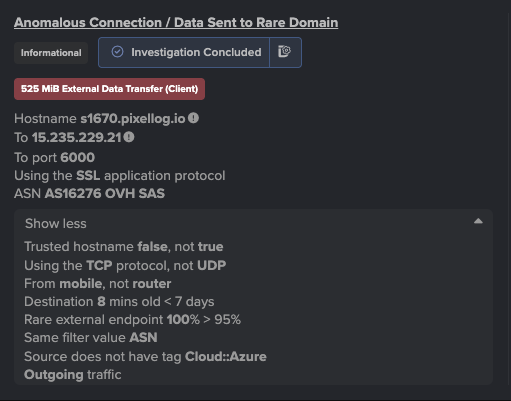
Approximately 45 minutes after the suspicious RDP connection from Ukraine, the RDP server connected to the popular file sharing platform, Megaupload, and downloaded close to 300MB from there.

Darktrace’s AI recognized that neither this server, nor its automatically detected peer group, nor, in fact, anyone else on the network commonly utilized Megaupload — and therefore instantly detected this as anomalous behavior, and flagged it as unusual.

As well as the full hostname and actual IP used for the download, Megaupload is 100% rare for this organization.

Later on, we will see over 40GB being uploaded to Megaupload. This initial download of 300MB however is likely additional tooling and C2 implants downloaded by the threat-actor into the victim’s environment.

Internal reconnaissance

Only 3 minutes after the download from Megaupload onto the RDP server, Darktrace alerted on the RDP server doing an anomalous network scan:
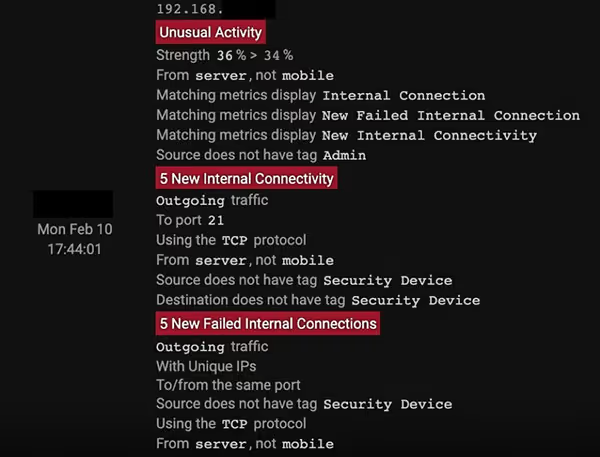
The RDP server scanned 9 other internal devices on the same subnet on 7 unique ports: 21, 80, 139, 445, 3389, 4899, 8080
 . Anybody with some offensive security know-how will recognize most of these ports as default ports one would scan for in a Windows environment for lateral movement. Since this RDP server does not usually conduct network scans, Darktrace again identified this activity as highly anomalous.

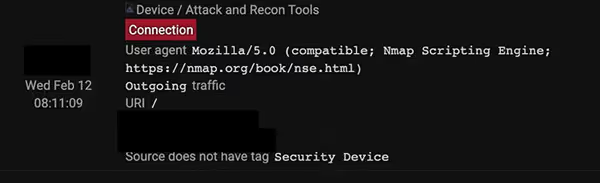
Later on, we see the threat-actor do more network scanning. They become bolder and use more generic scans — one of them showing that they are using Nmap with a default user agent:
Additional Command and Control traffic

While the initial Command and Control traffic was most likely using predominantly RDP, the threat-actor now wanted to establish more persistence and create more resilient channels for C2.

Shortly after concluding the initial network scans (ca. 19:17 on 10th February 2020), the RDP server starts communicating with unusual external services that are unique and unusual for the victim’s environment.
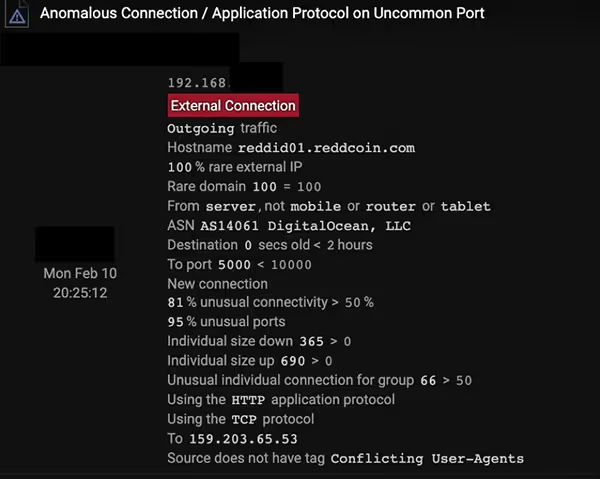
Communications to Reddcoin

Again, nobody else is using Reddcoin on the network. The combination of application protocol and external port is extremely unusual for the network as well.

The communications also went to the Reddcoin API, indicating the installation of a software agent rather than manual communications. This was detected as Reddcoin was not only rare for the network, but also ‘young’ — i.e. this particular external destination had never been seen to be contacted before on the network until 25 minutes before.
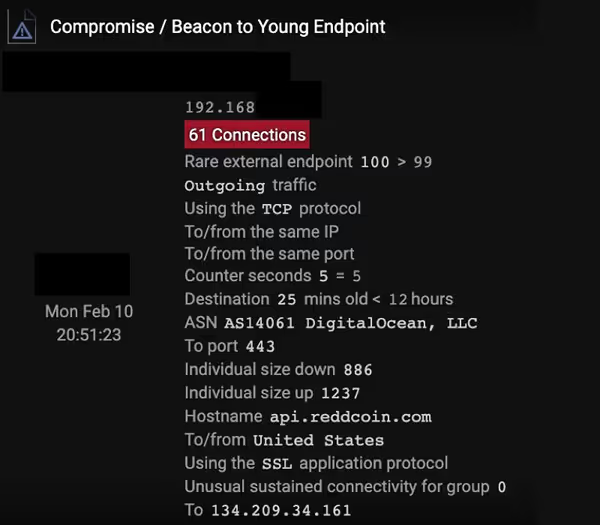
Communications to the Reddcoin API
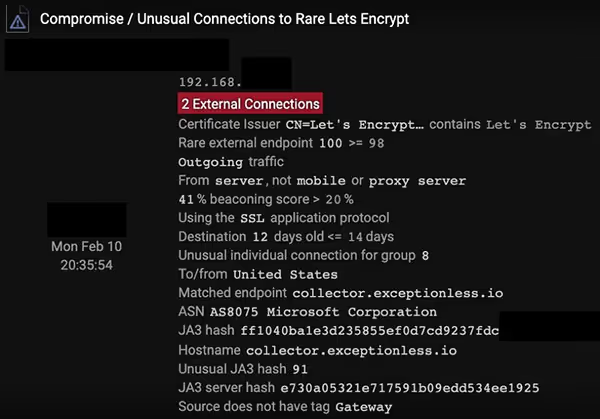
Communications to Exceptionless[.]io

As we can see, the communications to exceptionalness[.]io were done in a beaconing manner, using a Let’s Encrypt certificate, being rare for the network and using an unusual JA3 client hash. All of this indicates the presence of new software on the device, shortly after the threat-actor downloaded their 300MB of tooling.

While most of the above network activity started directly after the threat-actor dropped their tooling on the RDP server, the exact purpose of interfacing with Reddcoin and Exceptionless is unclear. The attacker seems to favor off-the-shelf tooling (Megaupload, Nmap, …) so they might use these services for C2 or telemetry-gathering purposes.

This concluded most of the activity on February 10.

More Command and Control traffic

Why would an attacker do this? Surely using all this C2 at the same time is much noisier than just using 1 or 2 channels?

Another significant burst of activity was observed on February 12 and 13.

The RDP server started making a lot of highly anomalous and rare connections to external destinations. It is inconclusive if all of the below services, IPs, and domains were used for C2 purposes only, but they are linked with high-confidence to the attacker’s activities:

  • HTTP beaconing to vkmuz[.]net
  • Significant amount of Tor usage
  • RDP connections to 198-0-244-153-static.hfc.comcastbusiness[.]net over non-standard RDP port 29348
  • RDP connections to 92.119.160[.]60 using an administrative account (geo-located in Russia)
  • Continued connections to Megaupload
  • Continued SSL beaconing to Exceptionless[.]io
  • Continued connections to api.reddcoin[.]com
  • SSL beaconing to freevpn[.]zone
  • HTTP beaconing to 31.41.116[.]201 to /index.php using a new User Agent
  • Unusual SSL connections to aj1713[.]online
  • Connections to Pastebin
  • SSL beaconing to www.itjx3no[.]com using an unusual JA3 client hash
  • SSL beaconing to safe-proxy[.]com
  • SSL connection to westchange[.]top without prior DNS hostname lookups (likely machine-driven)

What is significant here is the diversity in (potential) C2 channels: Tor, RDP going to dynamic ISP addresses, VPN solutions and possibly custom / customized off-the-shelf implants (the DGA-looking domains and HTTP to IP addresses to /index.php).

Why would an attacker do this? Surely using all this C2 at the same time is much noisier than just using 1 or 2 channels?

One answer might be that the attacker cared much more about short-term resilience than about stealth. As the overall attack in the network took less than 7 days, with a majority of the activity taking place over 2.5 days, this makes sense. Another possibility might be that various individuals were involved in parallel during this attack — maybe one attacker prefers the comfort of RDP sessions for hacking while another is more skilled and uses a particular post-exploitation framework.

The overall modus operandi in this financially-motivated attack is much more smash-and-grab than in the stealthy, espionage-related incidents observed in Advanced Persistent Threat campaigns (APT).

Data exfiltration

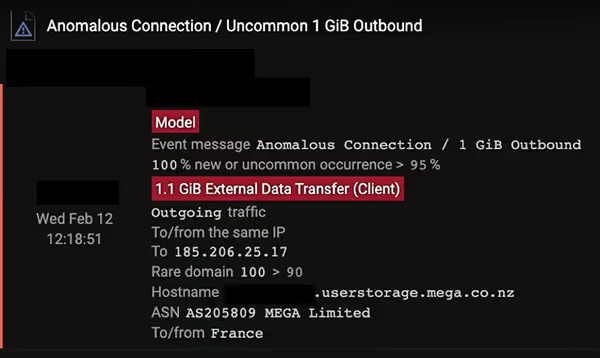
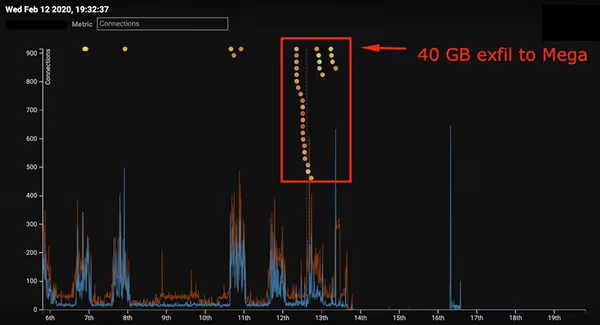
The DC uploaded around 40GB of data to Megaupload over the course of 24 hours.

While all of the above activity was seen on the RDP server (acting as the initial beach-head), the following data exfiltration activity was observed on a Domain Controller (DC) on the same subnet as the RDP server.

The DC uploaded around 40GB of data to Megaupload over the course of 24 hours.

Darktrace detected this data exfiltration while it was in progress — never did the DC (or any similar devices) upload similar amounts of data to the internet. Neither did any client nor server in the victim’s environment use Megaupload:
Ransom notes

Finally, Darktrace observed unusual files being accessed on internal SMB shares on February 13. These files appear to be ransom notes — they follow a similar, randomly-generated naming convention as other victims of the Sodinokibi group have reported:

413x0h8l-readme.txt
4omxa93-readme.txt

Conclusion and observations

The threat-actor seems to be using mostly off-the-shelf tooling which makes attribution harder — while also making detection more difficult.

This attack is representative of many of the current ransomware attacks: financially motivated, fast-acting, and targeted.

The threat-actor seems to be using mostly off-the-shelf tooling (RDP, Nmap, Mega, VPN solutions) which makes attribution harder — while also making detection more difficult. Using this kind of tooling often allows to blend in with regular admin activity — only once anomaly detection is used can this kind of activity be detected.

How can you spot the one anomalous outbound RDP connection amongst the thousands of regular RDP connections leaving your environment? How do you know when the use of Megaupload is malicious — compared to your users’ normal use of it? This is where the power of Darktrace’s self-learning AI comes into play.

Darktrace detected every stage of the visible attack lifecycle without using any threat intelligence or any static signatures.

The graphics below show an overview of detections on both compromised devices. The compromised devices were the highest-scoring assets for the network — even a level 1 analyst with limited previous exposure to Darktrace could detect such an in-progress attack in real time.
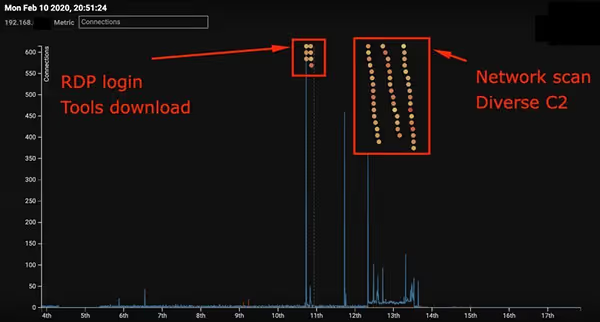
RDP Server

Some of the detections on the RDP server include:

  • Compliance / File Storage / Mega — using Megaupload in an unusual way
  • Device / Network Scan — detecting unusual network scans
  • Anomalous Connection / Application Protocol on Uncommon Port — detecting the use of protocols on unusual ports
  • Device / New Failed External Connections — detecting unusual failing C2
  • Compromise / Unusual Connections to Let’s Encrypt — detecting potential C2 over SSL using Let’s Encrypt
  • Compromise / Beacon to Young Endpoint — detecting C2 to new external endpoints for the network
  • Device / Attack and Recon Tools — detecting known offensive security tools like Nmap
  • Compromise / Tor Usage — detecting unusual Tor usage
  • Compromise / SSL Beaconing to Rare Destination — detecting generic SSL C2
  • Compromise / HTTP Beaconing to Rare Destination — detecting generic HTTP C2
  • Device / Long Agent Connection to New Endpoint — detecting unusual services on a device
  • Anomalous Connection / Outbound RDP to Unusual Port — detecting unusual RDP C2
DC

Some of the detections on the DC include:

  • Anomalous Activity / Anomalous External Activity from Critical Device — detecting unusual behaviour on dcs
  • Compliance / File storage / Mega — using Megaupload in an unusual way
  • Anomalous Connection / Data Sent to New External Device — data exfiltration to unusual locations
  • Anomalous Connection / Uncommon 1GB Outbound — large amounts of data leaving to unusual destinations
  • Anomalous Server Activity / Outgoing from Server — likely C2 to unusual endpoint on the internet


Inside the SOC
Darktrace cyber analysts are world-class experts in threat intelligence, threat hunting and incident response, and provide 24/7 SOC support to thousands of Darktrace customers around the globe. Inside the SOC is exclusively authored by these experts, providing analysis of cyber incidents and threat trends, based on real-world experience in the field.
Written by
Max Heinemeyer
Global Field CISO

More in this series

No items found.

Blog

/

/

May 27, 2026

How to Evaluate AI Vendors: 5 Key categories for AI Adoption

Default blog imageDefault blog image

Understanding the AI buyers’ market

AI adoption has become a central topic of discussion in boardrooms, drawing growing interest from business leaders. Ultimately, organizations hope that an investment in AI technology will have tremendous returns. However, the process of buying an AI solution is not as straight forward as it appears on the surface.  

While business leaders may be eager to improve productivity across their operations, practitioners responsible for evaluating and selecting AI solutions may not always have the visibility or technical understanding needed to make the right decisions for their business. What is typically marketed as a holistic solution to their most critical problems is usually followed by uncertainty when AI tools are finally operationalized in real environments.

This guide is intended to support security leaders who are under growing pressure to adopt AI tools while navigating complex terminology, vendor claims, and increasingly crowded buying cycles. Ultimately, the goal is to help organizations evaluate and adopt AI in a safe, effective, and well-governed way. To support this, we’ve structured the evaluation framework across five key categories:

  1. Governance, safety, and data controls
  1. Data gathering and training
  1. Model and technique choice
  1. Performance and accuracy validation    
  1. Interpretability, adjustability, and transparency    

What buying AI looks like in cybersecurity

While investing in AI can bring immense benefits to your security team, first-time buyers of AI cybersecurity solutions may not know where to start. They will have to determine the type of tool they want, know the options available, and evaluate vendors. Research and understanding are critical to ensure purchases are worth the investment.  

With acceleration in AI adoption, accompanied by the recent boom in agentic AI and autonomous agents, CISOs must look “beneath the hood" of these tools to understand how they work, how they are governed, and to ensure the system is secure and compliant with internal policies.

Challenges in the AI buyers’ marketplace  

The AI security software market is buzzing with hype and flashy promises, which, understandably, needs to be addressed with due diligence. Potential buyers, especially in the cybersecurity space, are hesitant when it comes to allowing AI autonomous capabilities across their workflows, and a lack of vendor transparency can exacerbate those feelings.  

Reinforcing this sentiment, research from this year's Darktrace’s State of AI Cybersecurity report shows where confidence and hesitancy emerge amongst potential buyers. On the one hand, security professionals agree that they have good visibility into the logic and reasoning processes their AI solutions use. However, they lack the explainability and trust to allow AI to take independent remedial action.

  • 89% say they have good visibility into the reasoning behind the outputs generated by AI solutions
  • 92% say they need to understand how a defensive AI tool makes decisions before they can trust it
  • Only 14% say they allow AI to act independently, performing autonomous actions without human approval
  • 74% say they are limiting the autonomy of AI taking action in their SOC until explainability improves

Given the desire for trust and explainability we are seeing from buyers, it's important for them to be equipped with the right questions to ask vendors during an assessment or POV of AI tools in order to demystify marketing hype from real operational outcomes.

Below is a list of categories in which buyers can assess AI vendors or AI Service Providers (AISPs) to help reach safe adoption and maximize their ROI.  

5 categories of AI vendor assessment

Darktrace groups these AI-related questions into 5 categories: governance, data and training, model and technique choice, performance validation, and interpretability and adjustability. By asking questions regarding each of these 5 categories, buyers can gain a deeper understanding of how an AISP’s systems work and whether they suit their business requirements.

Governance, safety, and data controls

Governance of AI systems is critical for all AISPs. Whether their platform is based around a single model, or is a more complex, composite AI solution, strong governance is essential to ensure the system is safe, robust, and reliable.

A simple question you could ask is:

What AI governance policies and frameworks do you follow, and/or certifications do you currently maintain?

For more questions you can ask vendors, download the full guide here.

Darktrace is certified to the ISO/IEC 42001 standard, the world’s first AI Management System (AIMS) standard. ISO/IEC 42001 addresses the unique ethical and technical challenges AI poses by setting out a structured way to manage risks such as transparency, accuracy, and misuse. This includes a commitment to ethical AI development, and effective management and monitoring of AI systems both prior to and continually after release.

Data gathering and training

Accurate, meaningful, and unbiased data gathering is the first important step in producing any AI system. An AI model trained using inaccurate, unbalanced, or poor-quality training data will fail to perform optimally.

To alleviate concerns regarding training data quality, a question you could ask is:

What steps do you take to prevent bias in your AI models and training data?

For more questions, download the full guide here.

AISPs should be able to provide information about the steps taken, workflows followed, and auditing performed to reduce AI bias where appropriate. While it’s sometimes impossible to fully remove bias from an AI model, appropriate actions should be taken to mitigate or reduce bias where relevant.

Model and technique choice

Different AI techniques are optimal for different tasks. For example, research from Gartner suggests that relying on a single “one-size-fits-all" model can lead to data gaps, especially in highly specialized domains.

To achieve more accurate and robust AI solutions, AI leaders should move beyond using just one model or technique, embrace composite AI practices, and adopt a holistic AI system perspective.

A straightforward question you could ask is simply:

What type(s) of AI model(s) do you utilize in your solution?

For more questions, download the full guide here.

While specific detailed information about custom systems used by AISPs is likely proprietary, buyers should expect vendors to be able to provide an overview of the broad techniques used. This will allow you as a buyer to determine if the type of model is appropriate for your use case.

Performance and accuracy validation  

Testing and evaluation of performance is essential for all AI systems. Performance analysis should be performed both before release and continually after release to identify potential data or model drift.  

A question you could ask to understand an AISPs testing workflow is:

How do you audit, test, evaluate, verify, and validate your AI model outputs?

For more questions, download the full guide here.

Testing workflows will likely vary depending on the type of model – measurements relevant to one system may not always be relevant to others. Assessment of systems should also extend beyond these standard accuracy and robustness tests, and should also feature physical performance, such as latency and resource consumption.  

Interpretability, adjustability, and transparency  

AI systems are typically a black box, simply providing an output without an explanation of how that output was attained. Interpretability and transparency are critical to ensure that both SOC teams and end-users trust the outputs of a system to be accurate and meaningful.

A question you could ask is:

How do you promote a trust relationship between human analysts and AI outputs?

For more questions, download the full guide here.

In the context of cybersecurity, trust and interpretability are even more essential. This is particularly relevant for generative AI-based systems (including most AI Agents), where the risk of hallucination can reduce trust in responses.

Cybersecurity systems often need to perform autonomous actions to block incoming threats – an email filtering system may hold potentially dangerous emails; a firewall may block malicious inbound connections. If SOC teams can’t trust these systems to perform accurately, these systems may be limited or disabled, critically reducing their defensive power.

Darktrace as an AI-native cybersecurity vendor

Darktrace has been building and applying AI in cybersecurity for over a decade, developing its capabilities alongside an increasingly complex and fast‑moving threat landscape. This experience has resulted in a mature, multi-layered approach to AI, which continuously learns the normal patterns of each organization to understand behavior, interpret context, and identify meaningful deviations — without relying on predefined rules or known attack signatures. Over time, this has enabled a proven behavioral understanding that helps uncover subtle signals of risk that may otherwise be missed.

With the backing of our ISO/IEC 42001 certification, stakeholders, customers, and partners can be confident that Darktrace is responsibly, ethically, and safely developing its AI systems, and managing the use of AI in day-to-day operations in a compliant and secure manner.  

Explore the principles behind Darktrace’s responsible AI approach, informed by collaboration with global experts in academia and governments, detailing how accountability, explainability, and continuous validation are built into its cybersecurity technology.

How Darktrace secures AI systems

Darktrace now brings these capabilities to monitor and respond to risk generated from AI systems across organizations with Darktrace / SECURE AI. This solution analyzes how prompts, agents, and systems are used within the context of each organization, bringing every AI interaction into a single view. This unique approach helps teams understand intent, assess risk, protect sensitive data, and enforce policy across both human and AI agent activity.

Stay up to date

Sign up for the Secure AI Readiness Program here: This gives you exclusive access to the latest news on the latest AI threats, updates on emerging approaches shaping AI security, and insights into the latest innovations, including Darktrace’s ongoing work in this area.

Ready to talk with a Darktrace expert on securing AI? Register here to receive practical guidance on the AI risks that matter most to your business, paired with clarity on where to focus first across governance, visibility, risk reduction, and long-term readiness.  

Further Reading on AI in cybersecurity

When deciding to invest in an AI solution, it’s important to understand what this means for you and your organization. The questions presented here are only a starting point in understanding an AI solution and whether it is appropriate for your use case.  

Gain deeper knowledge on applications of AI in cybersecurity and Darktrace’s multi-layered AI in the AI Arsenal White Paper.

[related-resource]

Continue reading
About the author
Jamie Bali
Technical Author (AI) Developer

Blog

/

Email

/

May 26, 2026

Journey of a Threat: How Multi-Layered AI Works in Darktrace / EMAIL

Man at a computerDefault blog imageDefault blog image

Darktrace / EMAIL is an implementation of the Darktrace methodology – a multi-layered AI system built into a single product. As with other Darktrace products, Darktrace / EMAIL learns the expected behaviours of an organization and its employees to identify novel threats and anomalous activity.

The diagram below represents the architecture of Darktrace / EMAIL’s multi-layered AI: a structured visualization of how intelligence is built, step by step, from raw data to actionable insight. Each layer plays a distinct role, feeding into the next: collecting data, understanding behaviour, analysing intent, making decisions, and presenting clear outcomes.

It all starts with an email

In this blog, we’ll follow a malicious email as it passes through the Darktrace / EMAIL system, showing exactly what happens as it travels through each layer of the pyramid, from basic data extraction to AI-powered metric creation, and finally deciding on any autonomous actions.

Let’s take this example email. As an end-user, you can see that this is an obvious extortion attempt where an adversary is threatening legal action if money isn’t paid within 24 hours, but how does Darktrace figure that out?

Part 1: Data Gathering

Processing of an email begins on point-of-transit for all inbound, outbound, or lateral emails. The first step is to extract information directly. This includes taking information from the headers (such as sending and receiving addresses, sender IP address, routing, and authentication protocols), as well as extraction of raw HTML and CSS data from the email itself.

This directly extracted information only allows for immediate surface level analysis, such as identifying signature-based attacks (known malicious addresses / domains), but is insufficient for identifying novel threats, complex attacks, or potential email or vendor compromise. This is where Darktrace’s AI analysis shines.

In this example, the SPF, DKIM, and DMARC authentication all passed successfully, showing that even malicious emails can still bypass these signature-based checks. Even with this success, Darktrace will continue to analyse the email.

Diving deeper into the technical information, we can see further information extracted from the headers, including aggregations from the header information, historical calculations such as the frequency and volume of emails to and from a particular domain, and much more.

Part 2: Social Graphing

Social Graphing involves the analysis of sending and receiving behaviours of different mailboxes to create peer-groups. Mailboxes who often send and receive to and from the same mailboxes, or exhibit other correlated behaviours, will be clustered together using a collection of unsupervised AI clustering systems. These groups may represent uses in the same teams who perform similar activity, groups of external facing mailboxes which often receive unsolicited emails, or groups of VIP users (such as C-suite or executives).

Social graphing is an essential component of Darktrace’s pattern of life analysis. This clustering allows Darktrace to understand the responsibilities of individuals – for example, behaviours which are anomalous for one group of users may be completely expected of another group.

In our example, the email was sent to 3 different users within the organization. As part of the social graphing, an “Association Anomaly” is calculated which indicates the likelihood that these users would receive emails from this user or domain, based on historical patterns.

Part 3: Metric Calculation

Metrics are calculated for every email, representing more complex characteristics of an email which can’t be directly extracted. Darktrace / EMAIL features over 1000 unique metrics, calculated both algorithmically and using an ensemble of AI systems.

Algorithmically calculated (non-AI) metrics include further historical calculations, and counts of features such as code blocks, and hidden text, to name a few.

AI-driven metrics include Inducement Classification which uses Natural Language Processing to identify potential phishing, solicitation, or extortion attempts; Named Entity Recognition to identify PII and other sensitive data within an email to support Data Loss Prevention; and many more.

We can follow our example email through this process and view the outcome of these metric calculations. Looking at the language metrics for this email, we can see that our email has reported a high extortion inducement, along with identification of banking information and language indicating urgency.

Part 4: Evaluation and Combination Engine (models)

Once all metrics have been calculated for an email, it gets sent to an evaluation and combination engine where the metrics are compared against blocks of logic to determine if an email contains a threat. One key model which alerted for this example message was a model to tag and block extortion attempts.

Since our example email has a high inducement score for extortion, along the presence of a bitcoin wallet address in the message, this model alerts. When a model in the engine is activated, actions are taken – in this case adding a tag to the email to flag it as extortion in the console and hold the email to prevent it from reaching the end-user mailbox.

Part 5: Meta-Modelling and Actions

Once the models have been run, the actions are taken against the email. If the email hasn’t been blocked or held, this is the point where it will reach the end-user's mailbox.

In the Darktrace / EMAIL UI, all actions models which alerted for an email and actions taken as a result can be seen. At the top of this page, you can see the alert indicating an extortion attempt along with the action to hold the message.

Alongside this, a meta-classifier is used to calculate an overall anomaly score for each email, based on how much the email differs from the pattern of life for the user. The score of the email is boosted by any actions that have taken place.

Part 6: Campaign Clustering

All emails are passed through the Darktrace / EMAIL campaign clustering system. This system creates clusters based on related features within the emails to identify groups of emails with the same sender or intent.

In our case, the email was identified as part of a campaign, alongside other emails which were also identified as extortion attempts against a small group of recipients.

Email campaigns may have additional actions applied to them if the campaign is deemed malicious, and in this case, you can see that the autonomous response was to hold all emails in the campaign. This means that if an email manages to avoid being blocked in the evaluation and combination engine but gets identified as part of the campaign, the hold action will be applied to it retroactively.

Part 7: Cyber AI Analyst

Darktrace’s Cyber AI Analyst presents key information and anomaly indicators for each email, such as further information about authentication, specific metrics, or other identified anomalies and mismatches.

Cyber AI Analyst can also utilize data from Darktrace / EMAIL to enhance its investigation of incidents from other Darktrace products, correlating relevant information to build a fuller picture. More information about the Cyber AI Analyst is available in the Darktrace AI Arsenal.

Part 8: Data Presentation (UI)

Once all processing has taken place against the email, it is presented in the Darktrace / EMAIL UI. Here, members of the SOC team can investigate incidents and anomalies, interact with malicious emails to see why they were blocked, and much more.

Our email stands out here with its 100 anomaly score. Every email which passes through a Darktrace / EMAIL will undergo the same thorough and rigorous analysis to identify potential risks, apply autonomous actions where required, and will ultimately be assigned a score to be displayed here. By providing a single overall score in the UI, rather than presenting emails in full, Darktrace / EMAIL allows SOC teams to more easily identify which emails are most important to investigate, increasing efficiency and reducing alert fatigue.

Take the next step

Many email security tools on the market that claim to be AI-driven are in fact bolting AI onto attack-centric approaches, which rely on automating the identification of known threats. These approaches struggle, and will continue to struggle, with adapting to novel, AI-generated threats.

By analyzing every email within its deeply integrated, multi-layered AI system, Darktrace / EMAIL is able to identify the subtle threats that others miss. This depth not only improves detection accuracy, but enables confident, autonomous action, giving security teams clearer insight into AI outcomes and greater control while supporting users.

For a full deep dive into each stage of the AI system, check out the white paper: A Guide to the Multi-Layered AI in Darktrace / EMAIL

Learn more about securing AI in your enterprise.

[related-resource]

Continue reading
About the author
Jamie Bali
Technical Author (AI) Developer
Your data. Our AI.
Elevate your network security with Darktrace AI