ブログ
/
Network
/
March 14, 2023

Protecting Yourself from Laplas Clipper Crypto Theives

Explore strategies to combat Laplas Clipper attacks and enhance your defenses against cryptocurrency theft in the digital landscape.
Inside the SOC
Darktrace cyber analysts are world-class experts in threat intelligence, threat hunting and incident response, and provide 24/7 SOC support to thousands of Darktrace customers around the globe. Inside the SOC is exclusively authored by these experts, providing analysis of cyber incidents and threat trends, based on real-world experience in the field.
Written by
Anna Gilbertson
Cyber Security Analyst
Written by
Hanah Darley
Director of Threat Research
Default blog imageDefault blog imageDefault blog imageDefault blog imageDefault blog imageDefault blog image
14
Mar 2023

Between June 2021 and June 2022, crypto-currency platforms around the world lost an estimated 44 billion USD to cyber criminals, whose modus operandi range from stealing passwords and account recovery phrases, to cryptojacking and directly targeting crypto-currency transactions. 

There has been a recent rise in cases of cyber criminals’ using information stealer malware to gather and exfiltrate sensitive crypto-currency wallet details, ultimately leading to the theft of significant sums of digital currency. Having an autonomous decision maker able to detect and respond to potential compromises is crucial to safeguard crypto wallets and transactions against would-be attackers.

In late 2022, Darktrace observed several threat actors employing a novel attack method to target crypto-currency users across its customer base, specifically the latest version of the Laplas Clipper malware. Using Self-Learning AI, Darktrace DETECT/Network™ and Darktrace RESPOND/Network™ were able to uncover and mitigate Laplas Clipper activity and intervene to prevent the theft of large sums of digital currency.

Laplas Clipper Background

Laplas Clipper is a variant of information stealing malware which operates by diverting crypto-currency transactions from victims’ crypto wallets into the wallets of threat actors [1]. Laplas Clipper is a Malware-as-a-Service (MaaS) offering available for purchase and use by a variety of threat actors. It has been observed in the wild since October 2022, when 180 samples were identified and linked with another malware strain, namely SmokeLoader [2]. This loader has itself been observed since at least 2011 and acts as a delivery mechanism for popular malware strains [3]. 

SmokeLoader is typically distributed via malicious attachments sent in spam emails or targeted phishing campaigns but can also be downloaded directly by users from file hosting pages or spoofed websites. SmokeLoader is known to specifically deliver Laplas Clipper onto compromised devices via a BatLoader script downloaded as a Microsoft Word document or a PDF file attached to a phishing email. These examples of social engineering are relatively low effort methods intended to convince users to download the malware, which subsequently injects malicious code into the explorer.exe process and downloads Laplas Clipper.

Laplas Clipper activity observed across Darktrace’s customer base generally began with SmokeLoader making HTTP GET requests to Laplas Clipper command and control (C2) infrastructure. Once downloaded, the clipper loads a ‘build[.]exe’ module and begins monitoring the victim’s clipboard for crypto-currency wallet addresses. If a wallet address is identified, the infected device connects to a server associated with Laplas Clipper and downloads wallet addresses belonging to the threat actor. The actor’s addresses are typically spoofed to appear similar to those they replace in order to evade detection. The malware continues to update clipboard activity and replaces the user’s wallet addresses with a spoofed address each time one is copied for a for crypto-currency transactions.

Darktrace Coverage of Laplas Clipper and its Delivery Methods 

In October and November 2022, Darktrace observed a significant increase in suspicious activity associated with Laplas Clipper across several customer networks. The activity consisted largely of:  

  1. User devices connecting to a suspicious endpoint.  
  2. User devices making HTTP GET requests to an endpoint associated with the SmokeLoader loader malware, which was installed on the user’s device.
  3. User devices making HTTP connections to the Laplas Clipper download server “clipper[.]guru”, from which it downloads spoofed wallet addresses to divert crypto-currency payments. 

In one particular instance, a compromised device was observed connecting to endpoints associated with SmokeLoader shortly before connecting to a Laplas Clipper download server. In other instances, devices were detected connecting to other anomalous endpoints including the domains shonalanital[.]com, transfer[.]sh, and pc-world[.]uk, which appears to be mimicking the legitimate endpoint thepcworld[.]com. 

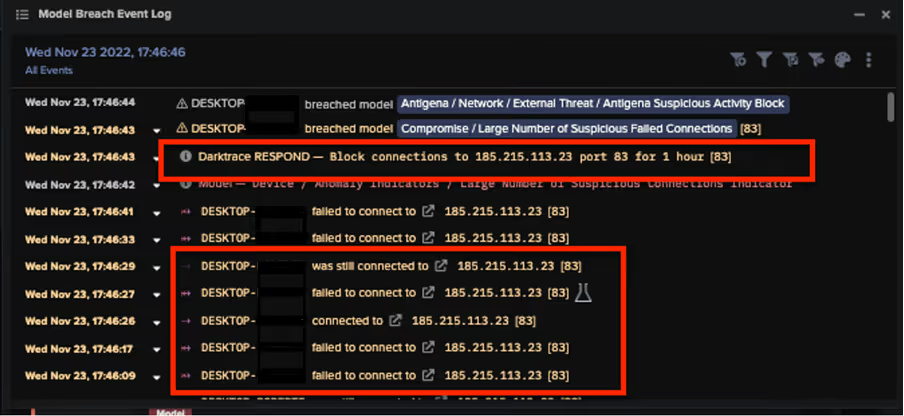
Additionally, some compromised devices were observed attempting to connect malicious IP addresses including 193.169.255[.]78 and 185.215.113[.]23, which are associated with the RedLine stealer malware. Additionally, Darktrace observed connections to the IP addresses 195.178.120[.]154 and 195.178.120[.]154, which are associated with SmokeLoader, and 5.61.62[.]241, which open-source intelligence has associated with Cobalt Strike. 
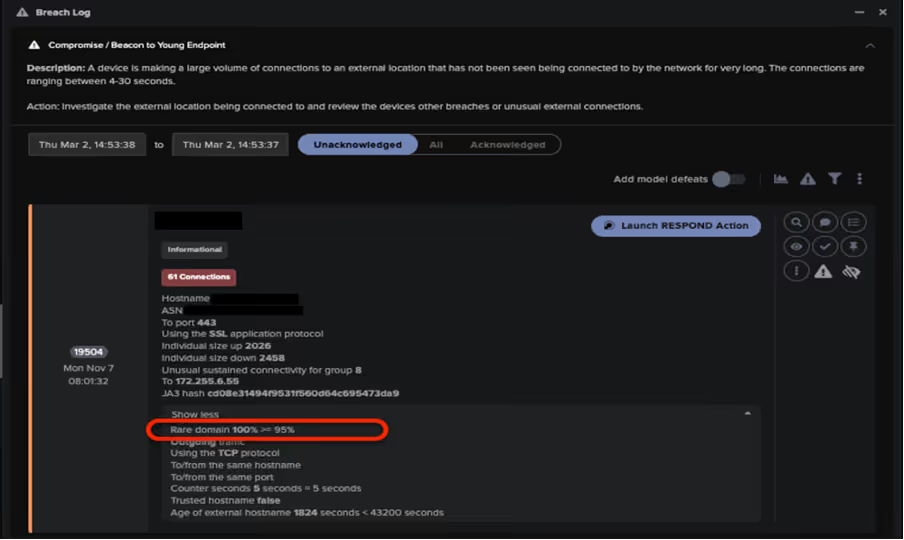
Figure 1: Beacon to Young Endpoint model breach demonstrating Darktrace’s ability to detect external connections that are considered extremely rare for the network.
Figure 2: The event log of an infected device attempting to connect to IP addresses associated with the RedLine stealer malware, and the actions RESPOND took to block these attempts.

The following DETECT/Network models breached in response to these connections:

  • Compromise / Beacon to Young Endpoint 
  • Compromise / Slow Beaconing Activity to External Rare 
  • Compromise / Beacon for 4 Days
  • Compromise / Beaconing Activity to External Rare
  • Compromise / Sustained TCP Beaconing Activity to Rare Endpoint 
  • Anomalous Connection / Multiple Failed Connections to Rare Endpoints 
  • Compromise / Large Number of Suspicious Failed Connections 
  • Compromise / HTTP Beaconing to Rare Destination 
  • Compromise / Post and Beacon to Rare External 
  • Anomalous Connection / Callback on Web Facing Device 

DETECT/Network is able to identify such activity as its models operate based on a device’s usual pattern of behavior, rather than a static list of indicators of compromise (IOCs). As such, Darktrace can quickly identify compromised devices that deviate for their expected pattern of behavior by connecting to newly created malicious endpoints or C2 infrastructure, thereby triggering an alert.

In one example, RESPOND/Network autonomously intercepted a compromised device attempting to connect to the Laplas Clipper C2 server, preventing it from downloading SmokeLoader and subsequently, Laplas Clipper itself.
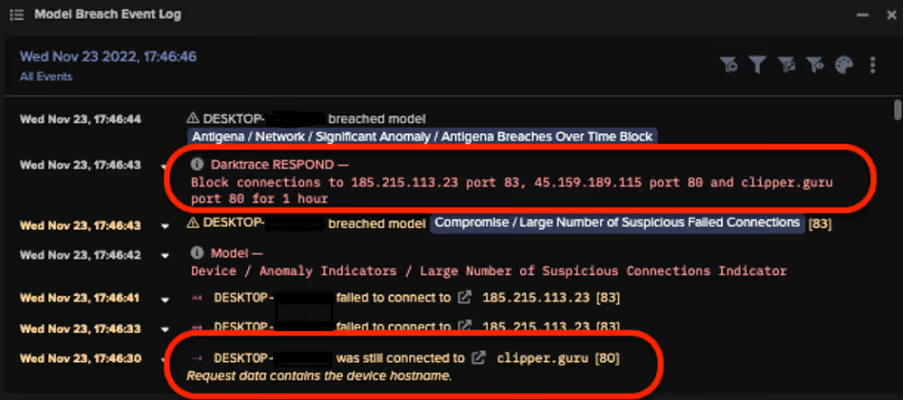
Figure 3: The event log of an infected device attempting to connect to the Laplas Clipper download server, and the actions RESPOND/Network took to block these attempts.

In another example, DETECT/Network observed an infected device attempting to perform numerous DNS Requests to a crypto-currency mining pool associated with the Monero digital currency.  

This activity caused the following DETECT/Network models to breach:

  • Compromise / Monero Mining
  • Compromise / High Priority Crypto Currency Mining 

RESPOND/Network quickly intervened, enforcing a previously established pattern of life on the device, ensuring it could not perform any unexpected activity, and blocking the connections to the endpoint in question for an hour. These actions carried out by Darktrace’s autonomous response technology prevented the infected device from carrying out crypto-mining activity, and ensured the threat actor could not perform any additional malicious activity.
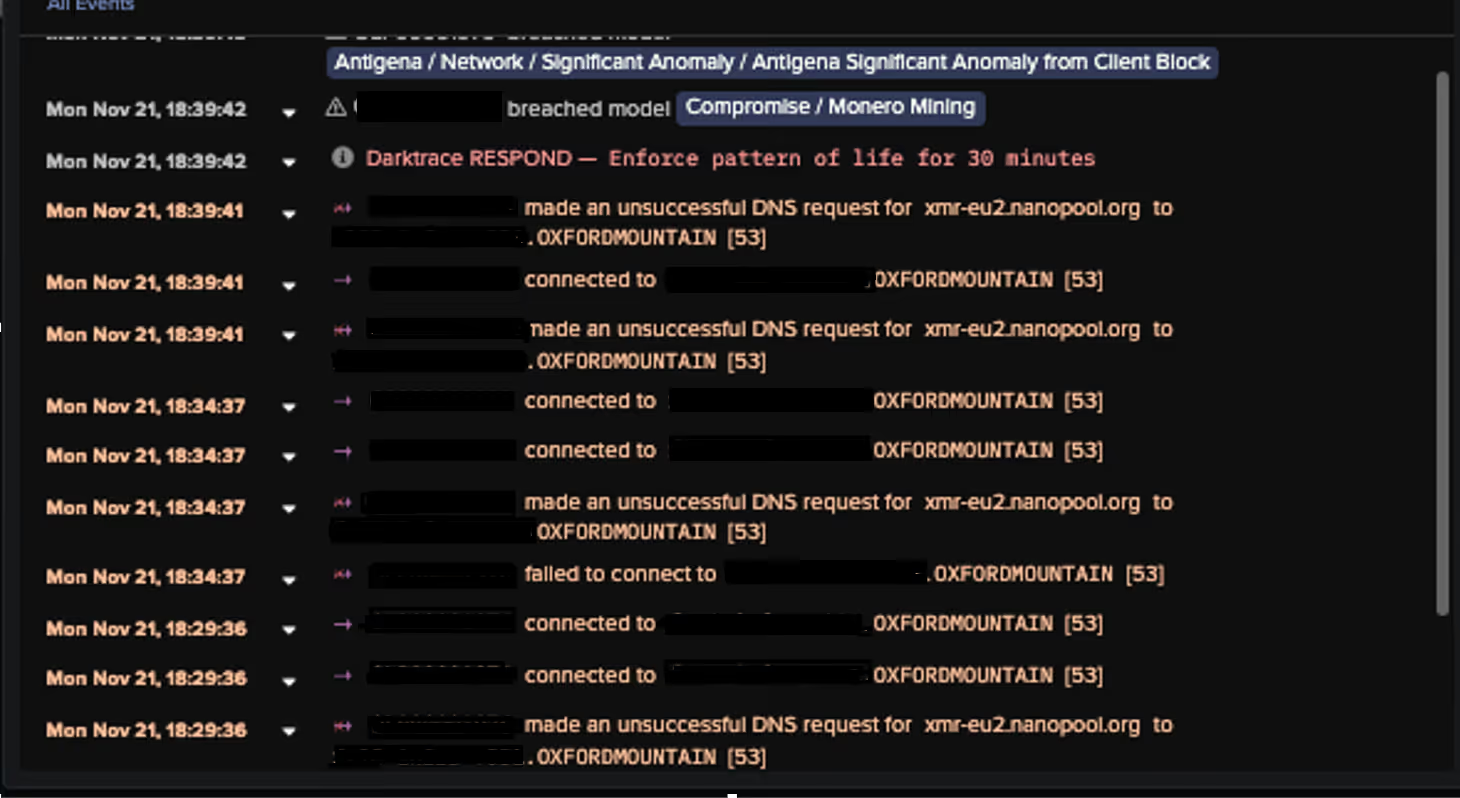
Figure 4. The event log of an infected devices showing DNS requests to the Monero crypto-mining pool, and the actions taken to block them by RESPOND/Network.

Finally, in instances when RESPOND/Network was not activated, external connections to the Laplas Clipper C2 server were nevertheless monitored by DETECT/Network, and the customer’s security team were notified of the incident.

Conclusion 

The rise of information stealing malware variants such as Laplas Clipper highlights the importance of crypto-currency and crypto-mining in the malware ecosystem and more broadly as a significant cyber security concern. Crypto-mining is often discounted as background noise for security teams or compliance issues that can be left untriaged; however, malware strains like Laplas Clipper demonstrate the real security risks posed to digital estates from threat actors focused on crypto-currency. 

Leveraging its Self-Learning AI, DETECT/Network and RESPOND/Network are able to work in tandem to quickly identify connections to suspicious endpoints and block them before any malicious software can be downloaded, safeguarding customers.

Appendices

List of IOCs 

a720efe2b3ef7735efd77de698a5576b36068d07 - SHA1 Filehash - Laplas Malware Download

conhost.exe - URI - Laplas Malware Download

185.223.93.133 - IP Address - Laplas C2 Endpoint

185.223.93.251 - IP Address - Laplas C2 Endpoint

45.159.189.115 - IP Address - Laplas C2 Endpoint

79.137.204.208 - IP Address - Laplas C2 Endpoint

5.61.62.241 - IP Address - Laplas C2 Endpoint

clipper.guru - URI - Laplas C2 URI

/bot/online?guid= - URI - Laplas C2 URI

/bot/regex?key= - URI - Laplas C2 URI

/bot/get?address - URI - Laplas C2 URI

Mitre Attack and Mapping 

Initial Access:

T1189 – Drive By Compromise 

T1566/002 - Spearphishing

Resource Development:

T1588 / 001 - Malware

Ingress Tool Transfer:

T1105 – Ingress Tool Transfer

Command and Control:

T1071/001 – Web Protocols 

T1071 – Application Layer Protocol

T1008 – Fallback Channels

T1104 – Multi-Stage Channels

T1571 – Non-Standard Port

T1102/003 – One-Way Communication

T1573 – Encrypted Channel

Persistence:

T1176 – Browser Extensions

Collection:

T1185 – Man in the Browser

Exfiltration:

T1041 – Exfiltration over C2 Channel

References

[1] https://blog.cyble.com/2022/11/02/new-laplas-clipper-distributed-by-smokeloader/ 

[2] https://thehackernews.com/2022/11/new-laplas-clipper-malware-targeting.html

[3] https://attack.mitre.org/software/S0226/

Inside the SOC
Darktrace cyber analysts are world-class experts in threat intelligence, threat hunting and incident response, and provide 24/7 SOC support to thousands of Darktrace customers around the globe. Inside the SOC is exclusively authored by these experts, providing analysis of cyber incidents and threat trends, based on real-world experience in the field.
Written by
Anna Gilbertson
Cyber Security Analyst
Written by
Hanah Darley
Director of Threat Research

More in this series

No items found.

Blog

/

Cloud

/

March 5, 2026

Inside Cloud Compromise: Investigating Attacker Activity with Darktrace / Forensic Acquisition & Investigation

Default blog imageDefault blog image

Investigating Cloud Attacks with Forensic Acquisition & Investigation

Darktrace / Forensic Acquisition & Investigation™ is the industry’s first truly automated forensic solution purpose-built for the cloud. This blog will demonstrate how an investigation can be carried out against a compromised cloud server in minutes, rather than hours or days.

The compromised server investigated in this case originates from Darktrace’s Cloudypots system, a global honeypot network designed to observe adversary activity in real time across a wide range of cloud services. Whenever an attacker successfully compromises one of these honeypots, a forensic copy of the virtual server's disk is preserved for later analysis. Using Forensic Acquisition & Investigation, analysts can then investigate further and obtain detailed insights into the compromise including complete attacker timelines and root cause analysis.

Forensic Acquisition & Investigation supports importing artifacts from a variety of sources, including EC2 instances, ECS, S3 buckets, and more. The Cloudypots system produces a raw disk image whenever an attack is detected and stores it in an S3 bucket. This allows the image to be directly imported into Forensic Acquisition & Investigation using the S3 bucket import option.

As Forensic Acquisition & Investigation runs cloud-natively, no additional configuration is required to add a specific S3 bucket. Analysts can browse and acquire forensic assets from any bucket that the configured IAM role is permitted to access. Operators can also add additional IAM credentials, including those from other cloud providers, to extend access across multiple cloud accounts and environments.

Figure 1: Forensic Acquisition & Investigation import screen.

Forensic Acquisition & Investigation then retrieves a copy of the file and automatically begins running the analysis pipeline on the artifact. This pipeline performs a full forensic analysis of the disk and builds a timeline of the activity that took place on the compromised asset. By leveraging Forensic Acquisition & Investigation’s cloud-native analysis system, this process condenses hour of manual work into just minutes.

Successful import of a forensic artifact and initiation of the analysis pipeline.
Figure 2: Successful import of a forensic artifact and initiation of the analysis pipeline.

Once processing is complete, the preserved artifact is visible in the Evidence tab, along with a summary of key information obtained during analysis, such as the compromised asset’s hostname, operating system, cloud provider, and key event count.

The Evidence overview showing the acquired disk image.
Figure 3: The Evidence overview showing the acquired disk image.

Clicking on the “Key events” field in the listing opens the timeline view, automatically filtered to show system- generated alarms.

The timeline provides a chronological record of every event that occurred on the system, derived from multiple sources, including:

  • Parsed log files such as the systemd journal, audit logs, application specific logs, and others.
  • Parsed history files such as .bash_history, allowing executed commands to be shown on the timeline.
  • File-specific events, such as files being created, accessed, modified, or executables being run, etc.

This approach allows timestamped information and events from multiple sources to be aggregated and parsed into a single, concise view, greatly simplifying the data review process.

Alarms are created for specific timeline events that match either a built-in system rule, curated by Darktrace’s Threat Research team or an operator-defined created at the project level. These alarms help quickly filter out noise and highlight on events of interest, such as the creation of a file containing known malware, access to sensitive files like Amazon Web Service (AWS) credentials, suspicious arguments or commands, and more.

 The timeline view filtered to alarm_severity: “1” OR alarm_severity: “3”, showing only events that matched an alarm rule.
Figure 4: The timeline view filtered to alarm_severity: “1” OR alarm_severity: “3”, showing only events that matched an alarm rule.

In this case, several alarms were generated for suspicious Base64 arguments being passed to Selenium. Examining the event data, it appears the attacker spawned a Selenium Grid session with the following payload:

"request.payload": "[Capabilities {browserName: chrome, goog:chromeOptions: {args: [-cimport base64;exec(base64...], binary: /usr/bin/python3, extensions: []}, pageLoadStrategy: normal}]"

This is a common attack vector for Selenium Grid. The chromeOptions object is intended to specify arguments for how Google Chrome should be launched; however, in this case the attacker has abused the binary field to execute the Python3 binary instead of Chrome. Combined with the option to specify command-line arguments, the attacker can use Python3’s -c option to execute arbitrary Python code, in this instance, decoding and executing a Base64 payload.

Selenium’s logs truncate the Arguments field automatically, so an alternate method is required to retrieve the full payload. To do this, the search bar can be used to find all events that occurred around the same time as this flagged event.

Pivoting off the previous event by filtering the timeline to events within the same window using timestamp: [“2026-02-18T09:09:00Z” TO “2026-02-18T09:12:00Z”].
Figure 5: Pivoting off the previous event by filtering the timeline to events within the same window using timestamp: [“2026-02-18T09:09:00Z” TO “2026-02-18T09:12:00Z”].

Scrolling through the search results, an entry from Java’s systemd journal can be identified. This log contains the full, unaltered payload. GCHQ’s CyberChef can then be used to decode the Base64 data into the attacker’s script, which will ultimately be executed.[NJ9]

Continue reading
About the author
Nathaniel Bill
Malware Research Engineer

Blog

/

Network

/

February 19, 2026

CVE-2026-1731: How Darktrace Sees the BeyondTrust Exploitation Wave Unfolding

Default blog imageDefault blog image

Note: Darktrace's Threat Research team is publishing now to help defenders. We will continue updating this blog as our investigations unfold.

Background

On February 6, 2026, the Identity & Access Management solution BeyondTrust announced patches for a vulnerability, CVE-2026-1731, which enables unauthenticated remote code execution using specially crafted requests.  This vulnerability affects BeyondTrust Remote Support (RS) and particular older versions of Privileged Remote Access (PRA) [1].

A Proof of Concept (PoC) exploit for this vulnerability was released publicly on February 10, and open-source intelligence (OSINT) reported exploitation attempts within 24 hours [2].

Previous intrusions against Beyond Trust technology have been cited as being affiliated with nation-state attacks, including a 2024 breach targeting the U.S. Treasury Department. This incident led to subsequent emergency directives from  the Cybersecurity and Infrastructure Security Agency (CISA) and later showed attackers had chained previously unknown vulnerabilities to achieve their goals [3].

Additionally, there appears to be infrastructure overlap with React2Shell mass exploitation previously observed by Darktrace, with command-and-control (C2) domain  avg.domaininfo[.]top seen in potential post-exploitation activity for BeyondTrust, as well as in a React2Shell exploitation case involving possible EtherRAT deployment.

Darktrace Detections

Darktrace’s Threat Research team has identified highly anomalous activity across several customers that may relate to exploitation of BeyondTrust since February 10, 2026. Observed activities include:

Outbound connections and DNS requests for endpoints associated with Out-of-Band Application Security Testing; these services are commonly abused by threat actors for exploit validation.  Associated Darktrace models include:

  • Compromise / Possible Tunnelling to Bin Services

Suspicious executable file downloads. Associated Darktrace models include:

  • Anomalous File / EXE from Rare External Location

Outbound beaconing to rare domains. Associated Darktrace models include:

  • Compromise / Agent Beacon (Medium Period)
  • Compromise / Agent Beacon (Long Period)
  • Compromise / Sustained TCP Beaconing Activity To Rare Endpoint
  • Compromise / Beacon to Young Endpoint
  • Anomalous Server Activity / Rare External from Server
  • Compromise / SSL Beaconing to Rare Destination

Unusual cryptocurrency mining activity. Associated Darktrace models include:

  • Compromise / Monero Mining
  • Compromise / High Priority Crypto Currency Mining

And model alerts for:

  • Compromise / Rare Domain Pointing to Internal IP

IT Defenders: As part of best practices, we highly recommend employing an automated containment solution in your environment. For Darktrace customers, please ensure that Autonomous Response is configured correctly. More guidance regarding this activity and suggested actions can be found in the Darktrace Customer Portal.  

Appendices

Potential indicators of post-exploitation behavior:

·      217.76.57[.]78 – IP address - Likely C2 server

·      hXXp://217.76.57[.]78:8009/index.js - URL -  Likely payload

·      b6a15e1f2f3e1f651a5ad4a18ce39d411d385ac7  - SHA1 - Likely payload

·      195.154.119[.]194 – IP address – Likely C2 server

·      hXXp://195.154.119[.]194/index.js - URL – Likely payload

·      avg.domaininfo[.]top – Hostname – Likely C2 server

·      104.234.174[.]5 – IP address - Possible C2 server

·      35da45aeca4701764eb49185b11ef23432f7162a – SHA1 – Possible payload

·      hXXp://134.122.13[.]34:8979/c - URL – Possible payload

·      134.122.13[.]34 – IP address – Possible C2 server

·      28df16894a6732919c650cc5a3de94e434a81d80 - SHA1 - Possible payload

References:

1.        https://nvd.nist.gov/vuln/detail/CVE-2026-1731

2.        https://www.securityweek.com/beyondtrust-vulnerability-targeted-by-hackers-within-24-hours-of-poc-release/

3.        https://www.rapid7.com/blog/post/etr-cve-2026-1731-critical-unauthenticated-remote-code-execution-rce-beyondtrust-remote-support-rs-privileged-remote-access-pra/

Continue reading
About the author
Emma Foulger
Global Threat Research Operations Lead
あなたのデータ × DarktraceのAI
唯一無二のDarktrace AIで、ネットワークセキュリティを次の次元へ