Blog
/
Network
/
November 5, 2025

Tracking a Dragon: Investigating a DragonForce-affiliated ransomware attack with Darktrace

Darktrace investigates a DragonForce-affiliated ransomware attack targeting the manufacturing sector. The blog details the attack lifecycle, from network scanning and credential brute-forcing to data exfiltration and file encryption.
Inside the SOC
Darktrace cyber analysts are world-class experts in threat intelligence, threat hunting and incident response, and provide 24/7 SOC support to thousands of Darktrace customers around the globe. Inside the SOC is exclusively authored by these experts, providing analysis of cyber incidents and threat trends, based on real-world experience in the field.
Written by
Justin Torres
Cyber Analyst
Tracking a Dragon: Investigating a DragonForce-affiliated ransomware attack with Darktrace Default blog image
05
Nov 2025

What is DragonForce?

DragonForce is a Ransomware-as-a-Service (RaaS) platform that emerged in late 2023, offering broad-scale capabilities and infrastructure to threat actors. Recently, DragonForce has been linked to attacks targeting the UK retail sector, resulting in several high-profile cases [1][2]. Moreover, the group launched an affiliate program offering a revenue share of roughly 20%, significantly lower than commissions reported across other RaaS platforms [3].

This Darktrace case study examines a DragonForce-linked RaaS infection within the manufacturing industry. The earliest signs of compromise were observed during working hours in August 2025, where an infected device started performing network scans and attempted to brute-force administrative credentials. After eight days of inactivity, threat actors returned and multiple devices began encrypting files via the SMB protocol using a DragonForce-associated file extension. Ransom notes referencing the group were also dropped, suggesting the threat actor is claiming affiliation with DragonForce, though this has not been confirmed.

Despite Darktrace’s detection of the attack in its early stages, the customer’s deployment did not have Darktrace’s Autonomous Response capability configured, allowing the threat to progress to data exfiltration and file encryption.

Darktrace's Observations

While the initial access vector was not clearly defined in this case study, it was likely achieved through common methods previously employed out by DragonForce affiliates. These include phishing emails leveraging social engineering tactics, exploitation of public-facing applications with known vulnerabilities, web shells, and/or the abuse of remote management tools.

Darktrace’s analysis identified internal devices performing internal network scanning, brute-forcing credentials, and executing unusual Windows Registry operations. Notably, Windows Registry events involving "Schedule\Taskcache\Tasks" contain subkeys for individual tasks, storing GUIDs that can be used to locate and analyze scheduled tasks. Additionally, Control\WMI\Security holds security descriptors for WMI providers and Event Tracing loggers that use non-default security settings respectively.

Furthermore, Darktrace identified data exfiltration activity over SSH, including connections to an ASN associated with a malicious hosting service geolocated in Russia.
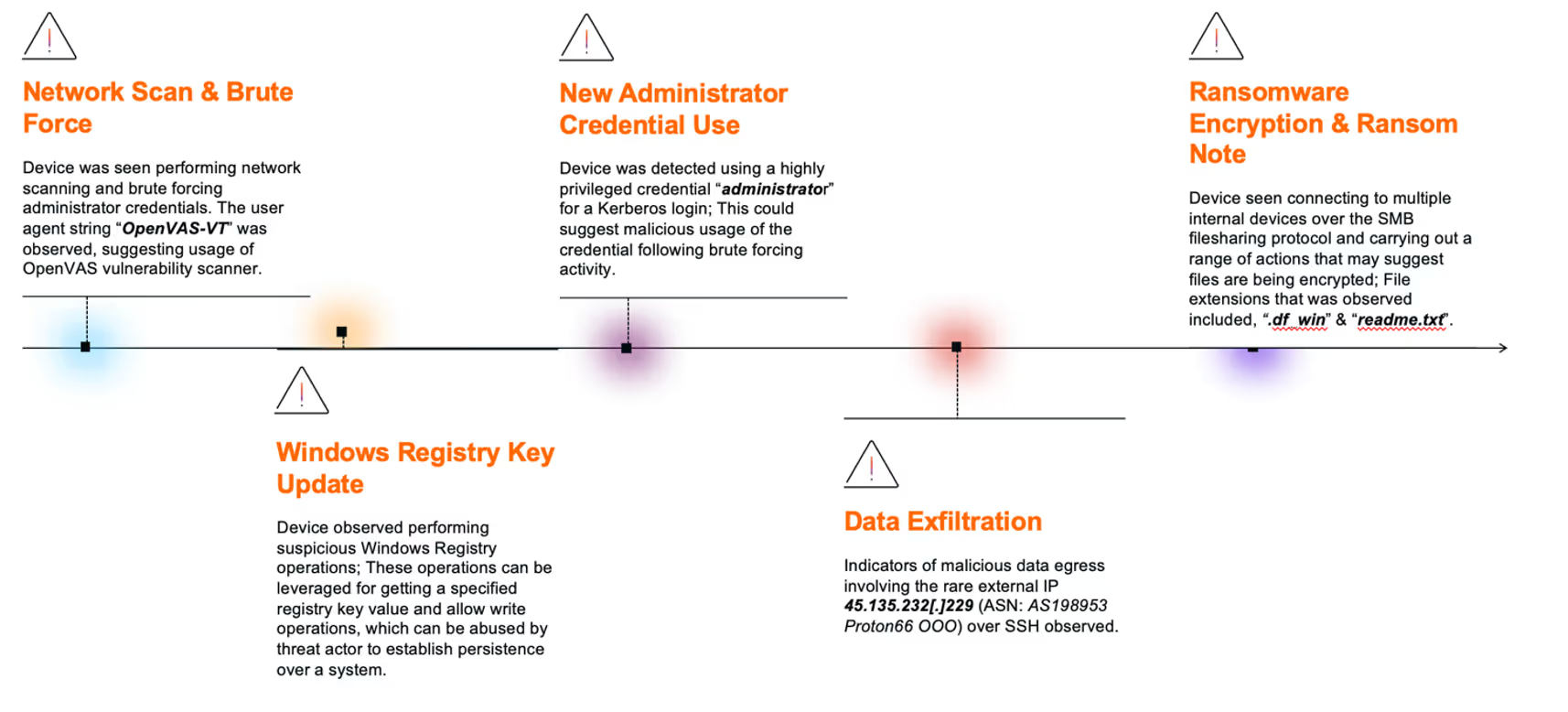
1. Network Scan & Brute Force

Darktrace identified anomalous behavior in late August to early September 2025, originating from a source device engaging in internal network scanning followed by brute-force attempts targeting administrator credential, including “administrator”, “Admin”, “rdpadmin”, “ftpadmin”.

Upon further analysis, one of the HTTP connections seen in this activity revealed the use of the user agent string “OpenVAS-VT”, suggesting that the device was using the OpenVAS vulnerability scanner. Subsequently, additional devices began exhibiting network scanning behavior. During this phase, a file named “delete.me” was deleted by multiple devices using SMB protocol. This file is commonly associated with network scanning and penetration testing tool NetScan.

2. Windows Registry Key Update

Following the scanning phase, Darktrace observed the initial device then performing suspicious Winreg operations. This included the use of the ”BaseRegOpenKey” function across multiple registry paths.

Additional operations such as “BaseRegOpenKey” and “BaseRegQueryValue” were also seen around this time. These operations are typically used to retrieve specific registry key values and allow write operations to registry keys.

The registry keys observed included “SYSTEM\CurrentControlSet\Control\WMI\Security” and “Software\Microsoft\Windows NT\CurrentVersion\Schedule\Taskcache\Tasks”. These keys can be leveraged by malicious actors to update WMI access controls and schedule malicious tasks, respectively, both of which are common techniques for establishing persistence within a compromised system.

3. New Administrator Credential Usage

Darktrace subsequently detected the device using a highly privileged credential, “administrator”, via a successful Kerberos login for the first time. Shortly after, the same credential was used again for a successful SMB session.

These marked the first instances of authentication using the “administrator” credential across the customer’s environment, suggesting potential malicious use of the credential following the earlier brute-force activity.
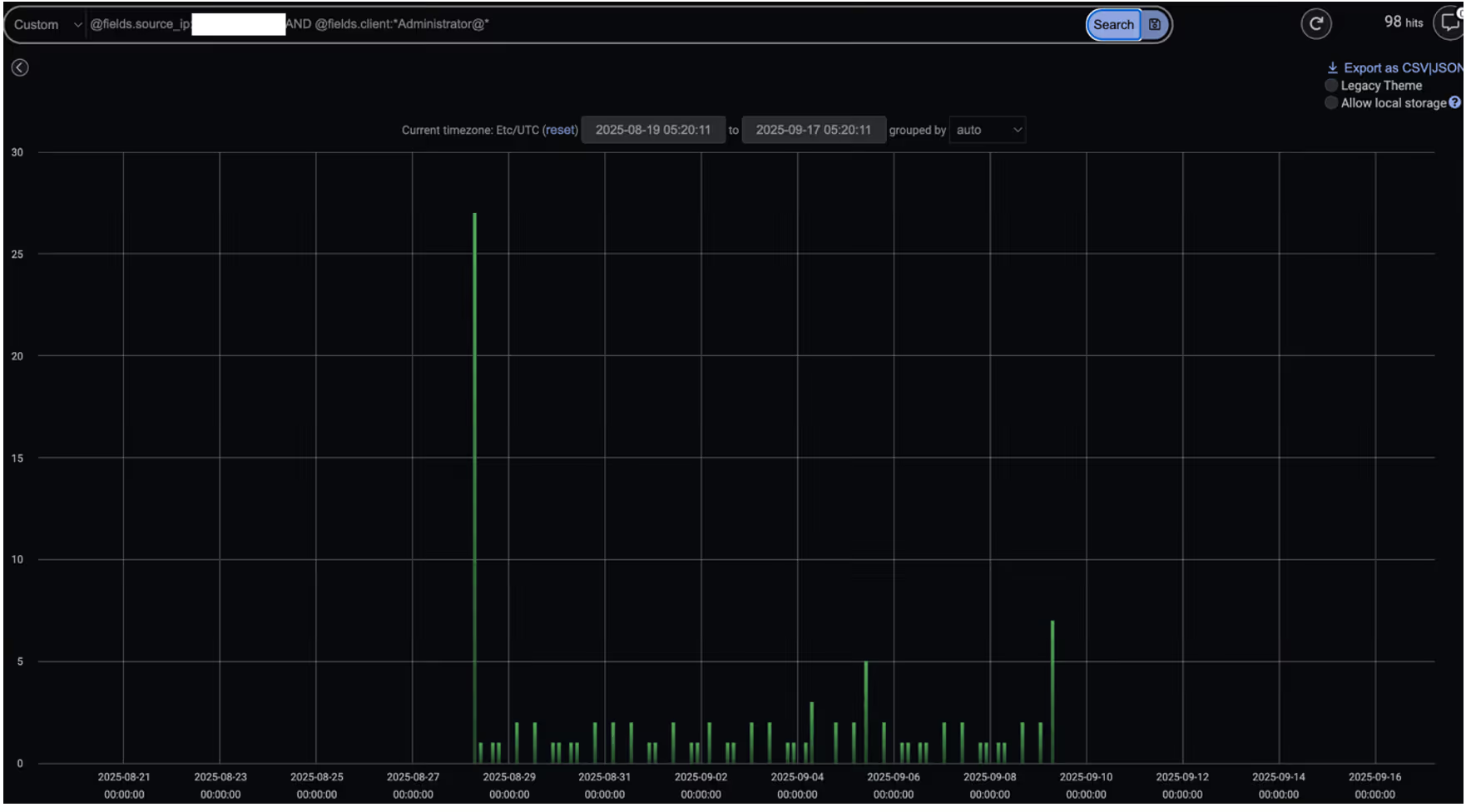
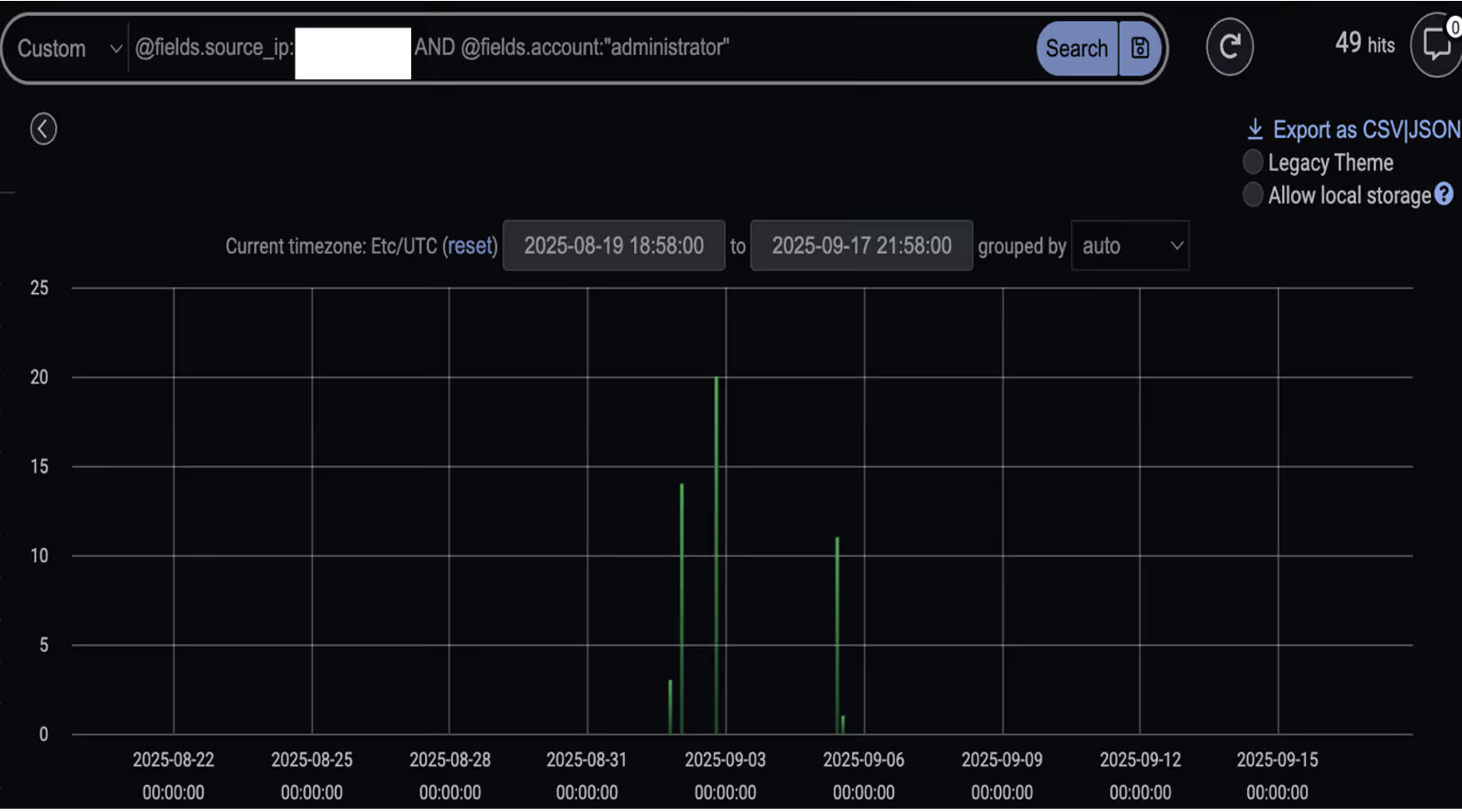
Darktrace’s detection of administrator credentials being used in Kerberos login events by an infected device.
Figure 1: Darktrace’s detection of administrator credentials being used in Kerberos login events by an infected device.
Darktrace’s detection of administrator credentials being used in SMB sessions by an infected device.
Figure 2: Darktrace’s detection of administrator credentials being used in SMB sessions by an infected device.

4. Data Exfiltration

Prior to ransomware deployment, several infected devices were observed exfiltrating data to the malicious IP 45.135.232[.]229 via SSH connections [7][8]. This was followed by the device downloading data from other internal devices and transferring an unusually large volume of data to the same external endpoint.

The IP address was first seen on the network on September 2, 2025 - the same date as the observed data exfiltration activity preceding ransomware deployment and encryption.

Further analysis revealed that the endpoint was geolocated in Russia and registered to the malicious hosting provider Proton66. Multiple external researchers have reported malicious activity involving the same Proton66 ASN (AS198953 Proton66 OOO) as far back as April 2025. These activities notably included vulnerability scanning, exploitation attempts, and phishing campaigns, which ultimately led to malware [4][5][6].

Data Exfiltration Endpoint details.

  • Endpoint: 45.135.232[.]229
  • ASN: AS198953 Proton66 OOO
  • Transport protocol: TCP
  • Application protocol: SSH
  • Destination port: 22
Darktrace’s summary of the external IP 45.135.232[.]229, first detected on September 2, 2025. The right-hand side showcases model alerts triggered related to this endpoint including multiple data exfiltration related model alerts.
Figure 3: Darktrace’s summary of the external IP 45.135.232[.]229, first detected on September 2, 2025. The right-hand side showcases model alerts triggered related to this endpoint including multiple data exfiltration related model alerts.

Further investigation into the endpoint using open-source intelligence (OSINT) revealed that it led to a Microsoft Internet Information Services (IIS) Manager console webpage. This interface is typically used to configure and manage web servers. However, threat actors have been known to exploit similar setups, using fake certificate warnings to trick users into downloading malware, or deploying malicious IIS modules to steal credentials.

Live screenshot of the destination (45.135.232[.]229), captured via OSINT sources, displaying a Microsoft IIS Manager console webpage.
Figure 4: Live screenshot of the destination (45.135.232[.]229), captured via OSINT sources, displaying a Microsoft IIS Manager console webpage.

5. Ransomware Encryption & Ransom Note

Multiple devices were later observed connecting to internal devices via SMB and performing a range of actions indicative of file encryption. This suspicious activity prompted Darktrace’s Cyber AI Analyst to launch an autonomous investigation, during which it pieced together associated activity and provided concrete timestamps of events for the customer’s visibility.

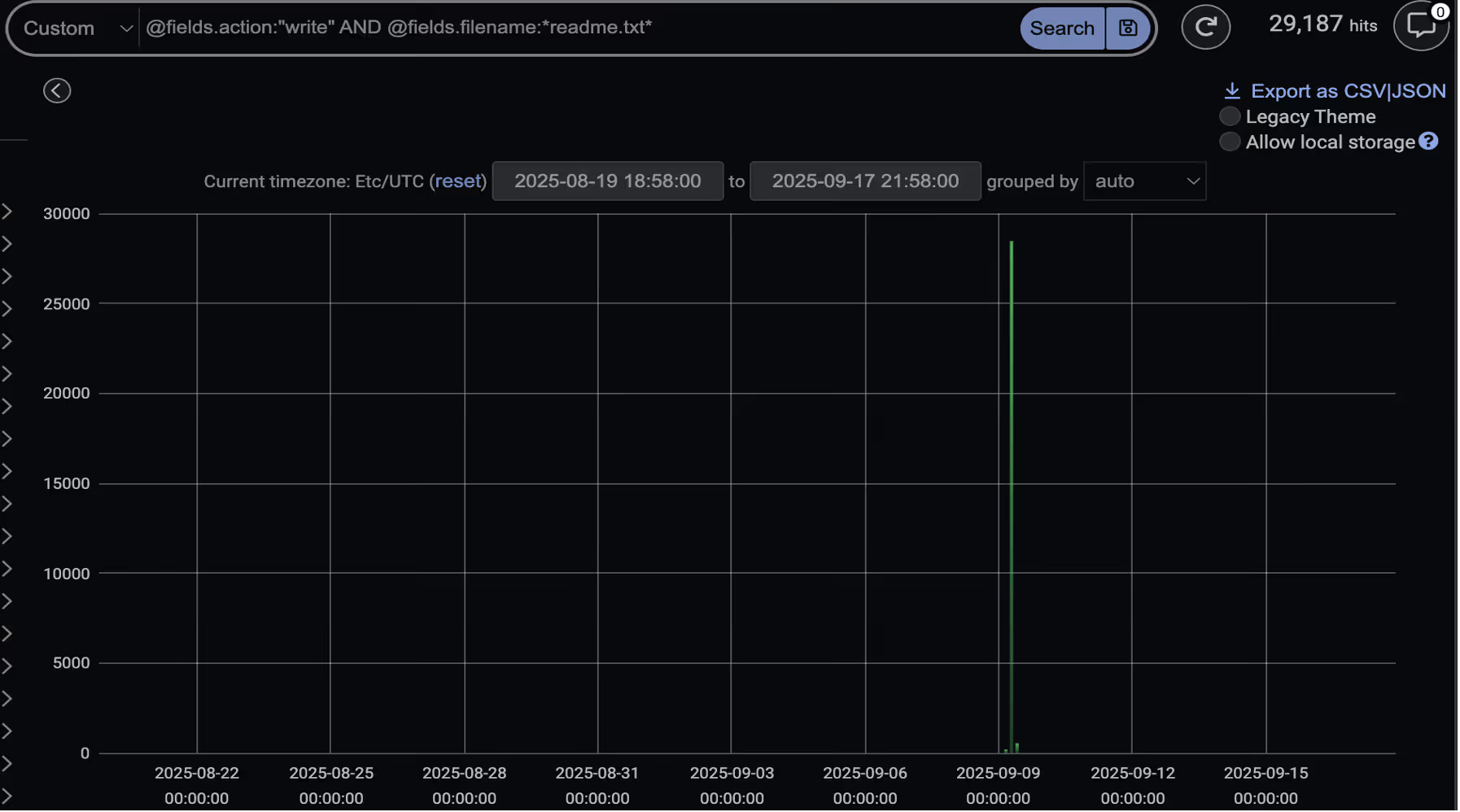
During this activity, several devices were seen writing a file named “readme.txt” to multiple locations, including network-accessible webroot paths such as inetpub\ and wwwroot\. This “readme.txt” file, later confirmed to be the ransom note, claimed the threat actors were affiliated with DragonForce.

At the same time, devices were seen performing SMB Move, Write and ReadWrite actions involving files with the “.df_win” extension across other internal devices, suggesting that file encryption was actively occurring.
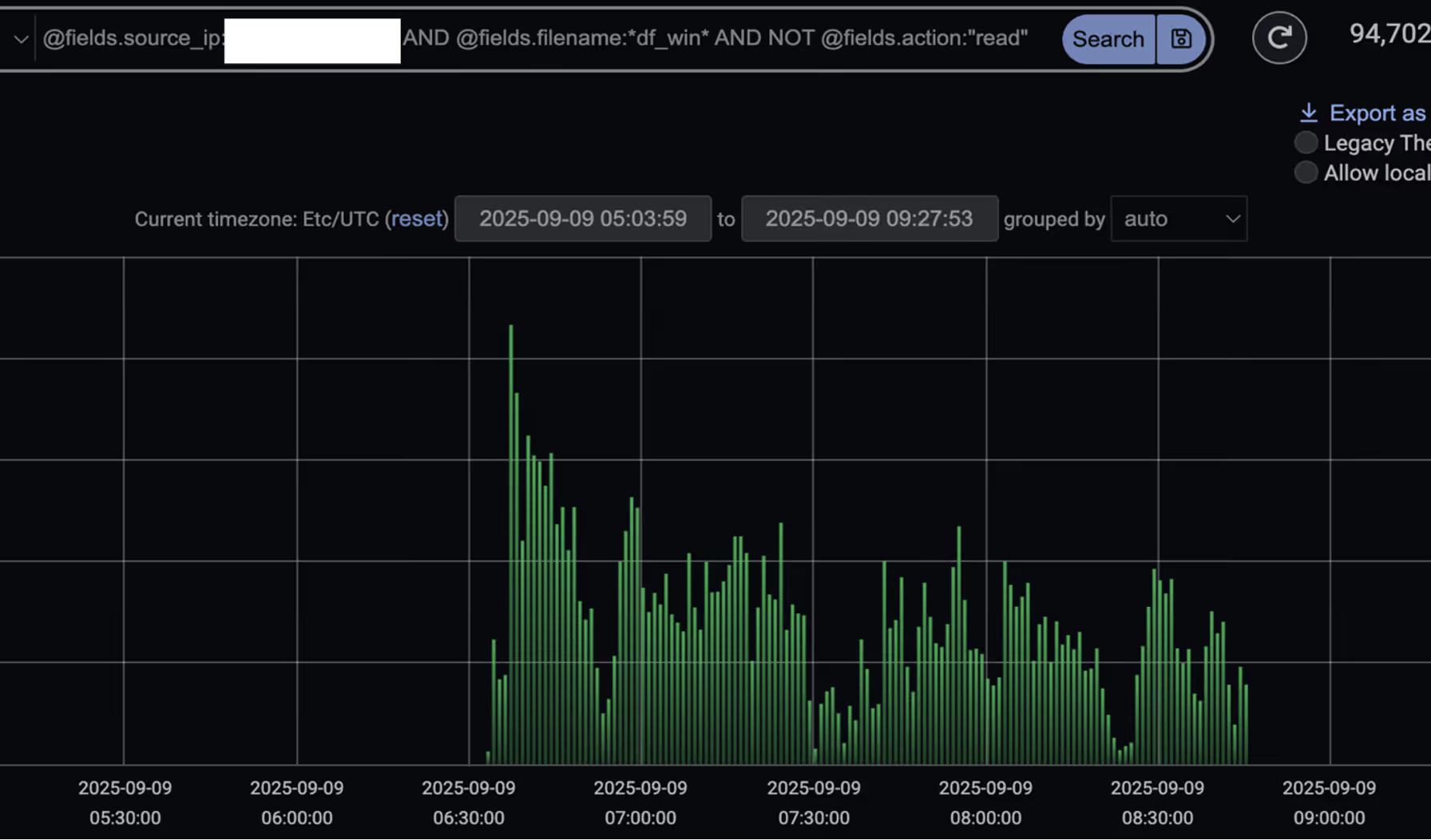
Darktrace’s detection of SMB events (excluding Read events) where the device was seen moving or writing files with the “.df_win” extension.
Figure 5: Darktrace’s detection of SMB events (excluding Read events) where the device was seen moving or writing files with the “.df_win” extension.
Darktrace’s detection of a spike in SMB Write events with the filename “readme.txt” on September 9, indicating the start of file encryption.
Figure 6: Darktrace’s detection of a spike in SMB Write events with the filename “readme.txt” on September 9, indicating the start of file encryption.

Conclusion

The rise of Ransomware-as-a-Service (RaaS) and increased attacker customization is fragmenting tactics, techniques, and procedures (TTPs), making it increasingly difficult for security teams to prepare for and defend against each unique intrusion. RaaS providers like DragonForce further complicate this challenge by enabling a wide range of affiliates, each with varying levels of sophistication [9].

In this instance, Darktrace was able to identify several stages of the attack kill chain, including network scanning, the first-time use of privileged credentials, data exfiltration, and ultimately ransomware encryption. Had the customer enabled Darktrace’s Autonomous Response capability, it would have taken timely action to interrupt the attack in its early stages, preventing the eventual data exfiltration and ransomware detonation.

Credit to Justin Torres, Senior Cyber Analyst, Nathaniel Jones, VP, Security & AI Strategy, FCISO, & Emma Foulger, Global Threat Research Operations Lead.

Edited by Ryan Traill (Analyst Content Lead)

[related-resource]

Appendices

References:

1. https://www.infosecurity-magazine.com/news/dragonforce-goup-ms-coop-harrods/

2. https://www.picussecurity.com/resource/blog/dragonforce-ransomware-attacks-retail-giants

3. https://blog.checkpoint.com/security/dragonforce-ransomware-redefining-hybrid-extortion-in-2025/

4. https://www.trustwave.com/en-us/resources/blogs/spiderlabs-blog/proton66-part-1-mass-scanning-and-exploit-campaigns/

5. https://www.trustwave.com/en-us/resources/blogs/spiderlabs-blog/proton66-part-2-compromised-wordpress-pages-and-malware-campaigns/

6. https://www.broadcom.com/support/security-center/protection-bulletin/proton66-infrastructure-tied-to-expanding-malware-campaigns-and-c2-operations

7. https://www.virustotal.com/gui/ip-address/45.135.232.229

8. https://spur.us/context/45.135.232.229

9. https://www.group-ib.com/blog/dragonforce-ransomware/

IoC - Type - Description + Confidence

·      45.135.232[.]229 - Endpoint Associated with Data Exfiltration

·      .readme.txt – Ransom Note File Extension

·      .df_win – File Encryption Extension Observed

MITRE ATT&CK Mapping

DragonForce TTPs vs Darktrace Models

Initial Access:

·      Anomalous Connection::Callback on Web Facing Device

Command and Control:

·      Compromise::SSL or HTTP Beacon

·      Compromise::Beacon to Young Endpoint

·      Compromise::Beaconing on Uncommon Port

·      Compromise::Suspicious SSL Activity

·      Anomalous Connection::Devices Beaconing to New Rare IP

·      Compromise::Suspicious HTTP and Anomalous Activity

·      DNS Tunnel with TXT Records

Tooling:

·      Anomalous File::EXE from Rare External Location

·      Anomalous File::Masqueraded File Transfer

·      Anomalous File::Numeric File Download

·      Anomalous File::Script from Rare External Location

·      Anomalous File::Uncommon Microsoft File then Exe

·      Anomalous File::Zip or Gzip from Rare External Location

·      Anomalous File::Uncommon Microsoft File then Exe

·      Anomalous File::Internet Facing System File Download

Reconnaissance:

·      Device::Suspicious SMB Query

·      Device::ICMP Address Scan

·      Anomalous Connection::SMB Enumeration

·      Device::Possible SMB/NTLM Reconnaissance

·      Anomalous Connection::Possible Share Enumeration Activity

·      Device::Possible Active Directory Enumeration

·      Anomalous Connection::Large Volume of LDAP Download

·      Device::Suspicious LDAP Search Operation

Lateral Movement:

·      User::Suspicious Admin SMB Session

·      Anomalous Connection::Unusual Internal Remote Desktop

·      Anomalous Connection::Unusual Long Remote Desktop Session

·      Anomalous Connection::Unusual Admin RDP Session

·      User::New Admin Credentials on Client

·      User::New Admin Credentials on Server

·      Multiple Device Correlations::Spreading New Admin Credentials

·      Anomalous Connection::Powershell to Rare External

·      Device::New PowerShell User Agent

·      Anomalous Active Directory Web Services

·      Compromise::Unusual SVCCTL Activity

Evasion:

·      Unusual Activity::Anomalous SMB Delete Volume

·      Persistence

·      Device::Anomalous ITaskScheduler Activity

·      Device::AT Service Scheduled Task

·      Actions on Objectives

·      Compromise::Ransomware::Suspicious SMB Activity (EM)

·      Anomalous Connection::Sustained MIME Type Conversion

·      Compromise::Ransomware::SMB Reads then Writes with Additional Extensions

·      Compromise::Ransomware::Possible Ransom Note Write

·      Data Sent to Rare Domain

·      Uncommon 1 GiB Outbound

·      Enhanced Unusual External Data Transfer

Darktrace Cyber AI Analyst Coverage/Investigation Events:

·      Web Application Vulnerability Scanning of Multiple Devices

·      Port Scanning

·      Large Volume of SMB Login Failures

·      Unusual RDP Connections

·      Widespread Web Application Vulnerability Scanning

·      Unusual SSH Connections

·      Unusual Repeated Connections

·      Possible Application Layer Reconnaissance Activity

·      Unusual Administrative Connections

·      Suspicious Remote WMI Activity

·      Extensive Unusual Administrative Connections

·      Suspicious Directory Replication Service Activity

·      Scanning of Multiple Devices

·      Unusual External Data Transfer

·      SMB Write of Suspicious File

·      Suspicious Remote Service Control Activity

·      Access of Probable Unencrypted Password Files

·      Internal Download and External Upload

·      Possible Encryption of Files over SMB

·      SMB Writes of Suspicious Files to Multiple Devices

The content provided in this blog is published by Darktrace for general informational purposes only and reflects our understanding of cybersecurity topics, trends, incidents, and developments at the time of publication. While we strive to ensure accuracy and relevance, the information is provided “as is” without any representations or warranties, express or implied. Darktrace makes no guarantees regarding the completeness, accuracy, reliability, or timeliness of any information presented and expressly disclaims all warranties.

Nothing in this blog constitutes legal, technical, or professional advice, and readers should consult qualified professionals before acting on any information contained herein. Any references to third-party organizations, technologies, threat actors, or incidents are for informational purposes only and do not imply affiliation, endorsement, or recommendation.

Darktrace, its affiliates, employees, or agents shall not be held liable for any loss, damage, or harm arising from the use of or reliance on the information in this blog.

The cybersecurity landscape evolves rapidly, and blog content may become outdated or superseded. We reserve the right to update, modify, or remove any content.

Get the latest insights on emerging cyber threats

This report explores the latest trends shaping the cybersecurity landscape and what defenders need to know in 2026.

Inside the SOC
Darktrace cyber analysts are world-class experts in threat intelligence, threat hunting and incident response, and provide 24/7 SOC support to thousands of Darktrace customers around the globe. Inside the SOC is exclusively authored by these experts, providing analysis of cyber incidents and threat trends, based on real-world experience in the field.
Written by
Justin Torres
Cyber Analyst

More in this series

No items found.

Blog

/

AI

/

August 26, 2026

AI Agents: Securing the Path from Intent to Action

Photograph of AI data centerDefault blog imageDefault blog image

The UK’s National Cyber Security Centre (NCSC) recently published guidance on managing the cyber risk of agentic AI. While the document is framed as interim advice as more formal guidance is developed, the framing reflects the current state of the industry: organizations are already deploying agents into production environments while standards, controls, and operating models for autonomous systems remain unsettled. Governance is evolving alongside adoption rather than preceding it, a reality which underscores the importance of robust controls.  

The NCSC’s guidance recommends aligning controls to an agent's level of autonomy, assigning distinct identities, limiting permissions, constraining access to systems and data, monitoring activity, maintaining human oversight, and preserving the ability to intervene when necessary. Most of these recommendations will sound familiar to security teams. The challenge is not the novelty of the controls. It is the type of system those controls now need to govern.

The shift from model security to agent security

For several years, AI security discussions have focused heavily on models. Can a model be manipulated? Jailbroken? Trusted? Can it expose information it should not? Those questions remain important, but they capture only part of the problem. A model generating text is one thing. A system connected to identities, applications, tools, workflows, and business data is another.

The difference becomes clearer when comparing a chatbot that answers questions with an agent that can retrieve customer records, update tickets, invoke tools, trigger workflows, and interact with external systems. The underlying model may be identical. Its access is not. The security question begins to shift from what the model knows to what the system can do.

The same theme appears in the Five Eyes statement released earlier this year, describing AI as a force multiplier that is accelerating both offensive and defensive cyber operations. The NCSC guidance explores what that reality looks like when autonomous systems begin operating inside enterprise environments.

Securing AI agents in operation

The NCSC spends relatively little time debating model behavior and considerably more time discussing identity, permissions, monitoring, oversight, containment, and response. Agents are treated as participants within an environment rather than isolated pieces of technology.  

That's broadly consistent with how we think about the problem at Darktrace.

An agent should not be treated as an extension of a user account. It develops its own behavioral patterns. It accesses systems, interacts with data, invokes tools, and moves across workflows in ways that can be observed independently. Understanding what an agent is permitted to do matters. Understanding how it actually behaves once deployed, and whether that behavior aligns with business intent, matters just as much.

Identity provides an obvious example. The NCSC recommends assigning distinct identities to agents rather than allowing them to disappear into surrounding human or service accounts. Most importantly, assigning agents distinct identities enables independent behavioral monitoring.

Development assumptions vs. real-world behavior

The same principle extends to monitoring. NCSC guidance places agent activity within normal security operations rather than treating it as a separate AI governance function. Many of the controls described are put in place before an agent begins operating. Sandboxing, credential design, approval workflows and human oversight all reflect judgments about how the system is expected to behave and what risks it is likely to create.

Actual use may challenge those assumptions. Access patterns change. Workflows expand. Systems begin interacting with resources they have never touched before. Processes that appeared reasonable during design behave differently in production. Human oversight requirements may turn out to be either excessive or inadequate once the system is operating at scale and operating within the context of unique business processes.

The Five Eyes statement points to a similar issue: organizations need confidence that controls continue to work as intended once systems are exposed to real users, data, tools and operational pressures. Often, the question is not whether an agent is technically allowed to perform an action, but whether its behavior remains consistent with the role it was intended to play.

Monitoring and governance of AI agents go hand-in-hand

This problem is exactly why monitoring and governance should be treated as part of the same process. Governance sets the initial parameters for deployment, while monitoring provides evidence about whether those parameters remain appropriate. That evidence should, in turn, inform changes to permissions, controls and oversight.

This matters increasingly as autonomous systems are integrated into business processes. The relevant risk is shaped not only by the model or agent itself, but by what it can access, what actions it can take, and how its behavior changes in practice.

Developing continuous oversight of AI agent behavior

The implication is clear: governance cannot end at deployment. Organizations need a way to understand how agents behave after deployment, test whether controls remain appropriate, and adjust them as conditions change. That requires visibility not just into technical activity, but into whether that activity makes sense in the context of the business process the agent is intended to support.

This is where business-centric behavioral security can become critical. Risk does not emerge from the model itself: it emerges from the actions an autonomous system takes within the enterprise and the downstream consequences of those actions.  

An agent can operate exactly as intended and still create risk if it accesses sensitive information in an unexpected context, exercises permissions in ways that create unintended exposure, or influences business processes in ways that were not anticipated during design and review.

Traditional governance vs. behavioral security

Traditional governance frameworks provide assurance at a point in time. Behavioral security can provide ongoing visibility into how autonomous systems interact with the organization they are meant to serve. Rather than focusing exclusively on model performance or policy compliance, organizations need to understand whether an agent's behavior aligns with business intent, operational expectations, and acceptable risk tolerances as conditions change.

As enterprises move from isolated AI deployments to interconnected ecosystems of agents, visibility into behavior becomes as important as visibility into code. Governance determines what an autonomous system is permitted to do. Behavioral analytics helps determine what it is doing, what business outcomes it is producing, and whether those outcomes remain aligned with the organization's objectives.

[related-resource]

Continue reading
About the author
Margaret Cunningham, PhD
VP, Security & AI Strategy, Field CISO

Blog

/

AI

/

August 26, 2026

When AI Becomes the Lure: A Fake Gemini Installer Delivers Vidar

Default blog imageDefault blog image

Key takeaways

  • Darktrace observed a customer download a fake Google Gemini installer hosted on Google Colab, resulting in the execution of the Vidar information stealer.
  • Darktrace identified the compromise through behavioral indicators, including suspicious process activity, anomalous network communications, and indicators of credential theft, before autonomously containing the threat.
  • The incident highlights how threat actors are increasingly exploiting trusted platforms and a growing interest in AI tools to distribute malware through seemingly legitimate software acquisition workflows.

The Growing Abuse of Generative AI

As organizations are increasingly adopting generative AI tools into their daily workflows, attackers are adapting their distribution methods accordingly too. As part of their day-to-day work, users are now searching for AI assistants, programming tools, browser extensions, desktop applications, and productivity integrations.

Recent reports have highlighted campaigns that use fake AI software and AI-related installers to distribute malware and steal credentials [1]. Researchers have documented campaigns that exploit fake AI-themed websites and services to distribute information stealers and backdoors [2]. Security researchers have also observed attackers disguising malware as legitimate installers for AI software to increase the likelihood of victim interaction and execution [3].

In July 2026, Darktrace observed one such case within a customer environment in the Europe, Middle East and Africa (EMEA) region, where attackers used a fake generative AI installer to deliver the prolific information stealer Vidar. This incident highlights how threat actors are exploiting interest in AI services to distribute established malware using increasingly convincing social engineering techniques.

How a Fake Gemini Installer Delivered Vidar

Initial Access: From Search Result to Malware Download

Unlike many malware campaigns that begin with a phishing email, this activity appears to have originated from a user searching for and downloading software.

Darktrace first observed unusual activity on the customer network after a suspicious executable file was launched from a user’s Download folder. Further investigation revealed that the file purported to be a Google Gemini installer and was named “Download_Google_Gemini_For_Windows.exe”.

During the initial analysis, it was noted that the top search result for the suspicious filename associated pointed to a file hosted on Google Colab, a cloud-based Jupyter notebook platform, commonly used by developers, researchers, and data scientists to run code and machine learning workloads through a web browser. By leveraging another trusted Google platform, the attacker increased the likelihood that users would perceive the download as legitimate, making the lure more convincing to those searching for Gemini-related software.

Figure 1: The Google Colab page containing a download prompt for the fake Google Gemini installer.

Further investigation of the Google Colab page revealed that the download prompt redirected users to a secondary site, hxxps://micronsoftwares[.]com, which posed as a "Windows Software Hub" download page and offered the fake Gemini installer for download.

Figure 2: The secondary website posing as a "Windows Software Hub" download page, which likely hosted the fake Gemini installer.

While the investigation did not uncover any HTTP or file-download telemetry data that conclusively identified the download source, SSL communication sessions with Google Colab were detected immediately before the suspicious file was executed. The timing of these connections suggests that the user interacted with the Colab resource before being redirected to the secondary site from which the executable was downloaded.

The user was not simply tricked into opening an email attachment; instead, the attacker embedded malicious content into a process many users would consider entirely legitimate: searching for and downloading software associated with a trusted platform.

Weaponizing Trusted Platforms

At the time of review (July 15, 2026), Darktrace's Threat Research team confirmed that the Google Colab page was still active and prompting users to download a ZIP archive containing the binary file.

The archive also appeared to contain a README file instructing users to run the binary file with administrator privileges and add it to their antivirus software’s exception lists. These instructions suggest that the campaign relied heavily on social engineering, convincing users to take actions that would facilitate malware execution and potentially bypass security checks.

The use of a legitimate platform also complicates the user’s decision-making. Downloads associated with a trusted service are often perceived as less suspicious than those hosted on unfamiliar domains. When combined with the branding of a widely used AI tool, the lure becomes even more convincing.

Malware Analysis

Darktrace’s Threat Research team identified the executable file as the information-stealing malware Vidar. Analysis revealed that the binary file was a newer Go-compiled variant that communicated with Telegram-based infrastructure. Darktrace’s researchers also identified dtm[.]kijangturbo88[.]top as a command-and-control (C2) endpoint associated with the activity. While the malware itself was not novel, the lure and delivery mechanism was.

For a deeper look at the information stealer, see Darktrace’s 2023 analysis of Vidar.

Figure 3: Darktrace’s detection of the unusual outbound connection associated with the fake Gemini installer.

Shortly after execution, the process established communications with the external IP address 91.98.98[.]86 via port 443, directly linking the executable to suspicious network activity observed on the device. Subsequent open-source intelligence (OSINT) analysis of the revealed multiple malicious associations [5].

Additional Darktrace detections included unusual SSL activity from the affected device. Analysis of related SSL telemetry identified 91.98.111[.]49 as additional infrastructure associated  with the activity [6].

Subsequent alerts from the customer's Microsoft Defender for Endpoint integration later confirmed activity consistent with the theft of browser credentials and other sensitive data from the affected endpoint.

Taken together, these detections provided a clear picture of the attack, from the execution of a suspicious file and unusual network connections to indicators of C2 activity and credential theft.

Figure 4: Darktrace’s detection of anomalous activity following the execution of the fake Gemini installer, seen in the Model Alert Event Log.

Darktrace's Autonomous Response

Following the detection, Darktrace’s Autonomous Response took immediate containment action, including blocking communication with suspicious external infrastructure, including 91.98.98[.]86, and quarantining the compromised device.

Despite the apparent legitimacy of the activity, with the installer hosted on a trusted platform and resembling a routine software download, Darktrace was able to detect and contain the attack because the device's behavior deviated from its normal pattern.

Figure 5: Automated containment actions implemented by Darktrace's Autonomous Response following the detection of activity associated with the fake Gemini installer.

Conclusion

This investigation highlights how threat actors continue to adapt established malware delivery techniques to emerging technology trends. While the malware itself was not new, the distribution method was. By disguising Vidar as a Google Gemini installer and hosting the malicious content on a trusted platform, the attack aligned its lure with a growing behavioral trend: users actively searching for AI tools and services as part of their day-to-day work.

Although fake installers are not a new phenomenon, the rapid rise of generative AI has created new opportunities for threat actors. Rather than relying solely on traditional delivery methods, attackers can now target users who are actively searching for AI applications. As AI adoption continues to accelerate across enterprise environments, organizations should remain alert to campaigns that exploit this interest through fake applications, malicious websites, manipulated search results, the misuse of trusted platforms, and AI-themed social engineering.

Credit to Rushanth Ramanathan (Cyber Analyst) Joanna Ng (Detection Engineer)

Edited by Ryan Traill (Content Manager)

Appendices

Darktrace Model Detections

  • Security Integration / C2 Activity and Integration Detection
  • Endpoint / New Suspicious Executable Launched
  • Endpoint / Process Connection / Unusual Connection from New Process
  • Anomalous Connection / Rare External SSL Self-Signed
  • Security Integration / High Severity Integration Detection
  • Antigena / Network / Significant Anomaly /  Antigena Significant Security Integration and Network Activity Block

•Antigena / Network / Significant Anomaly /  Antigena Significant Anomaly from Client Block

List of Indicators of Compromise (IoCs)

IoC Type Description
Download_Google_Gemini_For_Windows.exe File Fake Gemini-themed installer observed during the investigation.
GoogleAppInstaller.exe File Related executable identified through endpoint telemetry.
91.98.98[.]86 IP Address External destination contacted by the malicious executable.
91.98.111[.]49 IP Address Related infrastructure identified through SSL certificate pivoting.
dtm[.]kijangturbo88[.]top Domain Command-and-control endpoint identified during malware analysis.
1e13c2c9eac72daf63fd00a9946878949e159ae6ec51b54ec64f942d79d61913 SHA256 Malware sample associated with the fake Gemini installer.

MITRE ATT@CK Mapping


MITRE ATT&CK Mapping Tactic Technique
Initial Access T1204 User Execution
Execution T1204.002 User Execution: Malicious File
Defence Evasion T1036 Masquerading
Credential Access T1555 Credentials from Password Stores
Credential Access T1555.003 Credentials from Web Browsers
Command and Control T1071 Application Layer Protocol
Exfiltration T1041 Exfiltration Over C2 Channel
Continue reading
About the author
Rushanth Ramanathan
Cyber Analyst
Your data. Our AI.
Elevate your network security with Darktrace AI